
Email Reminders
Video transcript
- 0:02 Come back to it. Here is how you set an email reminder on a page you saved, so a good article does not simply disappear in your library. Reminders are part of Ultimate.
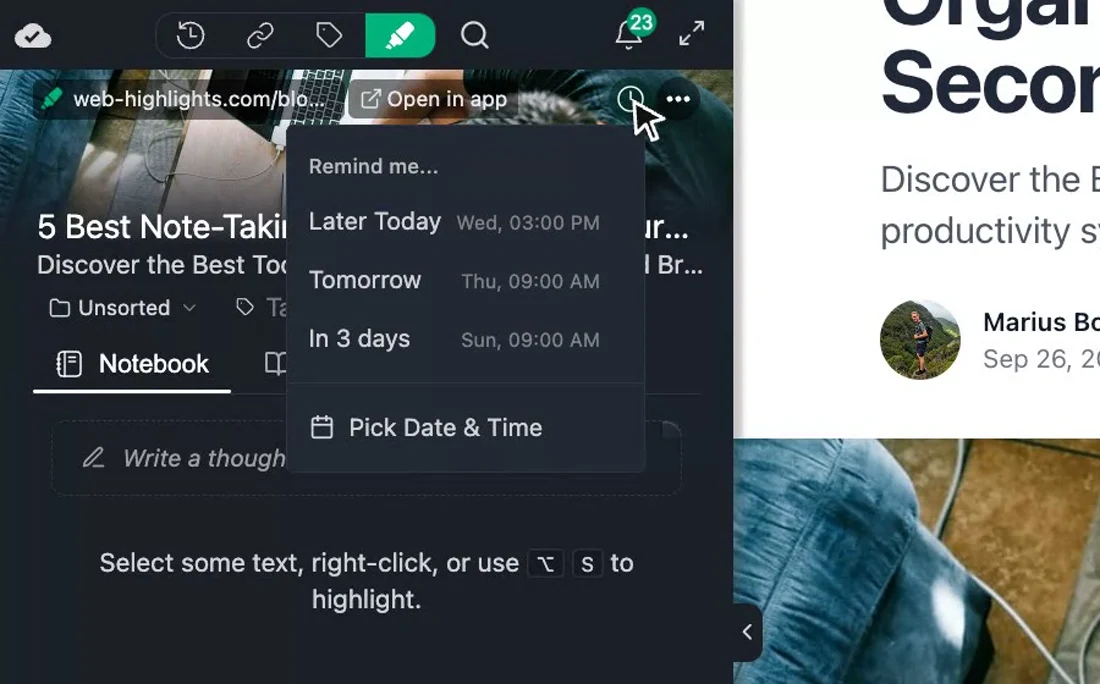
- 0:10 Click the clock icon. Open the page in the sidebar and click the clock icon in the bookmark header. Web Highlights offers later today, tomorrow or in three days, and of course you can also pick your own date and time.
- 0:20 Pick a time. I take in three days, and the clock now carries that date. When the time comes, you get an email with a direct link back to this page and to your highlights.
- 0:27 Change it anytime. If you change your mind, the small x next to the clock removes the reminder again, and you can simply set a new one whenever you like.
Save an article for later and actually come back to it. Email reminders let you schedule a notification for any bookmarked page, so important reads don't get buried in your library.
How It Works
- Open the bookmark details in the sidebar or web app
- Click the clock icon in the bookmark header
- Choose a preset — later today, tomorrow, or in 3 days — or pick a custom date and time
- At the scheduled time, Web Highlights sends you an email with a direct link to the page and your highlights
To cancel a reminder, click the X icon next to the clock.
When to Use Reminders
- Read-it-later workflow — Bookmark a long article during work and set a reminder for the evening
- Follow-up research — Found a source you need to revisit after finishing a draft? Set a reminder for next week
- Spaced review — Combine reminders with spaced repetition learning to revisit material at increasing intervals
- Deadline-driven reading — Set a reminder for the day before a meeting or deadline so you review the relevant material in time
Reminders vs Bookmarks
Every page you save in Web Highlights becomes a bookmark. Reminders add a time-based trigger on top:
| Bookmark only | Bookmark + Reminder | |
|---|---|---|
| Saved in your library | Yes | Yes |
| Accessible anytime | Yes | Yes |
| Email notification | No | Yes, at scheduled time |
| Appears in your inbox | No | Yes |
Plan Availability
Email reminders are available on the Ultimate plan and during the free trial. Compare plans →
Common Questions
What email address receives the reminder?
Reminders are sent to the email address associated with your Web Highlights account.
Can I set multiple reminders on the same page?
Each bookmark supports one active reminder at a time. After a reminder fires, you can set a new one.
What happens if I don't open the email?
The reminder email stays in your inbox. Your bookmark remains in your Web Highlights library regardless of whether you open the email.
Can I use reminders on highlights or only bookmarks?
Reminders are set at the bookmark (page) level. Since every highlighted page is automatically bookmarked, you can set a reminder on any page that contains highlights.