
Spaced Repetition Learning
Video transcript
- 0:02 Highlights you keep. Here is how you actually remember what you highlight. Web Highlights turns your highlights into flashcards and brings them back right before you would forget them.
- 0:10 Open learning. In the sidebar you simply click the brain icon at the bottom. The badge tells you how many highlights are waiting for you today.
- 0:16 Start a session. Start a learning session, and Web Highlights puts ten cards in front of you: highlights that are due today, mixed with ones you have never reviewed.
- 0:24 Know it or not. Every card shows one highlight with the page it came from. If you remembered it, click Know it and the card moves further into the future. Don't know brings it back sooner, and Discard takes it out of your sessions for good.
- 0:36 Your confidence. The header keeps your average confidence, and after roughly five well timed repetitions a highlight sits in your long term memory.
Web Highlights turns your highlights into flashcards and uses spaced repetition to help you move knowledge from short-term into long-term memory. Instead of forgetting 80 % of what you read, you review at scientifically optimized intervals and remember it for good.
The Problem: The Forgetting Curve
In 1885 Hermann Ebbinghaus discovered that we lose most of what we learn within days unless we actively review it. His research produced the forgetting curve — a chart showing how retention drops exponentially over time:
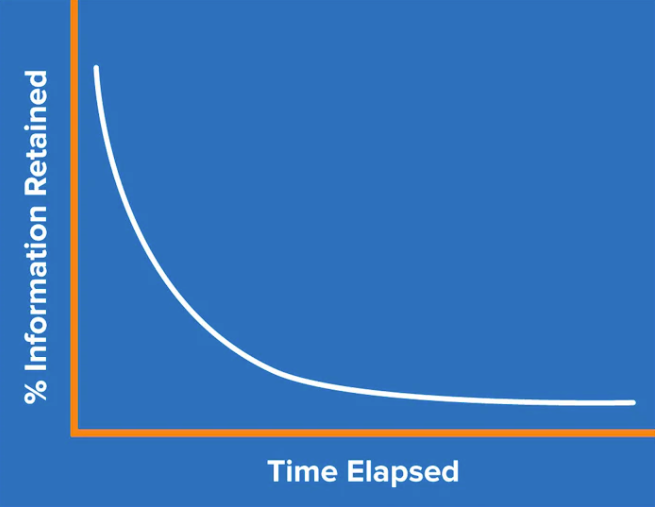
The key insight: each review resets the curve and makes the next one shallower. After roughly five well-timed repetitions, information is considered anchored in long-term memory.
How Spaced Repetition Works
Spaced repetition schedules reviews at increasing intervals. Rather than cramming everything in one sitting, you revisit material right before you are likely to forget it:
| Review | Typical interval |
|---|---|
| 1st | 1 day |
| 2nd | 3 days |
| 3rd | 7–10 days |
| 4th | ~30 days |
| 5th+ | 60–360 days |
The exact intervals adapt to your performance — items you know well are pushed further out, while items you struggle with come back sooner.
Why it works
A meta-analysis across over 1,350 participants confirmed that spaced practice produces significantly better long-term retention than massed (crammed) practice, with a strong effect size of g = 0.74. (Cepeda et al., 2008; Educational Psychology Review, 2020)
The SuperMemo Algorithm
Under the hood Web Highlights uses a variant of the SuperMemo (SM-2) algorithm, originally developed by Piotr Woźniak. Here is how it works in practice:
Easiness Factor (EF)
Every highlight starts with an easiness factor of 2.5. After each review the EF is adjusted based on your self-rated performance:
- "Know it" → EF increases, interval grows (you remembered well)
- "Don't know" → EF decreases, interval shrinks (needs more practice)
The EF never drops below 1.3 (to avoid frustratingly short intervals) and can rise up to 3.2 for material you consistently recall.
Interval Calculation
The next review date is calculated as:
next interval = current interval × EFFor example, if your current interval is 3 days and EF is 2.5, the next review will be scheduled in roughly 8 days. Intervals are capped at 360 days maximum.
Confidence Score
Web Highlights derives a confidence score (0–100 %) from the EF and number of repetitions. This score is displayed for each highlight and aggregated per website, tag, and across your entire library:
| Confidence | Status |
|---|---|
| 80–100 % | Long-Term Memory |
| 60–79 % | Confident Recall |
| 40–59 % | Good Recall |
| 20–39 % | Moderate Recall |
| 1–19 % | Likely to Forget |
| 0 % | Not Yet Learned |
Learning Sessions
A learning session presents 10 flashcards per review — a mix of due items (scheduled for review today) and new items (never reviewed before). When nothing is due, the session is never a dead end: if you have cards scheduled for later, it offers to review them ahead of time — pulling your soonest-scheduled cards forward so you can get ahead. Grading a reviewed-ahead card reschedules it just like a normal review. On the Decks tab and on Home, the top card then reads All caught up and leads with Explore decks, with the review-ahead button beside it.
Start a session from your library
You don't have to open the learning dashboard to start reviewing — learning fits into normal browsing:
- From the sidebar — click the brain icon in the sidebar footer. Its badge shows how many highlights are due today, and it opens Learn & Remember with your due count, your confidence bar and a Start learning button.
- From Home — its Learn & Remember section shows the same card as the Decks tab, with your first four decks below it; a deck opens its page right there (see Your decks), where one click starts a session over it. The Book of the week in the right-hand column (at the end of the page on a phone) adds that week's featured book deck to your library and starts it.
- One bookmark — open a bookmark's details and choose Start learning from its dots menu (shown when the bookmark has at least one highlight). The session starts immediately, scoped to that bookmark's highlights.
- Several bookmarks — select bookmarks in your library and choose Start learning from the multi-select toolbar. The session covers the highlights of all the selected bookmarks.
- Specific highlights — switch the grid to a bookmark's highlights (click its highlight count), select the ones you want, and choose Start learning. The session contains exactly those highlights.
A scoped session works exactly like a normal one — the same flip, Correct/Incorrect grading, and schedule — it just draws only from the highlights you scoped it to.
During a Session
For each card you see the highlighted text in context, along with the source page. On a plain highlight (one without a question and answer) you grade yourself with:
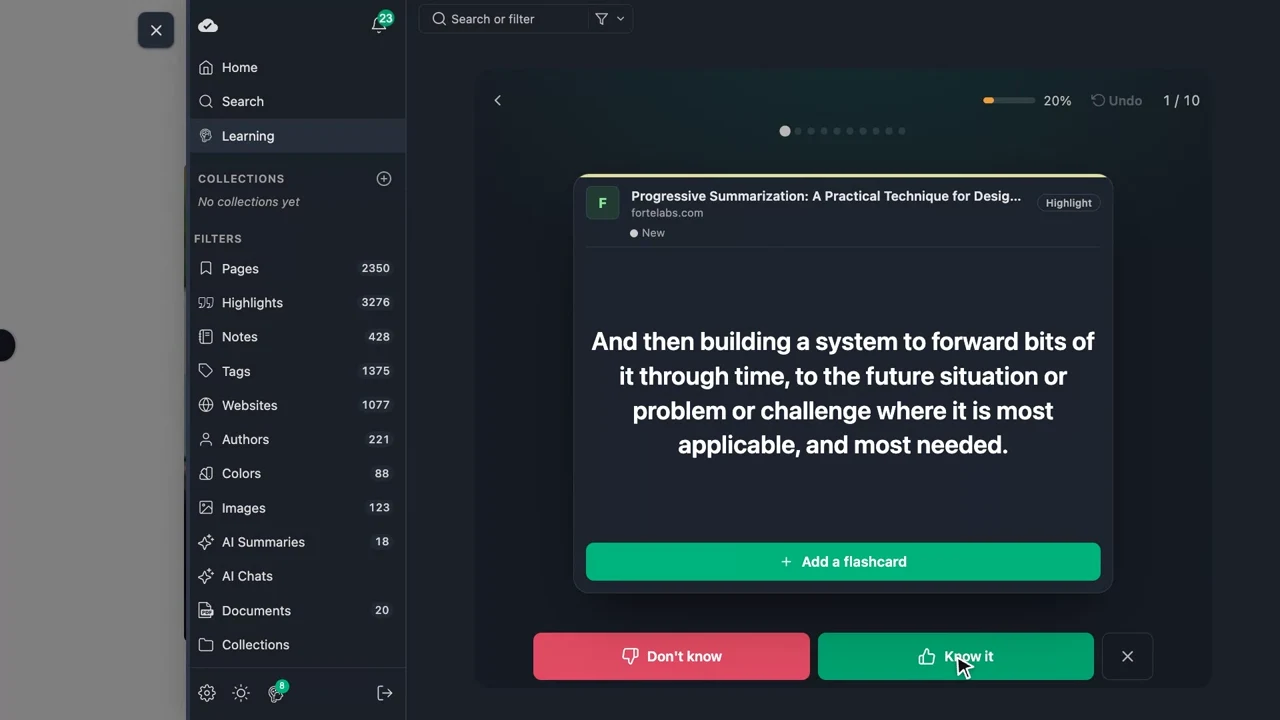
- Know it — You remembered the content. Confidence increases, and the next review is pushed further into the future.
- Don't know — You could not recall the content. Confidence decreases, and the item is rescheduled for an earlier review.
- Discard (in the session's ⋯ menu) — Remove this highlight from future sessions entirely.
Cards that carry a question and answer work a little differently — you reveal the answer before grading, and the buttons read Correct / Incorrect. See Turn a highlight into a flashcard below.
Clicked the wrong button? Use Undo (↺) in the session's top bar — or in its ⋯ menu — to return to the previous card. Your last answer is undone — the schedule change it made is reverted — so you can grade the card again. The top bar also shows your progress, one segment per card, and a back button that names where it takes you.
With a keyboard, Space reveals an answer, 1 and 2 grade the card, Z undoes, S swaps question and answer and Esc leaves the session.
Turn a highlight into a flashcard
A plain highlight tests passive recognition — you read it and decide whether it felt familiar. For real active recall, turn any highlight into a question-and-answer flashcard. You can start from two places:
- During a session — on a card that has no flashcard yet, open the ⋯ menu and choose Add a flashcard.
- From any highlight's toolbar — click the Create flashcard button (the brain icon) on a highlight anywhere in the app. The editor opens in a dialog. This is free.
Then:
- Write the question you want to be asked. The answer is prefilled with the highlighted text, so you usually only need to phrase the question — edit the answer freely.
- Save. The card now shows the question first and hides the answer.
Or let AI draft it for you. On Chrome, the editor shows a ✨ Generate with AI button that drafts a concise question and answer from your highlight using the browser's built-in on-device AI — the same private model as AI Chat: nothing leaves your device. Generation happens in the highlight's language, and you can edit both fields before saving. AI-drafted cards carry a subtle ✨ AI badge in sessions and always show the original highlight under the answer as context. Plans with AI generate unlimited cards; free users get a small daily quota. (The button only appears when your browser supports the built-in AI — see the Chrome AI troubleshooting guide if it doesn't.)
When a card has a question and answer, the session changes to match:
- The card shows the question, and a Tap to reveal answer button sits where the grade buttons would be — so you have to see the answer before you can grade it (real active recall). Discard stays available in the ⋯ menu.
- Tapping it flips the card to the answer, with the original highlight kept underneath as context, and unlocks the review buttons — now Correct and Incorrect instead of Know it / Don't know (they feed the exact same spaced-repetition schedule).
- Once revealed, you can flip back to the question and still grade; the next card starts on its question with grading gated again.
- Want to be asked the other way round? Choose Swap question and answer in the session's ⋯ menu (or press S), or tap ⇄ in a deck's preview in Explore. The deck remembers it: its cards show the answer first until you swap back. It is still the same card with the same schedule — only the side you see first changes.
- You can reopen a saved flashcard any time to edit its question or answer.
TIP
Everything is stored on the highlight itself, so your flashcards sync across devices and travel with the highlight wherever you review it.
Turn a whole page into a deck with AI
When a page is worth studying in depth, you don't have to make cards one at a time. On Chrome, open the bookmark and choose Generate flashcards — from the quick-actions button floating at the bottom of the bookmark, or the bookmark's ⋯ menu. A configurator opens and immediately drafts a set of question-and-answer cards from your highlights and the saved page, using the browser's built-in on-device AI — nothing leaves your device, and it focuses on what you highlighted.
- A slider sets how many cards to generate (1–20).
- Cards appear as they're written; each is checked by default and you can edit or uncheck any before saving. Regenerate swaps in a fresh batch.
- Create saves them as a new deck in your top-level Flashcards folder; the cards carry the ✨ AI badge in sessions.
- You then land right on the deck, where Start a learning session and Edit the flashcards sit alongside your configured quick actions. The source page keeps a Show flashcards action to reopen the deck any time.
Plans with AI generate unlimited decks; free users get one deck per day. (The option only appears when your browser supports the built-in AI — see the Chrome AI troubleshooting guide.)
Quick actions
Every bookmark — flashcard decks included — has a quick-actions button floating in the bottom-right corner with your configured actions (✎ to customize; AI summary, generate or show flashcards, open the dashboard, start a learning session, and more). A deck's bar adds its own Start learning and Edit flashcards on top. Start learning shows as a disabled hint until the page has highlights or flashcards to learn from. The bar takes no space and folds away, so it never gets in the way of a long list of highlights.
Generate flashcards from any website, YouTube video or PDF — no account
You don't need the extension or an account to try AI flashcards. Three free tools turn a source into a deck in one click, using the same on-device AI:
- Website Flashcard Generator — paste any URL; the page opens in the reader and the generator drafts a deck for it.
- YouTube Flashcard Generator — paste a video link; the video opens in the reader with its transcript and the generator drafts a deck from it. The video needs captions — without them there is no transcript, so no cards can be drafted.
- PDF Flashcard Generator — upload a PDF (lecture slides, a textbook chapter, a paper); it opens in the viewer and the generator drafts a deck for it.
All three run entirely in your browser, are free, and need no signup — the same one-deck-per-day limit as the signed-in free plan applies, and the built-in AI requires Chrome 138+ (see the Chrome AI troubleshooting guide). The YouTube tool additionally applies the free one-video-per-day limit that every YouTube surface shares.
Long sources are covered end to end
The generator reads the whole source in sections, so a long lecture, talk or article produces cards drawn from across its entire length, not just the opening minutes. Want the deck to focus on specific parts? Highlight the passages that matter and generate again — your highlights are always fed to the model first.
Step-by-step guides: create flashcards from any website and from any PDF.
Create flashcards without a page
Not everything you want to remember comes from a web page — vocabulary, for example. Open Learning in the navigation and choose Add flashcard in the card at the top of the Decks tab. When nothing is due but cards are scheduled, that card offers to review ahead instead: open All flashcards, the first tile under Your decks, and choose Add a card. Both open the same editor:
- Check the deck: it is the one you used last, or your own Flashcards deck. Click it to search your decks — recent ones first, then yours, then the ready-made ones by subject — or type a new name, for example "English Vocabulary", and create that deck right there.
- Write the question and answer and save (⌘/Ctrl + Enter). Writing several? Save & add another keeps the dialog open on the same deck.
The card lands in that deck and is immediately part of your next learning session, reviewed with the same spaced-repetition schedule as your highlights. Inside a deck of your own, the button names that deck and saves straight into it. A deck is just a bookmark in your library, so you can browse its cards, tag it, and organize it like anything else.
Starting a new deck? Click Add a deck — the last tile under Your decks — and choose Start your own deck. The editor then asks for the deck's name first, and the deck is created with its first card. Want to write the cards later? Create empty deck creates the deck right away, and its page waits for the first card.
Learning vocabulary
Put the word on the front and its translation on the back, one deck per language — for example "Spanish vocabulary". A deck of your own joins Your decks by itself. Its page lets you learn just those words, and Swap question and answer in its ⋯ menu quizzes you the other way round. During a session, S swaps the sides too.
Explore ready-made decks
Don't want to author cards yourself? The Decks tab of Learning ends with Discover decks: how many ready-made decks there are, a search box, what to learn next (Up next for you suggests the next level of the decks you already have) and your subjects as a row of coloured chips — a subject keeps its colour in every language. Browse all decks, a subject chip or Add a ready-made deck opens Learning → Explore, the full library. Decks are grouped by subject, like Geography, Anatomy or Computer Science, and each category is a learning path of three to five difficulty levels.
- Pick a subject in the sidebar to see its categories as level paths, or search: the search covers deck titles and the text on the cards.
- Narrow any list by level or format, or turn on Hide decks I have.
- Switch the deck language in the dropdown at the top of the sidebar, above the subjects, to browse decks written in another language — a German reader can learn from English decks. Your choice is remembered, on every device you sign in on.
- The back button at the top names where it goes (the subject, all decks, or Learning), so you always know one tap takes you up a level.
Books. Every language has a book library: one deck per bestseller with the book's key ideas — the lists inside the book included — chosen for that language's readers rather than translated. The Decks tab shows them as covers in a Book library band, and the Books subject in Explore is a cover grid you can narrow by theme (habits, mind, money, people, work). Covers are the local edition's where Open Library has one; otherwise the deck gets a designed cover in its theme's colour.
Technical decks — like the five-level React learning path — put real code on the cards: fenced snippets render as proper code blocks on the session card (and on the deck's article page on the website), so "What does this snippet render?" questions read the way code should.
Click a deck to open its details: the learning path it belongs to, a few sample cards (tap one to reveal its answer), and Start learning, which adds the deck to your library and starts a session right away. Add to library adds it without starting one. Decks are filed under Flashcards/<Subject>/<Category>/; a deck you already have shows ✓ In your library and Continue learning instead. Adding the same deck twice never creates duplicates.
Filter what you learn
By default a session draws from all your highlights. To focus, use the search and filter bar at the top of the learning dashboard — the same one you use elsewhere in the app:
- Search for a word to learn only the highlights that contain it.
- Filter by tag or website to drill into one topic or source.
- Toggle Has Q/A to learn only your question-and-answer flashcards (or No Q/A for only plain highlights).
Filters scope the whole dashboard — the schedule, confidence breakdown, card list, and the next session's deck all narrow to what matches. To keep a filtered view, use the pin button next to Clear (Save as deck): it opens the deck builder with your filters already filled in — see Your decks. Whenever a filter is active, a banner across the top of the dashboard names your current scope (e.g. Filtered to medium.com · Cards with Q/A · 12 cards) with a prominent Clear filters button, so it is always obvious that you are looking at a subset — and one click takes you back to everything. The learning view always stays limited to highlights, so a filter never turns your board into pages. While a session is running, the filter bar sits right under the session's top bar, next to your current scope in plain text (e.g. medium.com · Cards with Q/A) — refine or clear it there. Change or clear a filter mid-session and the remaining cards re-scope instantly — cards you already reviewed keep their grades. And if nothing matches your filters, both the dashboard and the session say so clearly and offer a one-click Clear filters. If the cards in scope simply aren't due yet, the session says Nothing due right now and offers to review them ahead — rather than pretending there is nothing there. You can also scope a session straight from your library — see Start a session from your library — without opening the filter bar at all.
After a Session
A summary shows how many cards you reviewed, how many you knew, and your current learning streak — the number of consecutive days you have completed a session.
Learning Streaks
Completing at least 10 cards per day counts toward your daily streak. The Progress tab tracks your current streak, longest streak, and total days learned, next to a Learning history contribution graph of your learning activity over time. The Decks tab repeats your current and best streak in its header card.
Daily Reminder
You can enable a daily email reminder to nudge you into starting your learning session — helpful for building the habit in the first few weeks.
Learning Dashboard
Learning is three tabs: Decks, Library and Progress. It always opens on Decks.
Decks leads with today's session: how many cards are ready and roughly how long they take, your streak, one primary Start learning button, Add flashcard, and a preview of the next card. When nothing is due, it leads with ready-made decks and offers to review ahead instead (see Learning Sessions). Below it sit your decks, the ready-made decks to discover, and the book library.
Your decks
Your decks starts with All flashcards — every card with a question and an answer, the way to learn only real flashcards — which is always there. Before your first flashcard it reads Write your first card, and while you only have highlights, the Highlights deck sits next to it. After them come the decks you pinned and your own decks, then one stack per ready-made course you added (its title and the highest level you own, e.g. Level 2 of 3), with book decks as paperbacks. Each deck has its own colour. The last tile, Add a deck, lets you start your own deck or add a ready-made one.
A deck here is a saved live filter, not a copy: it keeps growing as you highlight. Click one to open its page:
- what is waiting — cards to review, the card count, memory strength, and a bar of new, weak, good and strong cards;
- every card with both sides, due ones first. Search them, narrow to To review or Weak, or hide the answers to test yourself. Click a card to edit it, turn a highlight into a flashcard, open its page or discard it;
- Add a card in decks you write into, and one button to learn the cards that are due (or review ahead when nothing is).
An empty deck shows you ways in: write a card, turn a recent highlight into one, add a ready-made deck, or — where Chrome's built-in AI runs — generate cards from a saved page. Pin or unpin a deck, swap its sides, or — for custom decks you built — edit or delete it from its ⋯ menu. Your decks roam with your settings, so they follow you to every device.
The Library tab
Library turns everything in your library into a deck: the built-in ones (All flashcards, Highlights, At risk and New cards), then every page and book, tag, folder and website. Each group previews its five largest decks; chips at the top show a whole group, and the search box finds one by name. Every row shows the card count, how many are due and a small memory-strength bar, with ▶ to start a session of just those cards and a pin to add it to your decks.
A deck's count is exactly what its session learns: discarded cards don't count, a folder includes its subfolders, and a tag deck includes highlights on pages with that tag.
New deck opens the deck builder: name the deck, pick a colour, choose any number of sources — pages, tags, folders, websites — and whether it holds all cards, only questions, or only highlights. The builder shows the live count as you go.
The Progress tab
- Memory strength — "Where your N highlights stand": a header with your average confidence (Ø), a single proportional bar of every group (Long-Term Memory → Discarded), and a legend showing each group's card count and share of your library. Click a group (e.g. Likely to forget) to filter to just those cards
- Streaks and history — your current streak, longest streak and total days learned, the daily reminder toggle, and a Learning history contribution heatmap of your learning activity over the past several weeks
- Highlights — A sortable, searchable, responsive list of every learning item (source, highlight, memory strength, next review) — scoped by the same filters, searchable by highlight text or source, and available on mobile too. Sort by next review, confidence, last learnt, or discarded status — sorting by discarded status pulls discarded highlights to the top, so you can quickly find and un-discard any you dropped by accident
Getting Started
- Highlight text on any webpage or PDF
- Open the Learning Dashboard — via the Learning entry in the app's sidebar navigation or the Learn button. This always opens a fresh dashboard on the Decks tab: active learning filters are cleared, and a running session returns to the dashboard overview
- Start a learning session and rate each card
- Come back daily — even 2–3 minutes a day builds lasting knowledge
INFO
The learning feature is available on all platforms — the browser extension sidebar, the web app, and on mobile.
Try It Free — No Account Needed
You don't need to install anything or sign up to try spaced-repetition learning. Open the free learner at app.web-highlights.com/learner and either:
- Pick a ready-made set — curated flashcard packs load into a deck with one click, and
- Start blank — create your own flashcards on the spot.
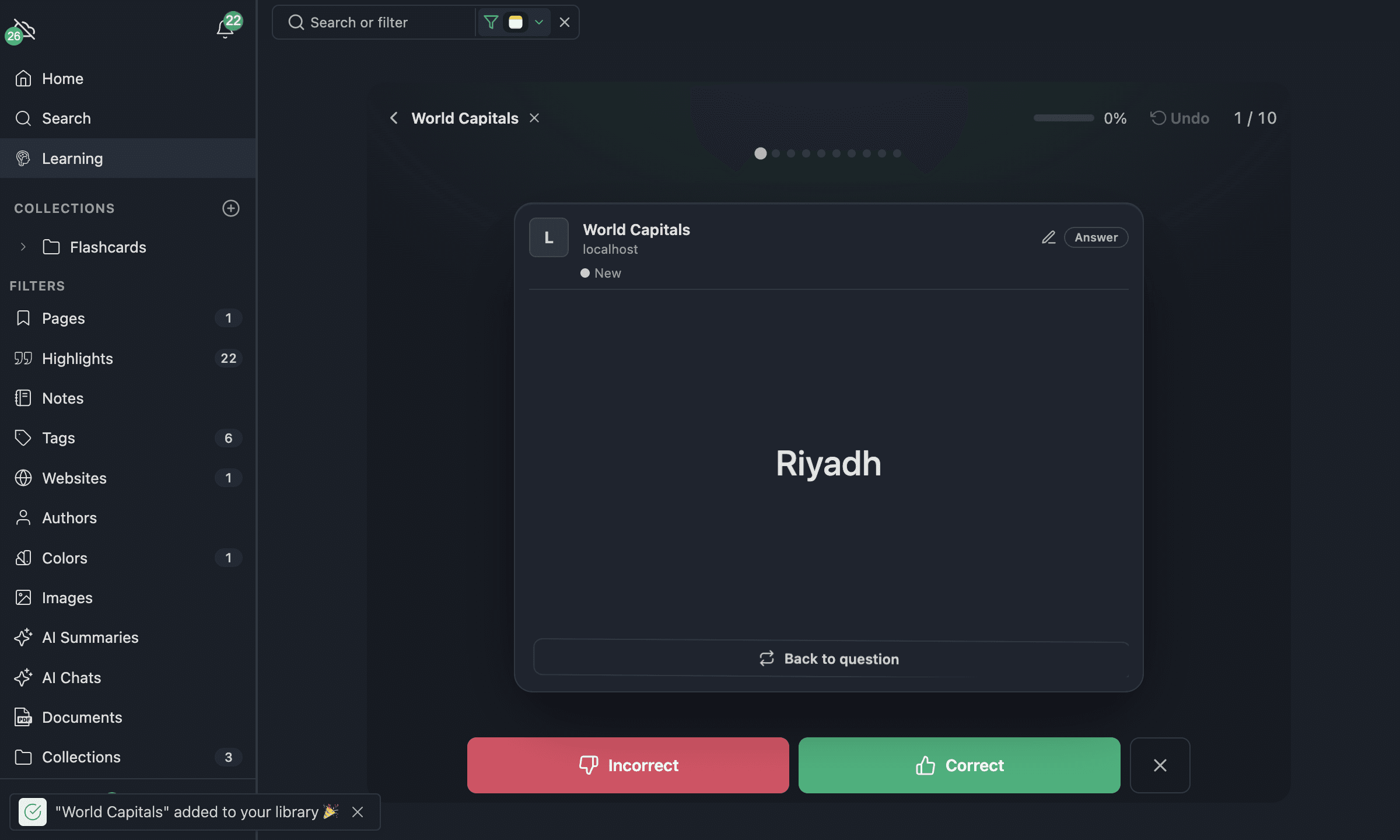
The ready-made sets live in the Learning Hub — free, searchable learning paths where every flashcard is readable inline. Each subject is split into categories (themes), and each category is a three-level path (beginner → advanced) you can preview in the browser and load with one click. Launch subjects include Geography (Capitals, Flags), Law School (Fundamentals, Constitutional Law), Anatomy (Foundations, Cardiovascular System), Computer Science (Fundamentals, Web Development) and English Vocabulary (Core Vocabulary, Idioms & Phrasal Verbs) — with more on the way.
When you load a set, it is filed in a matching folder so you can find it again: imported decks land under Flashcards / <Subject> / <Category> / in your library, and the flashcards you create yourself sit in the top-level Flashcards folder.
The learner is the real Web Highlights learning hub — sidebar, search and filters included. Every set you load becomes a deck in your local library, so you can load several sets, switch between them with the filter, and return to app.web-highlights.com/learner any time to continue exactly where you left off. Everything works right in your browser and is stored locally — only syncing is off until you sign up (free for your first 7 days, then part of the paid plans). When you're ready to keep your progress across devices (or explore the rest of the app), create a free account — your decks and learning history are merged into it automatically. (The free daily limit is the same as the signed-in free plan.)
Further Reading
- Spaced Repetition: Retain Your Readings Long-Term — Our in-depth blog post on the science and practice
- Roediger & Karpicke (2006) — The Power of Testing Memory — Foundational research on the testing effect
- Cepeda et al. (2008) — Spacing Effects in Learning — Meta-analysis on optimal spacing intervals