
YouTube Highlighter Installed ๐ŸŽ‰

Picture of me (Marius)

Hey, I'm Marius ๐Ÿ‘‹ I built this one so the videos I learn from stop disappearing the moment they end. I hope it earns a place in how you watch โ™ฅ๏ธ

โ€” Marius, Founder of Web Highlights

Follow on Twitter For Updates
- or on LinkedIn
Let's get you set up in just a few steps ๐Ÿš€
โฌ‡๏ธ

1. Pin Highlighter ๐Ÿ“Œ

Click the extension icon in the top right corner and click the "Pin" icon to have it always available.

2. Highlight Any YouTube Video โ€“ YouTube Video PlaceholderScroll to load video. If you can't see the video, watch it on YouTube.

2. Highlight Any YouTube Video

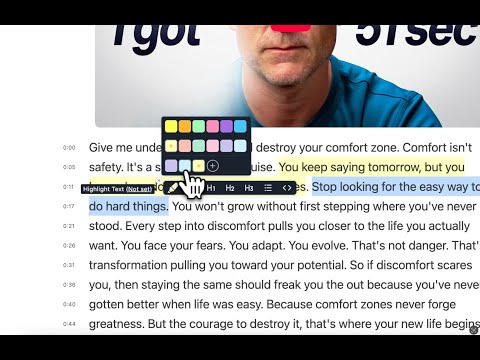
Visit any YouTube video and click the highlight button to open the YouTube reader. Then start selecting text to highlight.

3. Take Notes & Add Tags ๐Ÿท๏ธ

Add personal notes and organize your research with custom tags. Access your annotations instantly from the popup or sidebar.

Learn More โ†’

4. Create Account & Sync

Create an account to access your highlights & bookmarked pages from anywhere on any device.

Create Account

5. Create AI Summaries

Create AI-powered summaries of your highlights and web pages with the AI built into your browser. It runs on your device, so your pages stay with you.

Learn More โ†’

6. Highlight in Multiple Colors ๐ŸŽจ

Use pastel and neon colors to organize research. Create custom highlights, notes, and bookmarks for better productivity.

Learn More โ†’
7. Save Bookmarks ๐Ÿ”– โ€“ YouTube Video PlaceholderScroll to load video. If you can't see the video, watch it on YouTube.

7. Save Bookmarks ๐Ÿ”–

Use Web Highlights as a web clipper or bookmark manager. Simply click the bookmark icon (or use the context menu) to save any page and access it later from the sidebar or web app.

Learn More โ†’

8. Export to Notion, Markdown, and More

Send highlights, notes, and bookmarks to Notion or Capacities with one click, or copy them as Markdown for Obsidian and other apps.

Learn More โ†’

Questions? I'm here to help! ๐Ÿ‘‹

Reach out on Twitter, LinkedIn, or email me at marius@web-highlights.com

๐Ÿš€ You're All Set!

Ready to transform your highlighting experience? Happy highlighting! ๐Ÿค“

Start Highlighting Now

๐Ÿ“š Learn More About Web Highlights

๐Ÿ’ก
Helpful Settings & Tips

Learn how to use the helpful settings to make your reading experience even better.

Learn More โ†’
๐Ÿ“–
Complete Getting Started Guide

Learn all the basics of highlighting, note-taking, and organizing your research.

Read Guide โ†’
๐Ÿ“„
How to Highlight PDFs

Master PDF highlighting and note-taking for research and study.

Learn More โ†’
๐Ÿ”„
Export to Notion & Obsidian

Sync your highlights with your favorite note-taking apps.

Export Guide โ†’
โšก
Keyboard Shortcuts

Speed up your workflow with powerful keyboard shortcuts.

Learn More โ†’
๐Ÿ“ฑ
Web App Dashboard

Access your highlights anywhere with the Web Highlights web app.

Open Web App โ†’

Frequently Asked Questions

What is the YouTube Highlighter extension?
The YouTube Highlighter extension is a specialized Chrome extension designed specifically for highlighting and taking notes on YouTube video transcripts. Unlike our main Web Highlights extension that works on all websites, this focused extension only handles YouTube videos, making it perfect for students, researchers, and content creators who primarily consume educational content on YouTube. You can highlight one video per day for free, with full highlighting capabilities including color-coded highlights, personal notes, and AI-powered summaries.
How does YouTube video highlighting work?
YouTube highlighting is incredibly simple and powerful:
  • Automatic transcript extraction: The extension fetches the video's transcript from YouTube's captions
  • Seamless integration: A highlight button appears directly in YouTube's video player controls
  • Reader mode activation: Click the button to open the video in our distraction-free reader
  • Real-time synchronization: Transcript scrolls and highlights as the video plays
  • Full highlighting support: Highlight text, add notes, create tags, and generate AI summaries
Perfect for TED Talks, podcasts, educational videos, and any long-form content on YouTube.
Can I highlight YouTube videos without installing the extension?
Yes! We offer a free YouTube highlighter tool that works directly in your browser without any installation. Simply paste any YouTube video URL, and you can start highlighting and taking notes immediately. However, for the best experience with automatic transcript loading and seamless video synchronization, we recommend installing the YouTube Highlighter extension.
What types of YouTube videos can I highlight?
The YouTube Highlighter works with most videos that have captions available, including:
  • Auto-generated captions: YouTube's automatic speech recognition captions
  • Manual captions: Creator-uploaded subtitle files
  • Multiple languages: Videos with captions in various languages
  • Educational content: TED Talks, lectures, tutorials, and courses
  • Long-form content: Podcasts, documentaries, and interviews
The extension automatically detects available captions and loads the transcript in your preferred language when possible.
Is the YouTube Highlighter extension free to use?
Yes! The YouTube Highlighter extension offers a generous free tier that lets you highlight one video per day with full functionality. This includes:
  • Unlimited highlights and notes on your daily video
  • Color-coded highlighting with multiple colors
  • Personal notes and annotations
  • Custom tags for organization
  • AI-powered video summaries
  • Export options (PDF, Markdown)
  • Video-transcript synchronization
For unlimited daily videos and advanced features like cloud sync, you can upgrade to our premium plans.
How does video-transcript synchronization work?
Our video-transcript synchronization is one of the most powerful features for studying YouTube content:
  • Auto-scroll: Transcript automatically follows video playback
  • Time markers: Click any part of the transcript to jump to that exact moment in the video
  • Current sentence highlighting: The spoken text is highlighted in real-time as the video plays
  • Manual control: Toggle auto-scroll on/off as needed
  • Pin video: Keep the video player visible while scrolling through the transcript
This makes it incredibly easy to review specific parts of videos and jump between your highlights and the corresponding video moments.
What makes this different from other YouTube note-taking tools?
The YouTube Highlighter extension stands out because it's specifically designed for YouTube content consumption:
  • Focused functionality: Only handles YouTube videos, making it lightweight and fast
  • Automatic transcript extraction: No manual work needed - just click and highlight
  • Seamless video integration: Works directly within YouTube's interface
  • AI-powered summaries: Generate quick summaries of entire videos
  • Study-friendly features: Customizable fonts, themes, and reading modes
  • Export capabilities: One click to Notion, or copy as Markdown for Obsidian and other second brain apps
Unlike general note-taking apps, this extension understands YouTube's structure and provides specialized tools for video-based learning.