
You've found the right person. The name is on screen, the title fits, the company is exactly who you wanted to talk to — and there's no way to reach them. LinkedIn's message box is capped or ignored, the contact form on the website drops into a shared inbox nobody reads, and guessing firstname@company.com is a coin flip that chips away at your sending reputation every time it lands wrong. Finding the address is the part of prospecting nobody budgets time for and everybody loses hours to.
An entire industry has grown up to close that gap, and it splits into two camps that are worth telling apart before you install anything. On one side sit the tools that only surface what companies have already published, and show you the pages they found it on. On the other sit database-backed platforms holding contributed records — personal addresses, private mobile numbers — handed over with no indication of where any of it came from. Prices run from a free plan you can genuinely work on to $400 a month, and a couple of vendors won't tell you what they charge at all until you've sat through a demo.
We spent time with the ten most-installed email finder extensions on the Chrome Web Store, judging them on hit rate, how many addresses actually survive contact with a mail server, whether the credit maths is honest, and how much of your own data they demand before the first search. What follows ranks all ten, with real Chrome download counts and store ratings behind every claim. Three of them also ship Firefox builds, and we'll flag those in passing — but Chrome is where this category lives, and it's where every number below comes from.
Key takeaways
- Hunter (9.00/10) is the only extension here that shows the public pages behind every address and attaches a confidence score — the pick when deliverability matters more than reach.
- GetProspect (8.87) verifies each address before it spends your credit; Snov.io (8.82) bundles finding, verifying and sending into one $39/month subscription.
- Skrapp (8.68) is the easiest place to start — no phone number at signup and the full feature set on the free tier.
- Apollo has the largest install base at 1,000,000 downloads and the most generous free plan, roughly 75 email reveals a month, indefinitely.
- Phone numbers, not just addresses – Kaspr, Lusha, SignalHire and Seamless.AI sell direct dials, and only Kaspr refuses to charge you for a lookup that finds nothing.
How this list was made: the scores come from Tooltivity, a review site run by my company — the same one that makes Web Highlights. It rates each extension from its Chrome Web Store listing, its ratings and what recent reviews report, and this list is ordered by that score. The descriptions below summarize each listing and what its users report.
List of the Best Email Finder Extensions for Chrome:
- Hunter - Email Finder Extension
- Email Finder - GetProspect
- Email Finder by Snov.io
- Email Finder by Skrapp.io
- Apollo.io: Free B2B Phone Number & Email Finder
- Kaspr: B2B Phone Number and Email Finder
- Email Finder by ContactOut – Email Lookup Tool
- Lusha - Easily find B2B contact information
- Seamless.AI
- SignalHire - find email or phone number
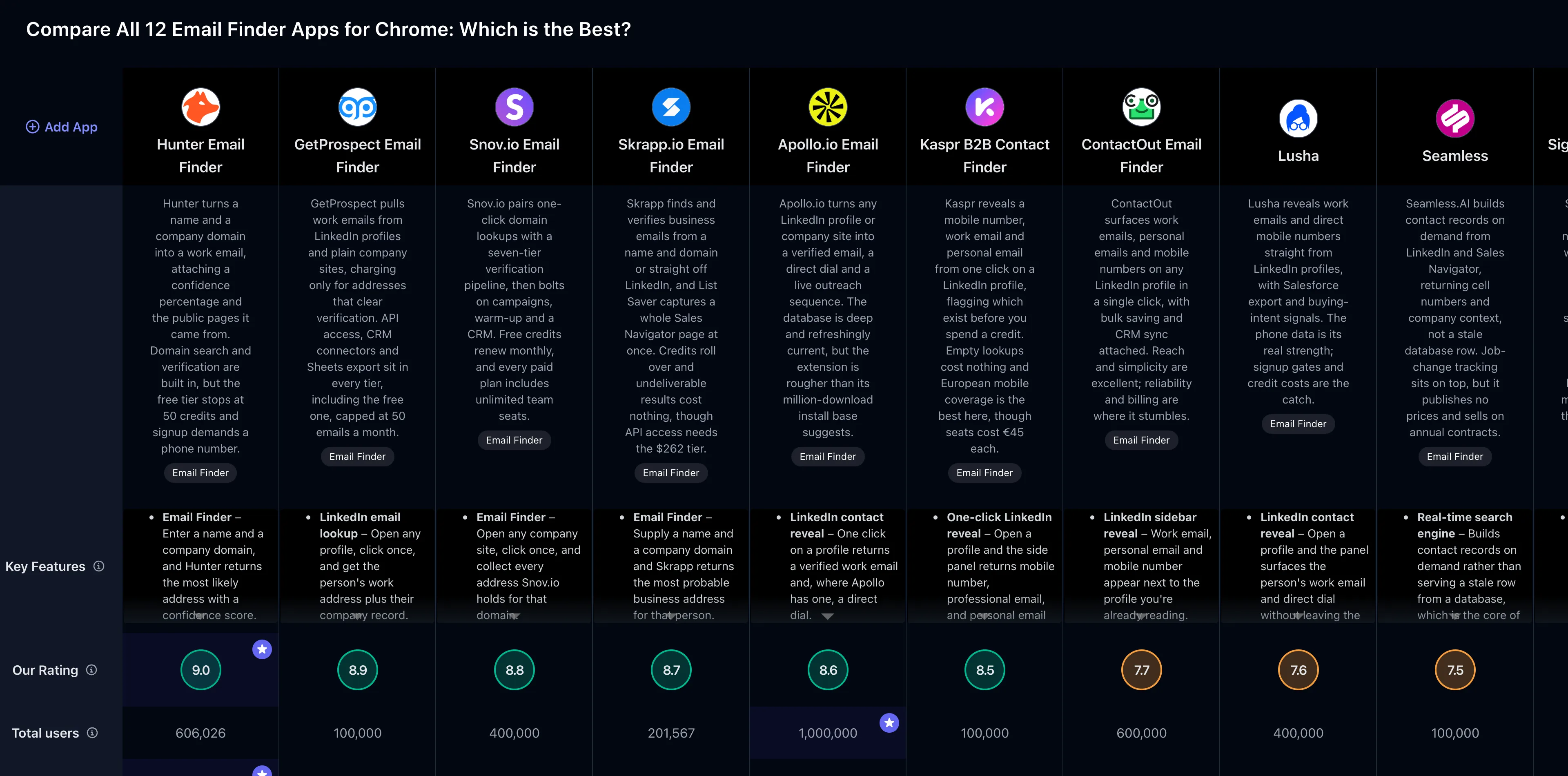
If you prefer a comparison overview, check out the full comparison table of all Email Finder extensions :
1. Hunter - Email Finder Extension

Hunter is the name most people reach for first, and 600,000 downloads on the Chrome Web Store make that hard to argue with. It carries a 4.72-star rating across 12,519 reviews — comfortably the largest review base in this comparison — with recent sentiment sitting just under the lifetime figure, as evidenced by its 4.66 rating for the last 100 reviews. A Firefox build exists but is a far thinner operation at 6,026 downloads and 4.16 stars.
What sets Hunter apart is that it shows its work. Every address arrives with a confidence percentage and a list of the public pages the pattern was spotted on, so a 97% result with four citations is something you can send to this morning, and a 55% guess with none is a prompt to verify first. Every other tool here hands you an address and expects you to trust it. That honesty costs Hunter reach — it indexes what's published, so it thins out fast on two-person consultancies — but it's the reason we'd put it in front of anyone whose sending domain matters.
Key Features
- Email Finder – Enter a name and a company domain, and Hunter returns the most likely address with a confidence score
- Domain Search – Pull every published address for a company, grouped by department and seniority
- Email Verifier – Check deliverability before you send, so bounces don't damage your sending reputation
- Confidence scoring – Every result carries a percentage and the public sources it was found on
- LinkedIn integration – Surface addresses directly from a profile while you browse
- Lead lists – Save prospects into named lists inside the extension and sync them to the Hunter web app
- Campaigns – Run cold sequences from a connected mailbox without leaving the Hunter ecosystem
- CRM export – Push leads to Salesforce, HubSpot, Pipedrive, or plain CSV
Pros & Cons
Pros:
- Accurate results with confidence scores
- Instant one-click domain lookups
- Built-in verification cuts bounces
- Unlimited team members on every plan
- Clean, uncluttered interface
Cons:
- Phone verification required at signup
- Only 50 free credits monthly
- Thin coverage for small companies
- Firefox build lags behind Chrome
Who is this great for?
Hunter is perfect for anyone who sends at volume and can't afford a burnt domain. If you're running outbound where deliverability is the whole game — a founder pitching investors, an agency mailing prospects weekly, a sales team whose replies depend on landing in the inbox rather than the spam folder — the verification and provenance are worth more than a bigger database would be.
It's especially great for users who work from company websites rather than LinkedIn profiles. Domain Search sorted by department is the fastest way we found to identify the marketing lead at a company without scrolling past forty engineers, and unlimited team members on every tier means a five-person team pays what one person pays.
Compared to others
Hunter's confidence scoring gives it an edge over Apollo and Snov.io , both of which return addresses with no indication of where they came from — though both find contacts at small companies where Hunter shrugs. Against Skrapp , Hunter is the more trustworthy result but the less generous free tier: 50 credits versus Skrapp's 50 with far fewer strings attached and no phone number demanded at signup.
Detailed comparisons
Hunter vs Snov.io • Hunter vs Apollo • Hunter vs Skrapp
Rating Summary
Hunter has reached 600,000 downloads on Chrome with a 4.72-star average from 12,519 reviews. Tooltivity gave Hunter a score of 9.00/10 . Check out the full review here .
2. Email Finder - GetProspect

GetProspect has built a quiet following in a loud category: 100,000 downloads and a 4.77-star Chrome Web Store rating from 1,323 reviews. The trend is the number worth watching — its 4.83 rating for the last 100 reviews sits above the lifetime average, which means the extension is better received today than its history suggests. It's Chrome-only, with no Firefox build to fall back on.
The thing GetProspect gets right is the order of operations. Addresses run through verification, including a catch-all test most rivals skip, before they reach your list — and a lookup that finds nothing doesn't cost you a credit. The practical effect is that your export is ready to send rather than ready to clean. What you pay for that is latency: stubborn domains can leave the panel spinning on "validating" for several uncomfortable seconds with no way to skip ahead.
Key Features
- LinkedIn email lookup – Open any profile, click once, and get the person's work address plus their company record
- Pre-delivery verification – Every address is checked before it lands in your list, including a proprietary catch-all test
- Bulk collection – Sweep an entire LinkedIn or Sales Navigator result page into a list in one pass
- Website and domain search – Works on plain company sites too, no LinkedIn profile required
- Lead lists with custom properties – Organise prospects into named lists and attach your own fields
- CRM and Sheets integrations – Native connectors plus CSV, XLSX, and Google Sheets export on every plan
- Reverse email lookup – Start from an address you already have and work back to the person behind it
- API access – Wire lookups into your own tooling without upgrading, unusual at this price point
Pros & Cons
Pros:
- Verifies addresses before charging credits
- One-click lookups from LinkedIn
- Free plan includes API access
- Unused credits roll over
- Tidy lead list management
Cons:
- Phone signup blocks some countries
- Only 50 free emails monthly
- Verification step can drag
- Guessed patterns occasionally miss
- Chrome only, no Firefox build
Who is this great for?
GetProspect is perfect for anyone who values a clean list over a long one. Small sales teams and solo founders get the most out of it, because API access, CRM connectors, bulk finding and Google Sheets sync are included on every tier — free one included — where most competitors treat half of that as an upgrade trigger.
It's especially great for users who prospect from LinkedIn and hate cleaning exports. The verification-first model means the thousand contacts you paid for are a thousand usable contacts, not a thousand attempts, and unused credits roll into next month rather than evaporating.
Compared to others
GetProspect's feature floor beats Hunter at comparable tiers — you get an API on the free plan, where Hunter reserves that kind of access for paying customers. Against Snov.io , it's the narrower tool: no campaigns, no warm-up, no CRM, just finding and verifying done properly. And where Skrapp lets you sign up and start, GetProspect demands a phone number first — and its verification provider refuses entire country codes, Italian and Chinese numbers among them.
Detailed comparisons
GetProspect vs Hunter • GetProspect vs Snov.io • GetProspect vs Skrapp
Rating Summary
GetProspect has 100,000 downloads on Chrome with a 4.77-star average across 1,323 reviews. Tooltivity gave GetProspect a score of 8.87/10 . Check out the full review here .
3. Email Finder by Snov.io

Snov.io holds the highest store rating in this comparison, and it isn't close: 4.92 stars from 6,060 reviews across 400,000 Chrome downloads. That standard has held rather than slipped, as evidenced by its 4.87 rating for the last 100 reviews. Scores that high are genuinely unusual in a category where most tools accumulate a steady drip of furious one-stars.
Where most extensions hand back one guessed address, Snov.io tends to hand back the department — sales, support, the founders, with names and roles attached — and every result has already passed through a seven-tier verification pipeline. Behind the extension sits a full outbound platform: drip campaigns, mailbox warm-up, a sales CRM, two-way HubSpot and Pipedrive sync. The catch is the free Trial, which renews 50 credits every 30 days and then blocks exports entirely. You can look at what it found; you can't take it anywhere.
Key Features
- Email Finder – Open any company site, click once, and collect every address Snov.io holds for that domain
- LinkedIn Prospect Finder – A companion extension that pulls contacts from profiles, search results and Sales Navigator
- Seven-tier verification – Each address runs through a layered deliverability check with bounce-risk flags
- Bulk search – Queue whole lists of domains and let the platform grind through them in the background
- Drip campaigns – Multi-step sequences with unlimited follow-ups, A/B testing and reply sentiment analysis
- Mailbox warm-up – Build sender reputation on a fresh domain before the first real campaign goes out
- Built-in sales CRM – Track deals and tasks through pipelines without exporting to another tool
- Integrations and export – Two-way HubSpot and Pipedrive sync, plus Zapier, Make, webhooks, API and CSV
Pros & Cons
Pros:
- Returns whole company email lists
- Verification keeps bounce rates low
- Near-instant domain lookups
- Free credits renew monthly
- Unlimited team seats on every plan
Cons:
- Free tier is only a taster
- CRM caps out at 10,000 leads
- Occasional deal-syncing bugs
- Best features sit behind payment
- Cold sends can still hit spam
Who is this great for?
Snov.io is perfect for anyone who wants the whole outbound stack on one bill. If you were about to buy an email finder, a verification service and a sequencer separately, this bundles all three for $39 a month — and unlimited team seats on every tier means a four-person agency pays the same as a solo consultant.
It's especially great for users prospecting from company domains rather than individual profiles. A single click returning an entire department beats clicking through eight LinkedIn pages, and the verification running underneath means most of those addresses will actually accept mail.
Compared to others
Snov.io covers far more ground than Hunter , which stops at finding and verifying — but Hunter tells you where each address came from and Snov.io doesn't. It's the closest thing here to Apollo in scope, at a fraction of the per-seat cost, though Apollo's database is deeper and better maintained. Against GetProspect , Snov.io wins on breadth and loses on the free tier, where GetProspect at least lets you export what you find.
Detailed comparisons
Snov.io vs Hunter • Snov.io vs Apollo • Snov.io vs GetProspect
Rating Summary
Snov.io has 400,000 downloads on Chrome and the category's best store rating at 4.92 stars from 6,060 reviews. Tooltivity gave Snov.io a score of 8.82/10 . Check out the full review here .
4. Email Finder by Skrapp.io

Skrapp has quietly become one of the better-liked finders on the Chrome Web Store, with 200,000 downloads and a 4.76-star rating from 550 reviews, and recent users like it more than the average implies — as evidenced by its 4.84 rating for the last 100 reviews. Its Firefox add-on is a much smaller story at 1,567 downloads and 2.75 stars, though that figure rests on four ratings and says more about the sample than the software.
Two things make Skrapp the easiest tool here to hand to a beginner. The panel is the least noisy in the category — a search box, a result list, a credit counter, nothing trying to sell you anything mid-task — and the credit policy is written in the customer's favour, with undeliverable results costing nothing and unused credits rolling over. The List Saver, which captures an entire Sales Navigator results page in one action, is the feature we'd miss most if it vanished.
Key Features
- Email Finder – Supply a name and a company domain and Skrapp returns the most probable business address
- Email Verifier – Check deliverability in single lookups or bulk, so bad addresses never reach your sequence
- LinkedIn extraction – Pull prospects from Basic, Sales Navigator, and Recruiter profiles without leaving the page
- List Saver for Sales Navigator – Capture an entire search result page into a named list in one action
- Multi-page enrichment – Walk through several pages of LinkedIn results and enrich them in a single pass
- Company websites lookup – Run the same domain search from a company's own site rather than from LinkedIn
- AI enrichment – Fill in missing fields on saved leads, metered separately from email credits
- Lists, exports, and CRM sync – Organise leads into lists, push them to your CRM, or export to CSV
Pros & Cons
Pros:
- Genuinely generous 50-credit free tier
- Unused credits roll over monthly
- Only charges for deliverable addresses
- Cleanest interface in the category
- Strong Sales Navigator list building
Cons:
- Guessed patterns still slip through
- API locked behind Enterprise pricing
- Occasional multi-day service outages
- Bulk exports bounce more than singles
Who is this great for?
Skrapp suits anyone taking their first run at outbound. There's no phone number demanded at signup, the free tier ships the complete feature set rather than a crippled preview, and we had a usable lead list inside three minutes of a cold install. Freelancers sending a handful of pitches a week can genuinely live on the free plan.
It's especially great for users whose prospecting starts with a filtered LinkedIn search. List Saver plus multi-page enrichment is the fastest path from search results to a saved, exportable list in this comparison — and both Chrome and Firefox run the same version, which is rarer in this category than it should be.
Compared to others
Skrapp asks for less than Hunter at the door — no phone verification — but Hunter tells you where each address came from, and Skrapp only tells you whether it verified. Against GetProspect , the finding is comparable and the list management is thinner, though Skrapp's daily-limited free tier is friendlier than GetProspect's country-blocking signup. And where Snov.io bundles campaigns and a CRM, Skrapp deliberately stops at finding and verifying, so you'll need something else to send with.
Detailed comparisons
Skrapp vs Hunter • Skrapp vs GetProspect • Skrapp vs Snov.io
Rating Summary
Skrapp has 200,000 downloads on Chrome with a 4.76-star rating from 550 reviews. Tooltivity gave Skrapp a score of 8.68/10 . Check out the full review here .
5. Apollo.io: Free B2B Phone Number & Email Finder

Apollo is the heavyweight here, with 1,000,000 downloads — the largest install base in this comparison — and a 4.71-star Chrome Web Store rating from 2,210 reviews. Recent sentiment runs ahead of the lifetime figure, as evidenced by its 4.81 rating for the last 100 reviews, which is the opposite of what usually happens to a tool this widely installed. There's no Firefox build, and the Chromium forks it does technically support are unreliable.
Scope is the whole pitch. Open a LinkedIn profile and Apollo returns a verified email, a direct dial, headcount, funding stage and tech stack, then fires the contact into an outreach sequence you can dial from in the same panel. Job-change tracking is the quiet killer feature — lists built three months ago still work here, where equivalent lists from annually refreshed databases are half-dead. The rough edges are real, though: Apollo injects unscoped CSS that leaks onto unrelated websites and breaks layouts on pages that have nothing to do with prospecting.
Key Features
- LinkedIn contact reveal – One click on a profile returns a verified work email and, where Apollo has one, a direct dial
- Company website lookup – Land on any company site and pull the decision-makers behind that domain
- Advanced search filters – Narrow by title, seniority, industry, headcount, location and buying intent before spending a credit
- Email sequences – Drop a prospect straight into a multi-step cadence from the extension panel
- Built-in dialer – Call from the browser, record the conversation, and drop pre-recorded voicemails
- AI Assistant and AI Research – Draft outreach and pull context on a prospect without leaving the page
- Job-change tracking – Contact records refresh when people move roles, so lists rot more slowly
- CRM and tool integrations – Push leads into Salesforce, HubSpot, Outreach or Salesloft in a couple of clicks
Pros & Cons
Pros:
- Huge, unusually current contact database
- One-click reveal on LinkedIn
- Sequences and dialer built in
- Genuinely usable free tier
- Clean panel, no clutter
Cons:
- Injects unscoped CSS into pages
- Phone numbers often personal or stale
- Occasional freezes and stuck panels
- Chrome only, shaky on forks
Who is this great for?
Apollo is perfect for anyone whose job is outbound rather than anyone who occasionally needs an address. If you're running sequences, dialing, and logging calls to a CRM every day, consolidating a data vendor, a sequencer and a dialer into one $49-per-seat subscription is straightforward maths.
It's also the best free plan in this comparison by a distance: 900 credits a year released monthly works out to roughly 75 email reveals a month, indefinitely. That's enough for a founder doing light outbound to never pay anything, and enough for everyone else to properly test data quality before a card comes out.
Compared to others
Apollo does far more than Hunter , but Hunter folds unlimited team members into every tier where Apollo charges per seat — a five-person team feels that difference immediately. Against ContactOut , Apollo is the platform and ContactOut is the scalpel: if your work never leaves LinkedIn, all of Apollo's outreach furniture just gets in the way. And against Lusha , Apollo is cheaper and broader, though Lusha's direct dials are more reliable than Apollo's eight-credit phone numbers.
Detailed comparisons
Apollo vs Hunter • Apollo vs ContactOut • Apollo vs Lusha
Rating Summary
Apollo.io has 1,000,000 downloads on Chrome with a 4.71-star rating from 2,210 reviews. Tooltivity gave Apollo.io a score of 8.63/10 . Check out the full review here .
6. Kaspr: B2B Phone Number and Email Finder

Kaspr comes at prospecting from the phone side, with 100,000 downloads and a 4.73-star Chrome Web Store rating from 1,231 reviews. It's holding steady rather than climbing, as evidenced by its 4.71 rating for the last 100 reviews against a 4.78 average across the last 500. Worth noting before those numbers persuade you of anything: 1,231 reviews on 100,000 installs is a strikingly high ratio, and Kaspr has handed out free credits in exchange for store reviews.
The French roots show in the data. Mobile coverage on French, Benelux and German prospects was consistently the strongest we've seen from a LinkedIn extension, and noticeably better than the same searches through Lusha. Two credit policies make it a pleasure to use all day: the panel tells you whether a number or address exists before you spend anything, and an empty lookup costs nothing at all. Email freshness is the softer half — we hit a run of bounces on records pointing at companies people had left years ago.
Key Features
- One-click LinkedIn reveal – Open a profile and the panel returns mobile number, professional email, and personal email
- Availability indicators – See whether a phone or email exists before you commit a credit to retrieving it
- No-result, no-charge – If Kaspr can't find a number, the credit stays in your balance
- Sales Navigator and Recruiter Lite – The same workflow follows you into LinkedIn's paid tiers
- Enrichment automations – Trigger connection requests and follow-ups against saved leads
- CSV enrichment – Upload an existing list and fill in the missing numbers and addresses in bulk
- Integrations and dialler support – Push contacts to HubSpot, Salesforce, Pipedrive, Zapier, or a connected dialler
- Hide Direct Emails – An admin permission that keeps personal addresses away from team members who shouldn't see them
Pros & Cons
Pros:
- Excellent mobile number hit rate
- Empty lookups cost no credit
- Shows availability before you spend
- Unlimited B2B emails on paid plans
- Set up in under five minutes
Cons:
- Bounced and outdated contacts persist
- Heavy 23 MB Chrome package
- Chrome only, no other browsers
- Per-seat pricing adds up fast
- API access requires a request form
Who is this great for?
Kaspr is perfect for anyone selling into Europe by phone. If your prospects are in France, the Benelux or Germany and you'd rather pay for a number that's right than a database that's large, nothing else here matches the hit rate — and paid plans stop metering standard B2B emails entirely, so only the dials cost you anything.
It's especially great for teams that resent paying to learn a profile is empty. Availability indicators plus no-charge misses change the rhythm of prospecting: you skip the dead profiles instead of funding the discovery, and credits roll over when you don't spend them.
Compared to others
Kaspr and Lusha are the two phone-first tools worth benchmarking against each other — Kaspr wins on European coverage and credit fairness, Lusha on North American reach. Against SignalHire , the difference is purely commercial: SignalHire charges you whether it finds anything or not and wipes unused credits at renewal, where Kaspr does neither. Apollo bundles sequencing into the same subscription, which Kaspr doesn't attempt.
Detailed comparisons
Kaspr vs Lusha • Kaspr vs SignalHire • Kaspr vs Apollo
Rating Summary
Kaspr has 100,000 downloads on Chrome with a 4.73-star rating from 1,231 reviews. Tooltivity gave Kaspr a score of 8.48/10 . Check out the full review here .
7. Email Finder by ContactOut – Email Lookup Tool

ContactOut has 600,000 downloads and a 4.36-star Chrome Web Store rating from 792 reviews. The gap between that and its 4.14 rating for the last 100 reviews tells the story of this entry — recent sentiment sits well below the longer-term average, and it's tracking a run of outages rather than anything wrong with the data. It ships for Chrome only, and has been broken on Brave for a long stretch despite Brave running the same engine.
The lookup itself is superb. Open a LinkedIn profile and a sidebar appears with a work email, a personal email and often a mobile number — no dashboard, no query to construct, nothing to learn. Personal addresses are the differentiator recruiters keep it installed for, because candidates ignore corporate inboxes. The problem is the "when": there have been multi-day stretches this year where the extension simply stopped connecting, and when it fails it fails silently, spinning indefinitely rather than saying what went wrong.
Key Features
- LinkedIn sidebar reveal – Work email, personal email and mobile number appear next to the profile you're reading
- Website email lookup – Point it at any company site and it surfaces addresses tied to that domain
- Save All Profiles – Bulk-save an entire LinkedIn search page into a list in one action
- Search Portal – Query the contact database directly when you don't have a profile to start from
- CRM and ATS sync – Push saved contacts into your recruiting or sales system automatically
- Email campaigns – Run basic follow-up sequences without wiring up a separate sending tool
- AI writing tools – Draft outreach messages and LinkedIn comments straight from the extension
- Data enrichment and API – Fill gaps in an existing list, or wire the database into your own stack
Pros & Cons
Pros:
- Almost no learning curve
- Finds work and personal emails
- Strong hit rate on LinkedIn
- Bulk Save All Profiles
- Syncs cleanly into CRMs
Cons:
- Outages and connection failures
- Endless loading with no results
- Broken on Brave and forks
- Fair-usage caps on unlimited plans
- Slow, unresponsive billing support
Who is this great for?
ContactOut is perfect for recruiters and sourcers whose working day happens inside LinkedIn. Nothing else here gets from a profile to a personal inbox faster, and Save All Profiles turns an hour of clicking through search results into a couple of minutes. We handed it to someone who'd never used a prospecting tool and they had a usable contact in two minutes.
There's also a genuine bargain buried in the pricing for teams outside the US and UK: excluding that data halves the bill, which makes ContactOut properly competitive for anyone selling or recruiting into Europe and Asia-Pacific — provided the reliability holds up.
Compared to others
ContactOut reaches people Hunter can't, because Hunter only indexes what's published and ContactOut deals in personal addresses — that's also exactly why it's the most invasive tool in this comparison. Against Apollo , it's the simpler product by design, with none of the sequencing or dialing, and a free tier that meters daily rather than monthly. If you need domain-first prospecting rather than profile-first, Lusha covers more ground.
Detailed comparisons
ContactOut vs Apollo • ContactOut vs Hunter • ContactOut vs Lusha
Rating Summary
ContactOut has 600,000 downloads on Chrome with a 4.36-star rating from 792 reviews. Tooltivity gave ContactOut a score of 7.70/10 . Check out the full review here .
8. Lusha - Easily find B2B contact information

Lusha carries 400,000 Chrome downloads and a 4.58-star rating across 1,848 reviews, but the trend line is the interesting part. The last 500 reviews average 4.20 while the most recent 100 sit at 4.51 — something went wrong here for a while, and it's partly being fixed. There's no Firefox or Edge build; Chrome is the only place it runs.
Direct phone numbers are the reason people install it. Email finders are commodity; a mobile number attached to the right person is not, and a sales floor that opens conversations by dialling gets value here that no address-only tool replaces. What stands between you and that value is the largest cluster of criticism any extension in this comparison has: a work-email requirement that rejects freelancers outright, automated account suspensions with no obvious appeal, and a sign-in loop that has been bouncing people between the extension and the website for years.
Key Features
- LinkedIn contact reveal – Open a profile and the panel surfaces the person's work email and direct dial
- Direct phone numbers – Mobile and desk lines, the part of the dataset Lusha built its reputation on
- Any-website prospecting – Works on company sites and CRM records, not just LinkedIn
- Bulk reveal – Pull contacts from a whole LinkedIn search page or Sales Navigator list in one pass
- CRM export – One-click push into Salesforce, HubSpot and others, with CSV enrichment on higher tiers
- Buying intent signals – Flags accounts researching your category so you can order the list by who's in market
- Company intelligence – Headcount, revenue, industry and tech stack shown alongside each contact card
- Compliance tooling – SOC 2 and ISO 27701 certification, GDPR and CCPA workflows, and a public opt-out
Pros & Cons
Pros:
- Strong direct-dial phone coverage
- Reveals contacts in one click
- Clean Salesforce and CRM export
- Panel stays quiet when empty
- Free plan needs no card
Cons:
- Paid plans are expensive
- Phone numbers cost five credits
- Work email required to register
- Recurring sign-in loops
- Contact data can be outdated
Who is this great for?
Lusha is perfect for Salesforce-based sales teams who dial more than they email. The export path is properly built rather than tacked on, buying-intent signals let you sort a list by who's actually in market, and each contact card carries the company context that would otherwise cost you a separate tab of research.
It works best for people who can absorb five credits per phone number. If closing one deal a quarter from a direct dial pays for the year, Lusha is cheap. If you're prospecting by email, you're paying a phone-data premium for something Apollo or Hunter will do for less.
Compared to others
Apollo is broader and cheaper, and its free plan is far more useful than Lusha's 40 credits — which, at five credits a dial, works out to eight phone numbers a month. Kaspr is the better pick for European mobile data and asks much less of you at signup. And SignalHire competes on the same phone-first ground with unlimited seats, though its credits expire monthly where Lusha's roll over to a capped extent.
Detailed comparisons
Lusha vs Apollo • Lusha vs Kaspr • Lusha vs SignalHire
Rating Summary
Lusha has 400,000 downloads on Chrome with a 4.58-star rating from 1,848 reviews. Tooltivity gave Lusha a score of 7.57/10 . Check out the full review here .
9. Seamless.AI

Seamless.AI arrives with 100,000 downloads and a 4.56-star Chrome Web Store rating from just 196 reviews, and recent feedback runs warmer still, as evidenced by its 4.78 rating for the last 100 reviews. That review count is the number to sit with — fewer than two hundred ratings against a hundred thousand installs is a thin foundation, and the recent positives cluster oddly, arriving in similarly shaped batches within days of each other. Chrome is the only build.
The product itself does real work. Open a LinkedIn profile or a Sales Navigator list and Seamless assembles a contact record on demand — work email, cell number, org structure, recent company news — rather than serving a stale database row. Job Changes tracking keeps saved lists from decaying. The difficulty is entirely commercial: Seamless publishes no prices at all, sells through demos into annual contracts, and has accumulated a long, specific record of complaints about how those contracts end.
Key Features
- Real-time search engine – Builds contact records on demand rather than serving a stale row from a database
- Cell phone numbers – Returns mobile numbers alongside emails, which most email-only tools don't attempt
- LinkedIn and Sales Navigator panel – Sits beside profiles and search results so prospecting never leaves the tab
- Pitch Intelligence – Surfaces company background, org structure, and recent news before you dial
- Job Changes tracking – Flags when a saved contact moves companies and refreshes their details
- Connect – Handles email, calls, and task management inside Seamless instead of exporting to a sequencer
- Buyer Intent and Data Enrichment – Identify accounts showing purchase signals and backfill CRM fields, both paid add-ons
- CRM integrations and API – Premium connectors plus API access to push contacts into your own systems
Pros & Cons
Pros:
- Finds cell phones, not just emails
- Deep Sales Navigator integration
- Strong US contact coverage
- Big time savings when prospecting
- Responsive US-based support
Cons:
- Prices are never published
- Repeated sign-in and SSO failures
- Annual contracts hard to exit
- Thin data outside the US
- Aggressive sales follow-up after demos
Who is this great for?
Seamless.AI is perfect for SDR teams selling into the US at volume who need mobile numbers as much as addresses. Coverage on US targets runs deep, including non-executive roles that are genuinely hard to find elsewhere, and Pitch Intelligence gives a call enough context to work out who can actually sign something.
One condition, though: you need someone who can negotiate a contract properly. Teams replacing a Sales Navigator seat have found Seamless materially cheaper for what they get, but that outcome depends on procurement experience the average solo user doesn't have.
Compared to others
Apollo covers most of the same ground on published pricing you can compare before talking to anyone, which is the single biggest reason to pick it over Seamless. Lusha is the closer match for phone-heavy work and at least tells you what a credit costs. And if email accuracy is genuinely all you need, Hunter is the safer choice — we saw bounce rates on Seamless exports run well above what a verified-contact tool should produce.
Detailed comparisons
Seamless.AI vs Apollo • Seamless.AI vs Lusha • Seamless.AI vs Hunter
Rating Summary
Seamless.AI has 100,000 downloads on Chrome with a 4.56-star rating from 196 reviews. Tooltivity gave Seamless.AI a score of 7.50/10 . Check out the full review here .
10. SignalHire - find email or phone number

SignalHire holds 300,000 Chrome downloads and a 4.49-star rating from 452 reviews, and it's recovering: its 4.69 rating for the last 100 reviews is a clear step up from the 4.35 average across the last 500. The Firefox add-on is a much smaller operation at 2,416 downloads and 4.32 stars from 44 reviews — and it's running an entire major version behind Chrome, on a build that hasn't seen meaningful work since 2021.
Reveal Contacts is the whole product in one button: work email, personal address, and a direct mobile number where SignalHire has one. Technical-role coverage held up better than we expected — engineers, IT managers and product people came back with usable details more often than not, and boolean database search lets you work backwards from a skills query. What drags it down is everything wrapped around the lookup. There's no preview, so you pay to discover a number is a switchboard, and unused credits vanish at the end of every cycle and again the day you cancel.
Key Features
- Reveal Contacts – One click on a LinkedIn profile returns work email, personal email, and direct mobile number
- Direct dial numbers – Mobile numbers are the headline draw, and few email-first tools attempt them at all
- Sales Navigator and Recruiter support – The panel follows you into LinkedIn's paid surfaces
- Bulk list processing – Feed in a list of profiles or a CSV and enrich the whole batch at once
- Boolean candidate search – Query the underlying database by skills, title, and location
- ATS and CRM sync – Push revealed contacts into recruiting and sales systems, or export to CSV
- Team credit pooling – Every paid plan allows unlimited seats drawing on one shared credit balance
- API access – Wire lookups into your own tooling, included on paid tiers rather than sold separately
Pros & Cons
Pros:
- Direct mobile numbers, not just emails
- Broad coverage for technical roles
- Fast one-click LinkedIn lookups
- Unlimited team seats on paid plans
- Solid Sales Navigator integration
Cons:
- Credits expire and never roll over
- Refund and cancellation handling is poor
- Sign-up frequently fails outright
- Can trigger LinkedIn account restrictions
- Stale, neglected Firefox build
Who is this great for?
SignalHire is perfect for technical recruiters who phone candidates rather than email them. The database runs deep on engineering and IT roles, boolean search means you don't need a profile to start from, and unlimited seats on every paid plan makes it unusually cheap for a team — five people pay what one person pays.
It only makes sense if you'll consume your credits every single month. Nothing rolls over, and cancelling wipes whatever balance you've already paid for, so a quiet quarter is money burned rather than banked.
Compared to others
Kaspr does the same phone-first job with a far kinder credit model — rollover as standard, no charge on an empty lookup — and costs less to start. Lusha has better North American dial coverage but charges per seat, where SignalHire doesn't. And ContactOut offers a similar LinkedIn-native workflow with considerably less billing drama attached, if not the same phone reach.
Detailed comparisons
SignalHire vs Lusha • SignalHire vs Kaspr • SignalHire vs ContactOut
Rating Summary
SignalHire has 300,000 downloads on Chrome with a 4.49-star rating from 452 reviews. Tooltivity gave SignalHire a score of 7.40/10 . Check out the full review here .
Final Thoughts
After working through all ten, the ranking comes down to one question: how much does the tool tell you about what it just handed you? Hunter takes the top spot at 9.00/10 for exactly that reason — it's the only extension here that shows the public pages behind every address and attaches a confidence score, which is what lets you decide whether to send now or verify first. It won't find everyone, particularly at small companies, but what it finds you can act on. GetProspect (8.87/10) takes the next-best approach by verifying before it charges you, and Snov.io (8.82/10) earns the category's highest store rating by bundling finding, verifying and sending into one $39 subscription.
For specific situations: Skrapp is where we'd send anyone new to this — no phone number at signup, the full feature set on the free tier, and the cleanest panel of the ten. Apollo has the best free plan and the most current database, and it's the obvious pick if outbound is your whole job rather than an occasional task. Kaspr owns European mobile numbers and refuses to charge you for an empty lookup. ContactOut is the recruiter's tool when it's up, though the outages are what dragged its recent rating down. Lusha and SignalHire both find direct dials that email-only tools can't, and both make you fight the billing to get there. Seamless.AI we'd approach carefully — the extension is capable, but nobody should sign an annual contract for a product that won't show a price.
Two things worth doing before you commit to any of them. Test the free tier on people whose addresses you already know, because that's the only honest measure of hit rate in your market — Apollo's 75 monthly credits and Skrapp's 50 both make that easy. And read where the data comes from: every tool on this list holds contact details of people who never agreed to be in a database, and under GDPR the responsibility for what you do with that lands on you, not the vendor. Start with the full comparison table , pick two, and run them side by side for a week.
If you're auditing the rest of your browser setup while you're at it, we've run the same treatment on bookmark manager extensions , Chrome VPN extensions , and language learning extensions . On the mailbox side rather than the prospecting side, there's our comparison of the best iOS and Android email apps and a look at what Gmail dropping POP3 support means for your email client . And if prospecting is only half the job, we've ranked the best SEO extensions for Chrome the same way.