
With online privacy a growing concern, VPN browser extensions have become some of the most-installed tools on the Chrome Web Store: the ten in this list alone count more than 55 million users there. People use them to mask their location, access geo-restricted content, and browse more securely—all without installing heavy desktop software.
Developers have responded with a wide range of options, from completely free services to premium offerings with advanced security features. Major players like NordVPN and Proton VPN compete alongside lightweight alternatives like Browsec and Planet VPN, each carving out their own niche in the crowded market.
I wanted to know which Chrome VPN extension fits which kind of user. In this article, I'll compare and contrast 10 of the most popular VPN extensions available on the Chrome Web Store today. Most of these extensions are also available for Firefox, Edge, and other browsers, but we'll focus primarily on their Chrome versions.
How this list was made: the scores come from Tooltivity, a review site run by my company — the same one that makes Web Highlights. It rates each extension from its Chrome Web Store listing, its ratings and what recent reviews report. Places 2–10 follow that score. PureVPN’s #1 spot is a paid placement, labelled as sponsored below. The descriptions summarize each listing and what its users report. User counts and ratings are the Chrome Web Store figures from October 12, 2026; the scores and recent-review averages are Tooltivity’s from October 2026.
List of the Best VPN Extensions for Chrome:
- PureVPN Proxy
- NordVPN
- Free VPN Proxy and ad blocker - Planet VPN
- Browsec VPN
- Proton VPN: Fast & Secure
- VPN Proxy VeePN
- Urban VPN Proxy
- Hola VPN
- Windscribe - Free Proxy and Ad Blocker
- SetupVPN
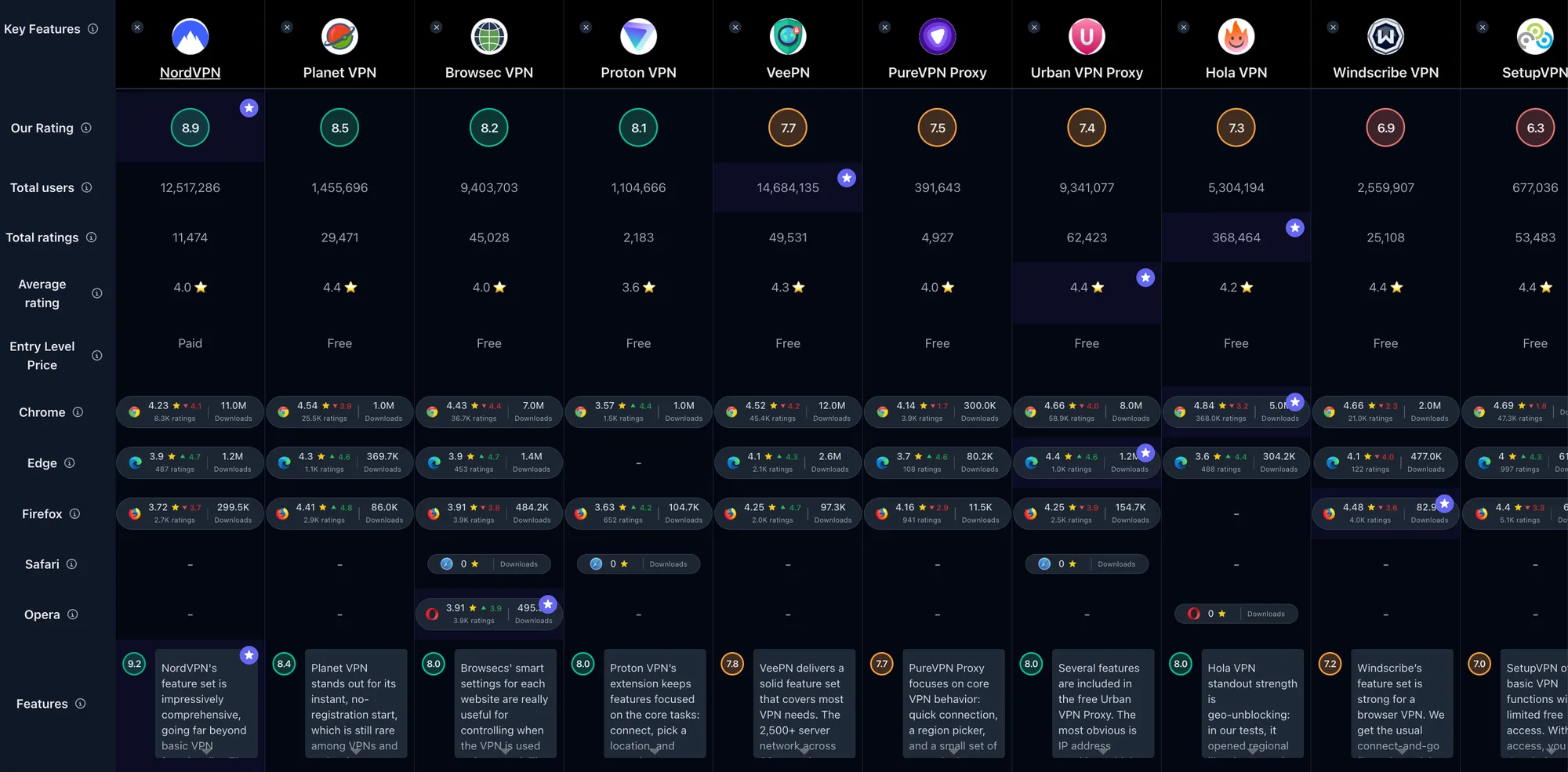
If you just prefer a simple comparison overview, check out the full comparison table of all VPN extensions:
1. PureVPN Proxy
Sponsored: PureVPN paid for this placement. Its Tooltivity score is 6.2/10, which on its own would put it eighth in this list.

PureVPN Proxy offers a lightweight browser extension tied to a broader VPN service. With around 300,000 users and a 4.0/5 rating from 4,000+ ratings on the Chrome Web Store, it has the smallest user base in this list. Recent reviews tell a concerning story, though: according to Tooltivity, the last 100 average about 1.5/5, and the most common complaint is that the extension won't connect without a paid subscription.
The listing shows a compact, familiar extension: a one-click toggle, 52+ locations, and shortcuts to popular streaming sites. You need a PureVPN subscription and login before it connects. The pricing on long-term plans is aggressive: the 2-year Standard plan comes to $2.15/month ($58.20 for the first 27 months), with a 31-day money-back guarantee.
Key Features
- One-click connect – Enable the VPN in seconds from a small panel
- Location switching – Jump between 52+ locations, according to the listing
- Browser traffic encryption – An encrypted proxy protects traffic inside the browser
- Account-based access – Needs a PureVPN subscription and login before it connects
- Multi-browser support – Extensions for Chrome, Firefox, and Edge
- Full-device apps – Windows, macOS, Android, and iOS apps for system-wide coverage
- Streaming shortcuts – A “Popular Websites” list with dedicated servers for Netflix, BBC iPlayer, and others
- Lightweight UI – Simple status and region controls without clutter
Pros & Cons
Pros:
- Easy region switching
- Strong long-term pricing
- Full-device apps available
- Up to 10 devices on one account
Cons:
- Paid subscription required before it connects
- Recent Chrome reviews are mostly one-star
- Repeated sign-in prompts reported by users
- Users report sites detecting and blocking its servers
Who is this great for?
PureVPN Proxy suits people who already pay for PureVPN, or plan to, and want a lightweight browser add-on that ties into the wider service. Whether you need browser-only protection now but might want full-device coverage later, or you're looking for aggressive long-term pricing, PureVPN offers a clear upgrade path.
It's less suited to anyone who wants to try a VPN for free first, because the extension needs a subscription before it connects. The ability to add Windows, macOS, Linux, Android, and iOS apps on the same account is the main draw.
Compared to others
PureVPN's long-term pricing is more competitive than that of NordVPN, but its recent store reviews are far weaker. Against Planet VPN and Browsec VPN, PureVPN requires a paid account, while those two connect without registration. When compared to VeePN, PureVPN's long-term pricing is similar.
Detailed comparisons
PureVPN vs NordVPN • PureVPN vs Planet VPN • PureVPN vs VeePN
Rating Summary
PureVPN Proxy has around 300,000 users on Chrome with a 4.0/5 lifetime rating, though recent reviews are far lower. Tooltivity gave PureVPN a score of 6.2/10. Check out the full review here.
2. NordVPN

NordVPN is one of the best-known names in the VPN industry, and its Chrome extension has the numbers to match. With 15 million users and a 4.2/5 rating from 9,100+ ratings on the Chrome Web Store, it's clearly a go-to choice for security-conscious users. Recent ratings hold up too: per Tooltivity, the last 100 reviews average at or above that lifetime figure.
What sets NordVPN apart is a security suite that goes beyond basic VPN functionality. The listing highlights Scam and Phishing Protection, which blocks intrusive ads and websites hosting malware, and a network of 7,400+ servers. There is no free tier: the extension only works with a NordVPN subscription, and most of the features below belong to that subscription and its apps rather than to the extension itself.
Key Features
- Scam and Phishing Protection – Blocks intrusive ads and websites hosting malware
- Meshnet – Create your own private encrypted network for secure file sharing
- Dark Web Monitor – Get alerts if your personal data turns up in a leak
- Dedicated IP – Maintain online reputation and skip denylists (included only in the top plan)
- Double VPN – Adds another layer of encryption
- SmartPlay – Watch shows and movies without extra setup steps
- Kill Switch – Shields your data if the VPN connection drops
- Split Tunneling – Choose which apps need VPN protection; the extension can exclude URLs from the proxy
- Private DNS – Enhanced privacy without third-party spying
- 7,400+ Servers – Covering 195 locations according to the listing (NordVPN's website says 225+)
Pros & Cons
Pros:
- Broad security feature set, from malware blocking to Double VPN
- Reviewers praise its speed and reliability
- Reviewers find it easy to set up and use
- No-logs claim verified by independent auditors every year, according to NordVPN
Cons:
- Higher pricing compared to some competitors
- No free plan—a subscription is required (30-day money-back guarantee)
- Occasional sign-outs and switching delays reported by users
- Fewer advanced features in the browser extension than in the apps
Who is this great for?
NordVPN is perfect for anyone who prioritizes security and wants a premium VPN experience. Whether you're a professional handling sensitive data, someone who frequently uses public Wi-Fi, or just someone who values privacy, NordVPN delivers a polished experience.
It's especially great for users who want more than just IP masking. The scam and malware protection, dark web monitoring, and dedicated IP option make it appealing for power users who need security coverage beyond basic VPN functionality.
Compared to others
NordVPN's premium positioning and extensive security features set it apart from free alternatives like Planet VPN and Browsec VPN. While those offer usable free tiers, NordVPN provides more server options and a no-logs policy that, according to NordVPN, independent auditors check every year. Against Proton VPN, NordVPN bundles more extras, but Proton has a free plan and NordVPN doesn't.
Detailed comparisons
NordVPN vs Planet VPN • NordVPN vs Browsec VPN • NordVPN vs Proton VPN
Rating Summary
NordVPN has 15 million users on Chrome with an average rating of 4.2/5. Tooltivity gave NordVPN a score of 8.9/10. Check out the full review here.
3. Free VPN Proxy and ad blocker - Planet VPN

Planet VPN is a popular pick among users seeking a truly free VPN option. With 1 million users and a 4.6/5 rating from 30,000+ ratings, it's one of the highest-rated free VPNs on the Chrome Web Store. Recent feedback holds that level too: Tooltivity puts the last 100 reviews at 4.5/5 or higher.
What stands out in the listing is the no-registration start. You can install and connect without creating an account or entering an email address. The free plan has no limits on traffic or time, but it is restricted to 6 server locations in 5 countries.
Key Features
- No Registration Needed – Start immediately without creating an account
- Free Plan – No limits on traffic or time, with 6 server locations in 5 countries
- Kill Switch – Blocks traffic if the VPN drops to avoid data leaks
- No-Logs Claim – States that no activity logs are kept
- Multiple Protocols – OpenVPN, IKEv2, and Planet VPN's own StarGuard
- Smart Filters – Control which websites go through the VPN in the extension
- Premium Network – 1,200+ servers across 60+ countries
- Streaming & P2P (Premium) – Streaming, P2P, and Double VPN servers are part of Premium
Pros & Cons
Pros:
- Truly free plan with no time limits
- No registration required to start
- Streaming and P2P support on Premium
Cons:
- Free version is funded by ads, according to Planet VPN's website (the listing says the extension itself shows none)
- Free plan is limited to 6 server locations
Who is this great for?
Planet VPN is perfect for anyone who wants quick privacy without any signup friction. Whether you're a casual user who needs occasional geo-unblocking, a student on a budget, or just someone who wants to try a VPN before committing, Planet VPN's free tier delivers real value.
It's especially great for users who prioritize ease of use over advanced features. The one-click activation and no-account start make it appealing for everyday browsing, while the premium upgrade path offers more locations and streaming servers when needed.
Compared to others
Planet VPN's completely free model with no registration gives it a clear advantage over NordVPN for budget-conscious users, though NordVPN offers a broader security suite. Against Browsec VPN, Planet VPN provides a similar free, no-account start, with 6 free server locations to Browsec's 4. When compared to Hola VPN, Planet VPN states a no-logs policy, while Hola's privacy policy lists IP addresses and visited pages among the data it may log.
Detailed comparisons
Planet VPN vs NordVPN • Planet VPN vs Browsec VPN • Planet VPN vs Hola VPN
Rating Summary
Planet VPN has 1 million users on Chrome with a 4.6/5 rating, and its most recent reviews hold that level. Tooltivity gave Planet VPN a score of 8.5/10. Check out the full review here.
4. Browsec VPN

Browsec VPN is one of the most popular browser VPNs with a massive user base. With 8 million users and a 4.5/5 rating from 40,000+ ratings, it has a large and largely satisfied audience. What's notable is the consistency: the last 100 reviews average 4.55/5, per Tooltivity, right in line with the lifetime figure.
Reviewers describe Browsec as genuinely straightforward: one click to connect, a small list of free locations, and encrypted traffic that handles basic tasks. The free plan needs no account, has unlimited traffic, and offers 4 server locations. It's not trying to be everything—it's a simple browser VPN that does the job.
Key Features
- Free, no-registration start – Connect in one click without creating an account
- Multiple locations (free and premium) – 4 free server locations; Premium unlocks 46+ countries
- Traffic encryption – Secures browser traffic, helpful on public Wi-Fi
- Smart Settings (per-site rules) – Auto-use or bypass VPN per site; unlimited rules on Premium
- Timezone spoofing (premium) – Match timezone to chosen location
- Faster premium servers – Premium runs on faster, dedicated servers
- Multi-device – Up to 5 devices on one account; each browser counts as one
- Simple UI – Clear toggle, quick country switch
Pros & Cons
Pros:
- Works without registration; one-click setup
- Very simple UI and onboarding
- Free plan has unlimited traffic
- Handy per-site Smart Settings
Cons:
- Free speeds can be slow or inconsistent, users report
- Occasional upsell prompts and pop-ups reported by users
- Mixed reliability in heavily restricted regions, according to reviews
Who is this great for?
Browsec VPN is perfect for anyone who wants a quick way to unblock sites or add a basic privacy layer without complexity. Whether you're a first-time VPN user, someone who occasionally needs to access geo-blocked content, or just someone who values simplicity, Browsec delivers.
It's especially great for users who appreciate the per-site Smart Settings feature. Being able to automatically route certain sites through the VPN while bypassing others is genuinely useful for streamlined workflows.
Compared to others
Browsec's simplicity and no-registration model puts it on par with Planet VPN, though Planet VPN's free plan has two more server locations. Against NordVPN, Browsec is lighter and free but lacks advanced security features. When compared to Urban VPN Proxy, Browsec offers far fewer free locations, but Urban VPN's listing discloses that its protection features process visited URLs and other browsing data.
Detailed comparisons
Browsec VPN vs NordVPN • Browsec VPN vs Planet VPN • Browsec VPN vs Proton VPN
Rating Summary
Browsec VPN has 8 million users on Chrome with a consistent 4.5/5 rating. Tooltivity gave Browsec VPN a score of 8.2/10. Check out the full review here.
5. Proton VPN: Fast & Secure

Proton VPN brings the Proton brand to browser VPNs. With around 2 million users and a 4.3/5 rating from 4,500+ ratings, the overall score may seem modest—but the trend tells a better story. The last 100 reviews average about 4.7/5, according to Tooltivity, well above the lifetime figure.
The extension is open to everyone with a Proton account, including the Free plan. Free users are connected to a server in one of 10 randomly selected countries; choosing a location takes a paid plan. The Proton brand carries weight in the privacy community, and that security-first positioning shows in the extension.
Key Features
- One-click connect – Fast toggle for basic browser protection
- Server list access – Paid plans choose from 20,000+ servers in 140+ countries; the Free plan picks a country for you
- Browser-only tunnel – Protects the browser without changing device-wide traffic
- Split tunneling (paid) – Exclude websites from the VPN tunnel
- Account-based access – Sign in with a Proton account, free or paid
- Cross-platform ecosystem – Full apps for Windows, Mac, iOS, Android, and Linux for device-wide coverage
- Lightweight UI – Minimal controls with quick status feedback
Pros & Cons
Pros:
- Free plan with no data limit
- Simple one-click controls
- Strict no-logs policy
- Apps on every major platform
Cons:
- Random free server choice
- Occasional disconnects reported by users
- Connection profiles are a paid feature
- Some sites fail to load, according to reviews
Who is this great for?
Proton VPN is perfect for users who value privacy from a trusted brand. Whether you're already in the Proton ecosystem (Proton Mail, Proton Drive) or simply want a VPN from a company with a strong privacy track record, Proton VPN fits naturally.
It's especially great for users who want browser-only protection without affecting the rest of their device. The lightweight approach makes it ideal for quick privacy needs while keeping your other traffic normal.
Compared to others
Proton VPN's privacy positioning gives it an edge over Browsec VPN and Planet VPN for privacy-focused users, though those two connect without an account. Against NordVPN, Proton VPN is lighter and has a free plan, but lacks the extensive feature set. When compared to VeePN, Proton's selling point is its privacy record: Swiss-based, with a strict no-logs policy.
Detailed comparisons
Proton VPN vs NordVPN • Proton VPN vs Planet VPN • Proton VPN vs Browsec VPN
Rating Summary
Proton VPN has around 2 million users on Chrome, with recent reviews trending strongly positive at about 4.7/5 (last 100, per Tooltivity). Tooltivity gave Proton VPN a score of 8.0/10. Check out the full review here.
6. VPN Proxy VeePN

VPN Proxy VeePN is one of the most-installed VPN extensions on Chrome. With 15 million users and a 4.5/5 rating from 53,000+ ratings, it's clearly resonating with users. In recent reviews, the most common complaint Tooltivity found is that the free version steers new installs toward a paid trial.
VeePN advertises a network of 2,600+ servers, and its long-term plans are priced competitively. The Pro plan covers 10 devices at once, which is generous.
Key Features
- Massive Server Network – 2,600+ servers for global access
- Multi-Device Support – Up to 10 devices at once on the Pro plan (5 on Basic, 20 on Max)
- Streaming – Marketed for streaming services such as Netflix
- Strong Security – AES-256 encryption with OpenVPN, IKEv2, and WireGuard protocols
- Kill Switch – Cuts internet access if the VPN drops to prevent data leaks
- No-Logs Policy – Claims a strict no-logs policy; the provider is based in Panama
- Ad and Tracker Blocking – The extension blocks ads, trackers, and malware, according to the listing
- Browser Extensions – Available for Chrome, Firefox, and Edge
Pros & Cons
Pros:
- Strong security features with AES-256 encryption and multiple protocols
- Up to 10 devices on one Pro subscription
- Competitive pricing on longer-term plans
Cons:
- Inconsistent speeds across different servers, users report
- Occasional connection drops reported by users
- Reviewers say the free version pushes a paid trial
Who is this great for?
VeePN is perfect for users who need a balance between features and affordability. Whether you're a streaming enthusiast wanting to access geo-restricted content, a family needing multi-device coverage, or someone who values strong encryption, VeePN delivers solid value.
It's especially great for users who want premium features without the premium price tag. The long-term plans are competitively priced, and the 10-device support makes it ideal for households.
Compared to others
VeePN's larger server network sets it apart from simpler options like Browsec VPN and Planet VPN. Against NordVPN, VeePN offers lower long-term pricing but has a lower Tooltivity score. When compared to Proton VPN, VeePN covers more devices on its top plan (20 to Proton's 10).
Detailed comparisons
VeePN vs NordVPN • VeePN vs Planet VPN • VeePN vs Browsec VPN
Rating Summary
VeePN has 15 million users on Chrome—level with NordVPN for the most in this comparison—with a 4.5/5 rating. Tooltivity gave VeePN a score of 7.6/10. Check out the full review here.
7. Urban VPN Proxy

Urban VPN Proxy is one of the most popular free VPN options available. With 7 million users and a 4.7/5 rating from 68,000+ ratings, it clearly works for a lot of people. Recent reviews stay close to that, with the last 100 averaging about 4.6/5, per Tooltivity.
The appeal is obvious: free access to 632 servers in 82 countries, according to the listing, without a subscription fee. Reviewers mostly say it works well for everyday browsing, and the optional ad blocker adds extra value.
Key Features
- IP Address Masking – Allows users to change their IP location to any of the 82 available countries
- Ad-Blocking – Optional protection against phishing attempts, malware, and intrusive ads
- Encryption – Uses the latest OpenVPN standards, according to the listing
- No Additional Software Required – Easy installation as a browser extension
- Free Service – Offers a network of 632 VPN servers without a subscription fee
Pros & Cons
Pros:
- Free access to a large network of servers
- Easy to install and use
- Optional ad and malware blocking
- High user ratings and large user base
Cons:
- Its protection features process visited URLs, clickstream data, and IP address, as the listing discloses
- Performance can vary depending on server load, users report
Who is this great for?
Urban VPN Proxy is perfect for casual users who want free VPN access without the hassle of subscriptions. Whether you're a student, someone who occasionally needs to access blocked content, or just someone who wants basic privacy on public Wi-Fi, Urban VPN delivers.
It's especially great for users who prioritize value and don't need strict privacy guarantees. The completely free model with a large server network makes it appealing for everyday browsing and light streaming.
Compared to others
Urban VPN's completely free model with a large server network gives it an edge over Browsec VPN for users who need more location options. Against NordVPN, Urban VPN is free but has notable privacy concerns due to data collection. When compared to Planet VPN, Urban VPN offers far more free locations, while Planet VPN states a no-logs policy.
Detailed comparisons
Urban VPN vs NordVPN • Urban VPN vs Planet VPN • Urban VPN vs Browsec VPN
Rating Summary
Urban VPN Proxy has 7 million users on Chrome with a 4.7/5 rating. Tooltivity gave Urban VPN Proxy a score of 7.4/10. Check out the full review here.
8. Hola VPN

Hola VPN is one of the most well-known VPN brands with a massive user base. With 4 million users and a 4.8/5 lifetime rating from 368,000+ ratings—the highest rating count in this comparison—it's clearly popular. Recent reviews are lower, though: the last 100 average about 4/5, per Tooltivity.
What makes Hola unique is the per-tab country selection. You can set different countries for different tabs or sites, which is useful for multi-region workflows. The free version allows limited daily use, while Premium removes the time limits.
Key Features
- Country switching per tab – Pick a different location for each tab or site
- One-click unblocking – Connect and switch countries in seconds
- Free and Premium tiers – Free use with time limits; Premium removes limits
- Multi-device (Premium) – Use on up to 10 devices with one subscription
- Split/multi-tunneling approach – Routes traffic efficiently to improve speed
- Streaming access – Listed for popular streaming services and social media sites
Pros & Cons
Pros:
- Very easy, one-click unblocking
- Reviewers like it for streaming and geo-restricted sites
- Flexible per-tab country selection
Cons:
- Its privacy policy lists IP address and visited pages among the data it may log
- Variable speeds and occasional disconnects or "not available" errors, users report
Who is this great for?
Hola VPN is perfect for users who mainly need quick, hassle-free access to geo-blocked sites. Whether you're accessing streaming content from different regions, browsing international shopping sites, or just occasionally need to change your apparent location, Hola makes it easy.
It's especially great for users who need the per-tab country selection feature. Being able to browse from the US in one tab while using a UK location in another is useful for power users.
Compared to others
Hola VPN's per-tab feature gives it a unique advantage over Browsec VPN and Planet VPN. However, against NordVPN and Proton VPN, Hola raises more privacy questions: its privacy policy lists IP addresses and visited pages as log data. When compared to Urban VPN Proxy, both have similar privacy trade-offs.
Detailed comparisons
Hola VPN vs NordVPN • Hola VPN vs Planet VPN • Hola VPN vs Browsec VPN
Rating Summary
Hola VPN has 4 million users on Chrome with the highest rating count (368,000+) and a 4.8/5 lifetime rating, though recent reviews run lower. Tooltivity gave Hola VPN a score of 7.0/10. Check out the full review here.
9. Windscribe - Free Proxy and Ad Blocker

Windscribe combines VPN functionality with built-in ad and tracker blocking. With around 2 million users and a 4.6/5 lifetime rating from 21,000+ ratings, it has a respectable presence. However, recent reviews are concerning: the last 100 average about 1.4/5, per Tooltivity, with most complaints about getting stuck at sign-up.
Windscribe's main draw is its privacy controls. The listing puts built-in ad blocking and tracker protection front and center, and it lists more privacy settings than many free alternatives. The free plan is generous at 10 GB of data per month, but only once you confirm an email address.
Key Features
- Browser-only VPN – Protects just the browser without changing device-wide traffic
- Server locations – Pro plans reach servers in 69+ countries
- Ad and tracker blocking – Built-in tools to block ads, trackers, and malware
- Privacy controls – Timezone and location spoofing, cookie-banner blocking, and anti-fingerprinting
- Account-based access – Sign in to sync your plan and data allowance
- Cross-platform ecosystem – Full apps for Windows, Mac, Linux, iOS, and Android for device-wide coverage
- Support tooling – Garry, a support bot that answers questions around the clock
Pros & Cons
Pros:
- Strong privacy and ad blocking
- Servers in 69+ countries on Pro
- Browser-only VPN flexibility
- 10 GB of free data per month
- Support bot available around the clock
Cons:
- Sign-up required before it connects, users report
- Captcha and login loops reported by users
- Connection drops reported by users
- Free data cap limits
- Recent Chrome reviews are mostly one-star
Who is this great for?
Windscribe is perfect for privacy-focused users who want more than just IP masking. Whether you value the built-in ad blocking, appreciate advanced privacy controls, or want a VPN that integrates with full desktop and mobile apps, Windscribe delivers a richer feature set than most free alternatives.
It's especially great for users who want a browser VPN as part of a larger ecosystem. The desktop and mobile apps mean the extension can be a lightweight companion rather than your only VPN.
Compared to others
Windscribe's privacy controls and ad blocking give it an edge on features over simpler options like Browsec VPN and Planet VPN, though both of those connect without an account. Against NordVPN, Windscribe offers a generous free tier but has far weaker recent reviews. When compared to VeePN, Windscribe's listing leads with privacy tools, while VeePN's leads with its server network.
Detailed comparisons
Windscribe vs NordVPN • Windscribe vs Planet VPN • Windscribe vs Browsec VPN
Rating Summary
Windscribe has around 2 million users on Chrome with a 4.6/5 lifetime rating, though recent reviews have dropped sharply. Tooltivity gave Windscribe a score of 5.9/10. Check out the full review here.
10. SetupVPN

SetupVPN markets itself as a "Lifetime Free VPN," but recent user reviews point to significant limitations. Despite 1 million users and a 4.7/5 lifetime rating from 47,000+ ratings, the recent feedback is alarming: the last 100 reviews average about 2/5, per Tooltivity, and the last 500 sit lower still.
You need to register an account before it works, and SetupVPN's FAQ says free accounts come with a daily quota. According to Tooltivity's reading of recent reviews, most locations now sit behind the premium plan.
Key Features
- Free Version – Free account with a daily quota
- Ease of Use – Simple interface suitable for beginners
- Basic Privacy – Encrypts browser traffic and changes your IP address
Pros & Cons
Pros:
- Easy to use
- Free version available
- Basic privacy protection
Cons:
- Free accounts have a daily quota
- Account required
- Recent reviews are mostly negative
Who is this great for?
SetupVPN is only suitable for users who need occasional, very basic VPN functionality and don't mind significant limitations. It may work for someone who rarely needs to change their apparent location and doesn't require reliable connections.
It's not recommended for users who need consistent VPN access or streaming. Based on its recent user reviews, there are much better alternatives available.
Compared to others
SetupVPN has the lowest Tooltivity score in this comparison. Against Planet VPN and Browsec VPN, SetupVPN requires an account and caps free use with a daily quota, while those two connect without registration. When compared to Urban VPN Proxy, Urban VPN lists more servers and has far better recent reviews.
Detailed comparisons
SetupVPN vs NordVPN • SetupVPN vs Planet VPN • SetupVPN vs Urban VPN
Rating Summary
SetupVPN has a 4.7/5 lifetime rating from 47,000+ ratings, but recent feedback is overwhelmingly negative, with the last 100 reviews averaging about 2/5. Tooltivity gave SetupVPN a score of 5.0/10. Check out the full review here.
Final Thoughts
Looking at all 10 VPN Chrome extensions side by side, each has carved out its own niche in the market. Going by the Tooltivity scores, NordVPN leads with the highest overall score (8.9/10), offering the broadest security feature set—though at a premium price and without a free plan. Planet VPN is the highest-scoring free option, with no registration required, while Browsec VPN provides a reliable middle ground with its easy-to-use interface and stable recent ratings.
For specific use cases: Proton VPN is perfect for privacy-focused users who trust the Proton brand, VeePN covers up to 10 devices on its Pro plan at a competitive long-term price, and Hola VPN stands out with its unique per-tab country selection—just be aware of the privacy trade-offs. Urban VPN Proxy offers a large free network (632 servers in 82 countries), while Windscribe combines VPN with ad blocking for a more complete privacy package—if you get past the sign-up that recent reviewers struggle with.
One thing to keep in mind: these are browser extensions, so they won't run in Chrome on your phone. On Android, Edge and Firefox can install extensions instead; here is which Android browsers can run Chrome extensions. Otherwise, most of the VPNs above also have their own mobile apps.
The key is finding what fits your specific needs. Start with free options like Planet VPN or Browsec to see whether they cover your use case, and only upgrade to premium when you hit their limits. Among the paid options, NordVPN has the highest score. Avoid SetupVPN unless you have very minimal needs: it has the lowest score in this list, and its recent reviews are poor.