
The best free website blocker extension for Chrome is LeechBlock NG if you want whole sites gone. It’s open source, needs no account, blocks on a schedule or after a time allowance, and scores 8.58/10 on Tooltivity. DigitalZen scores higher (8.67): its extension is free too, and its paid desktop app makes the block reach beyond Chrome. Cold Turkey Blocker (8.33) is the one you can’t switch off in the middle of a block, and one sec (8.87) puts a pause in front of a site instead of a wall. BlockSite, the most installed with 1,000,000 users, slipped to eleventh after Tooltivity’s security check. The top score in the category, Focused YouTube (9.17), doesn’t block anything: it strips YouTube down to a search bar.
You open a new tab to look something up, and your fingers type the first letters of a site you didn’t mean to visit. A website blocker puts something between that reflex and the page: a block screen, a countdown, or just a moment to ask whether you meant it.
The extensions in this category work in three different ways. Some block a site outright, on a schedule or after a daily allowance. Some pair with a desktop app, so the block holds even if you remove the extension. And some don’t block the site at all: they remove the feed, the recommendations or the Shorts and leave the rest of the page working.
This comparison ranks ten of the website blocker extensions with the highest Tooltivity scores on the Chrome Web Store. Read side by side, their listings and recent reviews show that the feature lists matter less than three other things: how easy each blocker is to switch off, what the free version still blocks, and what it does with your browsing. One of the ten has also lost a lot of ground with its recent reviewers this year.
Key takeaways
- LeechBlock NG (8.58/10) is the best free blocker for whole sites: up to 30 sets of sites, each with its own schedule or time limit, and no paid tier at all.
- DigitalZen (8.67) is the highest-scoring full blocker. The extension is free; its paid desktop apps for Windows, macOS and Linux block apps and other browsers too.
- Cold Turkey Blocker (8.33) is the strictest. Its listing warns that the browser may be blocked if you disable or remove the extension during a locked block. It needs its desktop app.
- one sec (8.87) doesn’t block at all. It makes you take a breath before a distracting site opens.
- Only YouTube or a feed is the problem? Focused YouTube (9.17), News Feed Eradicator (8.67), UnDistracted (8.58) and FocusTube (8.42) remove feeds, recommendations and Shorts and keep the sites usable.
- Read the recent reviews – Web Activity Time Tracker’s last 100 reviews average 3.29, down from 4.71 in early May, after an update put ads into web pages, according to Tooltivity’s review.
- Security – Tooltivity’s November 2026 security check rates Focused YouTube, one sec and News Feed Eradicator Low risk and the other seven Caution. StayFocusd is High risk and not on the list; BlockSite (Caution) fell to eleventh.
How this list was made: the scores come from Tooltivity, a review site run by my company — the same one that makes Web Highlights. It rates each extension from its Chrome Web Store listing, its ratings and what recent reviews report, and this list is ordered by that score. I haven’t tested these ten hands-on, so the descriptions below summarize each listing, Tooltivity’s review and what users report. User counts and star ratings were read from the Chrome Web Store on October 27, 2026, DigitalZen’s and Present’s on November 9. The averages for the last 100 and last 500 reviews, and the trends since last winter, come from Tooltivity’s crawls of the store. Scores are as of November 10, 2026, after a corrected review of DigitalZen and Tooltivity’s security check, which lowered the security marks of DigitalZen, LeechBlock NG, UnDistracted, Cold Turkey Blocker, FocusTube, Present and BlockSite. Web Highlights isn’t in the list because it doesn’t block websites. BlockSite was tenth until November 2026; it now ranks eleventh, Present took its place, and the reason is below the list.
How do I block a website on Chrome?
Install a website blocker extension: Chrome has no setting that blocks a site in your own profile. Its site settings decide what a site may use, such as your camera, location, pop-ups or JavaScript, as Google’s help page lists them. The two built-in ways to block a site are both meant for someone else to manage. Family Link lets parents allow or block specific sites for a child’s Google Account, although on Windows, Mac and Linux a child can sign out or switch profiles to leave those settings behind. And Chrome Enterprise lets admins block URLs on managed work and school browsers.
For your own browser, it takes four steps:
- Install a blocker from the Chrome Web Store. LeechBlock NG is free and handles schedules and time limits, and Cold Turkey Blocker is the one to pick if you always end up switching blockers off.
- Add the site to its block list. A domain such as youtube.com is enough; LeechBlock NG also takes wildcards like *.somesite.com.
- Decide when the block applies: all the time, during set hours, or once you’ve used up a daily allowance.
- Open Manage extensions, select Details on the blocker and turn on Allow in Incognito, as Google’s extension help describes, so a private window doesn’t skip the block.
These are desktop extensions. On a phone, one sec also makes an app, according to its listing. And if the trouble is one site’s feed rather than the whole site, read the section after the list first.
List of the Best Website Blocker Extensions for Chrome:
- Focused Youtube
- one sec
- Web Activity Time Tracker
- News Feed Eradicator
- DigitalZen - Block Websites & Stay Focused
- LeechBlock NG
- UnDistracted - Hide Facebook, YouTube Feeds
- FocusTube: Block YouTube Shorts, Hide Recommendations & Distractions
- Present
- Cold Turkey Blocker
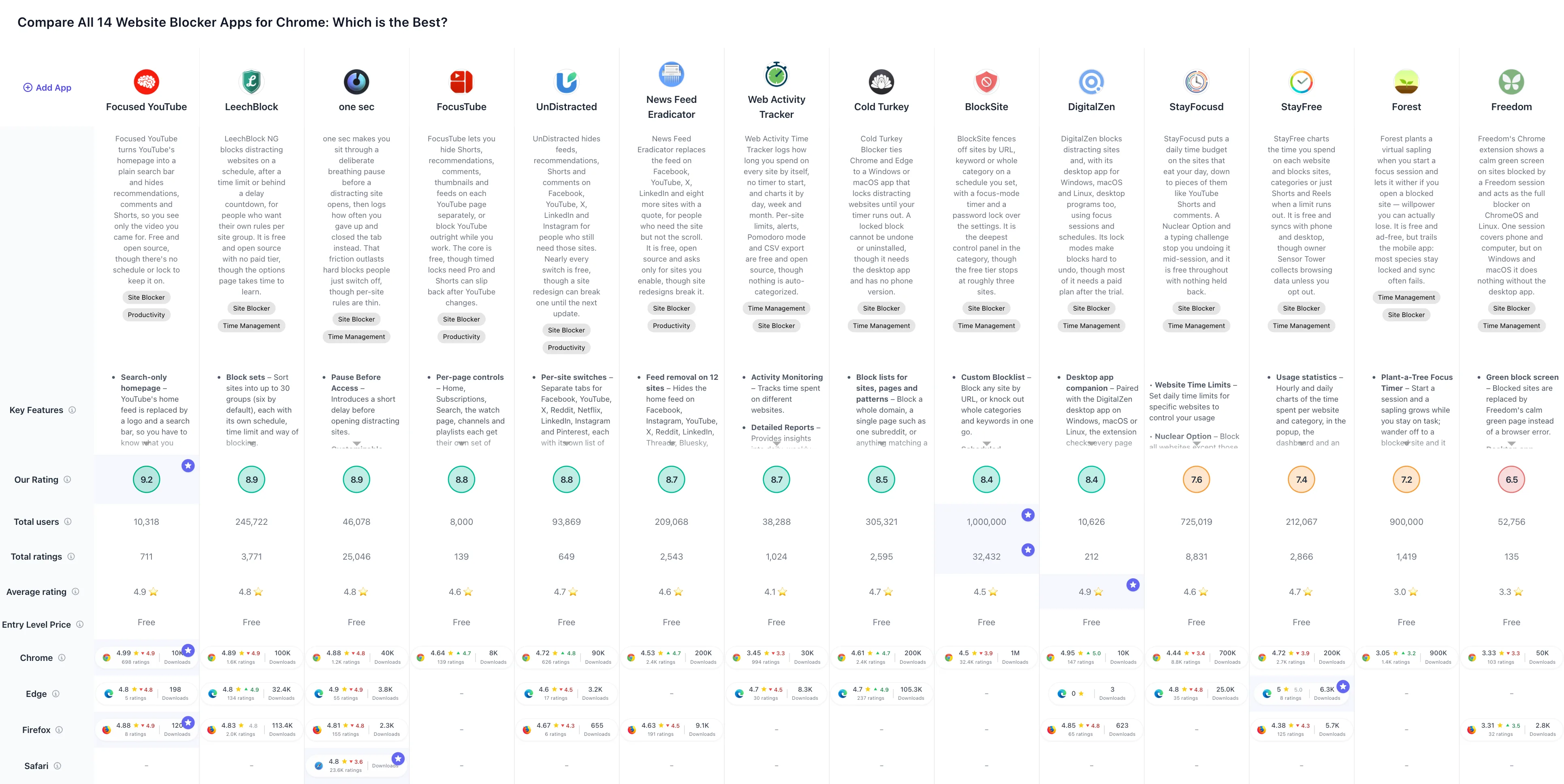
If you prefer a comparison overview, check out the full comparison table of all Chrome website blocker extensions:
Can you block YouTube distractions without blocking YouTube?
Yes. Four of the ten are built to hide the parts that keep you scrolling rather than block whole sites. Focused YouTube turns YouTube’s homepage into a search bar, News Feed Eradicator swaps the feed on twelve sites for a quote, UnDistracted covers eight sites including YouTube and can block them too, and FocusTube gives every YouTube page its own switches and adds a hard block for work sessions.
They’re on this list because Tooltivity files them under website blockers, and because for many people a missing feed is easier to live with than a missing site. If you want the site gone, skip to LeechBlock NG or Cold Turkey Blocker.
1. Focused Youtube

Focused YouTube has 10,000 users and a 5.0-star rating on the Chrome Web Store from 704 ratings, and its recent reviews are almost as high, as evidenced by its 4.92 rating for the last 100 reviews. It also has Firefox and Edge versions.
It’s the top score in this category, and it doesn’t block anything. Open YouTube and the homepage is a logo and a search bar. The column of suggestions next to the video is gone, comments and the description stay hidden until you ask for them, and Shorts stop showing up in the results. Search, your subscriptions and the video itself still work.
That narrow job is why it scores so high. Tooltivity’s review read the package: it asks only for storage and access to YouTube, contains no tracker and makes no network requests, and the code is public on GitHub. What it doesn’t have is any way to hold you to it. There’s no schedule and no lock, and one switch in the popup turns it off.
Security: Tooltivity’s security check rates Focused YouTube Low risk. The code of version 3.10, read on November 10, 2026, runs only on YouTube, makes no network calls and loads nothing from a server.
Key Features
- Search-only homepage – YouTube’s home feed becomes a logo and a search bar, so you have to know what you came for
- No recommendations while watching – the column of suggested videos next to the player disappears
- Comments on demand – comments and the description are hidden by default, each with its own switch
- Shorts out of sight – Shorts no longer appear between the search results
- Logo menu – hovering the YouTube logo opens your subscriptions, history, playlists and liked videos
- Open source – the code is public on GitHub, and the extension asks only for storage and YouTube access
Pros & Cons
Pros:
- Completely free and open source
- Homepage becomes a search bar
- No setup needed
- Only touches YouTube
- No tracking, no network calls
Cons:
- No schedule or password lock
- Sidebar can stay hidden when switched off
- Hides live chat on streams
- Firefox and Edge versions lag
Who is this great for?
Focused YouTube is perfect for anyone who uses YouTube for tutorials, lectures or music and keeps losing the evening to whatever it suggests next.
It’s especially great for users who don’t want to set anything up. Install it, and YouTube is quieter the next time you open it. If YouTube has to disappear during work hours, pair it with a real blocker or use FocusTube’s hard block.
Compared to others
FocusTube does the same job with far more switches and adds a hard block, at the price of a busier popup and a paid plan for timed locks. UnDistracted covers YouTube and seven other sites. News Feed Eradicator treats YouTube as one of twelve feeds and puts a quote in its place.
Detailed comparisons
Focused YouTube vs FocusTube • Focused YouTube vs UnDistracted • Focused YouTube vs News Feed Eradicator
Rating Summary
A 5.0 from 704 ratings is easier to hold with 10,000 users than with a million, but 4.92 across the last 100 reviews says it isn’t slipping. Tooltivity gave Focused Youtube a score of 9.17/10. Check out the full review here.
2. one sec

one sec has 40,000 users and a 4.9-star rating on the Chrome Web Store from 1,188 ratings, and recent reviews remain high, as evidenced by its 4.78 rating for the last 100 reviews. That average has eased a little this year: Tooltivity’s crawl showed 4.97 in January. It also has Edge and Firefox versions.
one sec doesn’t block anything in the usual sense either. When you open a site you’ve picked, it shows a short countdown and asks you to take a deep breath first. Its listing argues that a pause works on the habit itself, where most blockers only hold you back for a while. The delay is adjustable, down to one second if you only want the reminder, and a small dashboard shows how often you reached for each site.
The listing also says all usage data stays offline on your device. The extension is free and simple, and Tooltivity’s review counts the small feature set as its main weakness. The same developer makes one sec apps for iPhone, iPad and Android, which block apps as well as websites, according to the listing.
Security: Tooltivity’s security check rates one sec Low risk. The code of version 1.4.2 checks page addresses against your list on your computer, and only your account talks to one sec’s server.
Key Features
- Pause before access – a countdown and a breathing prompt before a distracting site opens
- Adjustable delay – from a single second to several, for each site you choose
- Your own site list – pick exactly which sites get the pause
- Attempts dashboard – shows how often you tried to open each site during the day
- On-device data – its listing says usage data is stored offline, on your device
Pros & Cons
Pros:
- Simple and effective concept
- Customizable delay and site list
- Insightful analytics
- Usage data stays on your device
Cons:
- Only delays, never blocks
- Few functions next to full blockers
- May not suit all browsing habits
Who is this great for?
one sec is perfect for anyone who opens social media out of reflex and would rather notice it than be locked out.
It’s especially great for users who tried strict blockers and switched them off within a week. A pause is easier to keep than a wall.
Compared to others
LeechBlock NG has a similar delaying page as one option among many; one sec makes the pause the whole product. Web Activity Time Tracker blocks a site outright once you reach a limit.
Detailed comparisons
LeechBlock NG vs one sec • one sec vs Web Activity Time Tracker
Rating Summary
40,000 users and a 4.9 from 1,188 ratings. The last-100 average has drifted from 4.97 to 4.78 since January and is still among the highest in this list. Tooltivity gave one sec a score of 8.87/10. Check out the full review here.
3. Web Activity Time Tracker

Web Activity Time Tracker has 30,000 users and a 3.4-star rating on the Chrome Web Store from 994 ratings, and its last 100 reviews average 3.29. In early May that average stood at 4.71, according to Tooltivity’s crawl. It fell within weeks of a May update and hasn’t recovered. It also has an Edge version.
On paper it’s a time tracker first. It logs how long you spend on every site by itself, with no timer to start, and charts the result by day, week and month. You can set a daily limit for a site and have it blocked once the limit is used up, run a Pomodoro timer and export your data to CSV, all for free.
The reviews tell a different story. According to Tooltivity’s review, an update in May 2026 asked for access to every website and then injected ad banners, many of them for gambling sites, into ordinary pages. It took about two months of one-star reviews before a new version removed them. The current version looks tamer: it no longer runs scripts on the sites you visit and keeps your tracking data in local storage. But the package still contains addresses on the same ad-tracking domain, and the short privacy policy doesn’t explain why. Tooltivity’s score is high because tracking and limits work well, while its mark for security and privacy is 6.5, the lowest single mark in this comparison. Read that mark before you install it.
Security: Tooltivity’s security check rates Web Activity Time Tracker Caution. The code of version 2.5.0 keeps your time statistics on your device and adds nothing to the sites you visit, but its dashboard fetches a sponsored banner from its publisher’s ad server with a random install ID until you switch the banner off in Settings.
Key Features
- Automatic tracking – time on every site is logged without a timer to start
- Reports – daily, weekly and monthly charts of where your time went
- Limits and blocking – set a daily limit for a site, and it is blocked once you reach it
- Custom alerts – a warning when you spend too long on a site
- Pomodoro mode – alternate work and rest periods
- CSV export – take your data into a spreadsheet
Pros & Cons
Pros:
- Easy to set up
- Detailed activity reports
- Many customization options
- Free
Cons:
- Injected ads into websites this spring
- Short privacy policy
- No automatic categorization of websites
- Recent reviews far below its history
Who is this great for?
Web Activity Time Tracker is perfect for anyone who first wants to know where the hours go, and only then decide what to block.
It’s especially great for users who like charts and CSV exports. After this spring, check its permissions with every update.
Compared to others
LeechBlock NG blocks more flexibly but tracks less. For the same kind of tracking without this history, Tooltivity’s review points to TimeOWare, which isn’t in this list. Tooltivity’s security check rates TimeOWare Low risk: version 0.0.12 keeps your time per site in the browser and sends nothing anywhere.
Detailed comparisons
LeechBlock NG vs Web Activity Time Tracker • one sec vs Web Activity Time Tracker
Rating Summary
A 3.4 from 994 ratings and 3.29 across the last 100 reviews, down from 4.71 in May: the steepest fall in this comparison. Tooltivity gave Web Activity Time Tracker a score of 8.70/10. Check out the full review here.
4. News Feed Eradicator

News Feed Eradicator has 200,000 users and a 4.5-star rating on the Chrome Web Store from 2,352 ratings, and its recent reviews are higher, as evidenced by its 4.71 rating for the last 100 reviews. It also has a Firefox version.
News Feed Eradicator does what the name says: it deletes the feed and puts a quote where the scrolling used to be. Jordan West built the first version in 2012 to keep himself off the Facebook news feed, according to Tooltivity’s review, and it now covers twelve sites, from Facebook, Instagram, YouTube, X, Reddit and LinkedIn to Threads, Bluesky, Substack, GitHub and Hacker News. Messages, groups, search and profiles keep working.
It never blocks a site. What it adds instead is friction around the feed: a snooze that brings feeds back for anything from a minute to 24 hours, an optional hold-to-snooze button that makes you hold for five seconds to get thirty seconds of feed, and a lock on its own settings. It’s free and open source, and Tooltivity’s review calls its permission set the smallest in the category: it asks for each site only when you switch that site on. The weak spot is the one every feed remover shares. A redesign can bring the feed back until the next update.
Security: Tooltivity’s security check rates News Feed Eradicator Low risk. The code of version 3.0.5 hides feeds with style rules on the sites you switch on, sends nothing out and runs nothing it downloads.
Key Features
- Feed removal on 12 sites – the home feed disappears while messages, search, groups and profiles work
- Region toggles per site – hide parts such as YouTube’s suggestions sidebar or Instagram Stories
- Quote in place of the feed – one of 83 built-in quotes, or your own lists
- Snooze – bring the feeds back for one minute up to 24 hours
- Hold to snooze – hold the button for five seconds to earn thirty seconds of feed
- Per-site permission – asks for access to a site only when you switch it on
Pros & Cons
Pros:
- Free and open source
- Sites stay usable without feeds
- Access only to chosen sites
- Hold-to-snooze adds real friction
- Region toggles for each site
Cons:
- Breaks when sites change layout
- No custom sites, no TikTok
- Snooze reopens every site
- Mobile site versions not covered
Who is this great for?
News Feed Eradicator is perfect for anyone who needs social sites for messages, groups or work and wants the feed out of the way.
It’s especially great for users who want a free tool that asks for as little access as possible.
Compared to others
UnDistracted covers fewer sites but can block them outright. Focused YouTube does a deeper clean-up of YouTube alone. LeechBlock NG is the free choice if you want the site gone.
Detailed comparisons
News Feed Eradicator vs UnDistracted • Focused YouTube vs News Feed Eradicator • LeechBlock NG vs News Feed Eradicator
Rating Summary
200,000 users and 2,352 ratings make it one of the most used tools here, and it has done the same job since 2012. Tooltivity gave News Feed Eradicator a score of 8.67/10. Check out the full review here.
5. DigitalZen - Block Websites & Stay Focused

DigitalZen has 3,000 users and a 4.9-star rating on the Chrome Web Store from 158 ratings (read on November 9, 2026), and recent reviews hold that level, as evidenced by its 4.95 rating for the last 100 reviews. It also has a Firefox version.
DigitalZen is a cross-platform blocker, and this extension is its browser half. On its own, the extension blocks sites, sets schedules and daily limits and runs focus sessions that allow only the sites you picked. With the DigitalZen desktop app on Windows, macOS or Linux, it checks every page against the app over a local connection, and the app can also block desktop programs and browsers that don’t have the extension.
Its lock modes add friction before you can end a block: an unlock delay, a long code to type out, or a code sent to someone else’s email. According to Tooltivity’s review, the extension stays free after a 14-day Premium trial and needs a free account; Premium adds the desktop apps, uninstall protection and filters for adult content and doomscrolling. The review also notes that a good share of the Chrome reviews arrived around launch and gives more weight to the more specific ones written since.
Security: Tooltivity’s security check rates DigitalZen Caution. Its blocking engine is a page on my.digitalzen.app that can change without a store update, and the code of version 2.1.125, read on November 10, 2026, lets that web app call the extension’s browser functions by name. The current web app doesn’t use those calls: it checks your pages against your rules inside the browser, and no visited addresses go out. A weakness a website could use is being reported to the maker.
Key Features
- Desktop app companion – with the paid app on Windows, macOS or Linux, every page is checked against your rules
- Website blocking – block sites by address or keyword, keep an allowlist, or give a site a daily limit
- Focus sessions – allow only the sites and apps you picked until the timer runs out
- Schedules and breaks – recurring blocks and breaks, plus allowances that start a block after a set time
- Lock modes – an unlock delay, a long code to type, or a code sent to someone else
- Blocking templates – ready-made rules such as “Block news sites” that you can switch on and edit
Pros & Cons
Pros:
- Free extension, no time limit
- Desktop apps for Windows, macOS and Linux
- Blocks are hard to switch off
- Focus mode with allowlist
- Ready-made blocking templates
Cons:
- Adult filters need Premium
- Uninstall protection needs desktop app
- No iOS app yet, Android in beta
- Feature depth takes time to learn
Who is this great for?
DigitalZen is perfect for anyone who needs the block to cover the whole computer, not just Chrome, including Linux, where it has few rivals.
It’s especially great for users who want a lock that involves another person, and who are ready to pay for the desktop app once the extension alone isn’t enough.
Compared to others
Cold Turkey Blocker is the closest match: a desktop app with locks and a one-time Pro purchase, but no Linux. LeechBlock NG is the free in-browser alternative.
Detailed comparisons
Cold Turkey Blocker vs DigitalZen • DigitalZen vs LeechBlock NG
Rating Summary
3,000 users and a 4.9 from 158 ratings, with 4.95 across the last 100 reviews. Tooltivity gave DigitalZen - Block Websites & Stay Focused a score of 8.67/10. Check out the full review here.
6. LeechBlock NG

LeechBlock NG has 100,000 users and a 4.9-star rating on the Chrome Web Store from 1,598 ratings, and that score is holding, as evidenced by its 4.88 rating for the last 100 reviews and 4.88 across the last 500. It started on Firefox and also has an Edge version.
This is the blocker for people who want to write their own rules. You sort sites into sets, up to 30 of them according to its listing, and give each set its own rule: blocked between 9am and 5pm, allowed for 10 minutes in every hour, or both. Lockdown blocks a set right now for as long as you enter, and a delaying page can put a countdown in front of a site instead of a wall.
Everything is free. There’s no paid tier, no account and no upgrade prompt, and the code is open source; Tooltivity’s review read the package and found no tracking. The cost is the options page, a dense form with its own notation (a plus sign for exceptions, a tilde for keywords), and a look that hasn’t kept pace with newer tools. And like any extension, it can be removed in a weak moment. Its password and access codes only make that slower.
Security: Tooltivity’s security check rates LeechBlock NG Caution. The code of version 1.8 sends nothing from your browsing and loads no code from a server, but a weakness a website could use is being reported to the maker.
Key Features
- Block sets – up to 30 groups of sites, each with its own schedule, time limit and way of blocking
- Time periods and limits – block within set hours, after an allowance such as 10 minutes an hour, or both
- Lockdown – block chosen sets immediately for the hours and minutes you enter
- Delaying page – a countdown, 60 seconds by default, in front of a site instead of a block
- Access control – a password or a random code of up to 128 characters in front of the options
- Wildcards, exceptions and keywords – block *.somesite.com, allow +allowedsite.com, or block pages by keyword
Pros & Cons
Pros:
- Completely free, no upsells
- Open source, no trackers found
- Separate rules per block set
- Delay page instead of a wall
- Password and access-code locks
- Runs on Chrome, Firefox and Edge
Cons:
- Options page takes learning
- Plain, dated interface
- Can be removed like any extension
- Statistics stay basic
Who is this great for?
LeechBlock NG is perfect for anyone whose distractions follow a pattern: news in the morning, social media after lunch, videos at night. Each pattern gets its own set.
It’s especially great for users who want a free blocker they can shape exactly, and who don’t mind spending some time in the options once.
Compared to others
Cold Turkey Blocker is stricter, because its desktop app can close the browser if you remove the extension mid-block. DigitalZen keeps its strongest locks, such as uninstall protection, for its paid desktop app. one sec doesn’t block at all and puts a pause in front of the site instead.
Detailed comparisons
Cold Turkey Blocker vs LeechBlock NG • DigitalZen vs LeechBlock NG • LeechBlock NG vs one sec
Rating Summary
100,000 users, and 4.88 across both the last 100 and the last 500 reviews: about as steady as a scorecard gets. Tooltivity gave LeechBlock NG a score of 8.58/10. Check out the full review here.
7. UnDistracted - Hide Facebook, YouTube Feeds

UnDistracted has 80,000 users and a 4.8-star rating on the Chrome Web Store from 631 ratings, and recent reviews hold that level, as evidenced by its 4.77 rating for the last 100 reviews. It also has Edge and Firefox versions.
UnDistracted leaves Facebook, YouTube, X, Reddit, Netflix, LinkedIn, Instagram and Pinterest open and removes the parts that keep you scrolling. Each site gets its own tab of switches for the feed, recommendations, Shorts, comments or Stories. Unlike the other feed removers here, it can also block a site outright, and the block list in its settings takes any other domain.
Nearly all of it is free. A subscription adds a password lock, pauses on chosen weekdays, a gambling and NSFW filter and a few extra switches, according to Tooltivity’s review, which also read the package and found two permissions and no trackers. The price of hiding parts of a page is upkeep: when a site is redesigned, a single switch can stop working until the next update.
Security: Tooltivity’s security check rates UnDistracted Caution. The code of version 3.7.7 sends nothing about your browsing on its own, but by default a blocked visit opens a page on the maker’s website with the blocked address in its URL, and that page loads Google Analytics.
Key Features
- Per-site switches – separate tabs for eight sites, each with its own list of sections to hide
- Feed hiding – remove the Facebook, LinkedIn and Instagram feeds or the X timeline and keep the rest
- YouTube controls – hide recommendations, Shorts, comments and Up Next, or open on your subscriptions
- Site blocking – a Block switch for every supported site, plus a block list for any other domain
- Redirect page – blocked visits land on a quote, a breathing exercise, a to-do list or a URL you choose
- Timed pauses – pause all filters for 5 to 30 minutes; they switch back on by themselves
Pros & Cons
Pros:
- Hides feeds, keeps sites usable
- Eight sites in one popup
- Free version covers nearly everything
- Two permissions, no trackers
- Short pauses and a redirect page
Cons:
- Site redesigns break single switches
- Password lock is paid only
- No TikTok or Threads support
- Reddit hiding needs old.reddit
Who is this great for?
UnDistracted is perfect for anyone who needs Facebook, LinkedIn or YouTube for work or study and loses time to the feed every time they go there.
It’s especially great for users who want one popup for several sites, with the option to block the worst of them completely.
Compared to others
News Feed Eradicator covers more sites, twelve, but only hides feeds and never blocks. FocusTube goes much deeper on YouTube alone. LeechBlock NG is the free choice when you want the site gone, not tidied.
Detailed comparisons
News Feed Eradicator vs UnDistracted • FocusTube vs UnDistracted • LeechBlock NG vs UnDistracted
Rating Summary
80,000 users and a 4.8 from 631 ratings, with recent reviews at the same level. Tooltivity gave UnDistracted - Hide Facebook, YouTube Feeds a score of 8.58/10. Check out the full review here.
8. FocusTube: Block YouTube Shorts, Hide Recommendations & Distractions

FocusTube has 8,000 users and a 4.6-star rating on the Chrome Web Store from 141 ratings, and recent reviews are a little warmer, as evidenced by its 4.72 rating for the last 100 reviews. It’s Chrome only.
Where Focused YouTube gives you a handful of switches, FocusTube gives you a set for every YouTube page: Home, Subscriptions, Search, the watch page, channels and playlists. You can drop Shorts and the homepage feed but keep your subscriptions, or hide thumbnails on the homepage and keep them in search. The popup draws a small map of each page, so you see what a switch hides before you flip it.
Unlike Focused YouTube, it can also shut YouTube off. Hard block mode sends YouTube to a focus screen, in every open tab or only in new ones, according to its listing. The core is free; timed locks need its Pro plan. Tooltivity’s review found no tracking and no network requests in the package, and notes that Shorts can creep back for a while after YouTube changes its layout.
Security: Tooltivity’s security check rates FocusTube Caution. The code of version 1.8.1 sends nothing on its own, but with the hard block on, it opens a page on the maker’s website, often with the YouTube address in its URL, and that page loads Google Analytics.
Key Features
- Per-page controls – Home, Subscriptions, Search, the watch page, channels and playlists each get their own switches
- Shorts and Playables removal – Shorts shelves, Shorts in search and YouTube Playables can all be hidden
- Watch page cleanup – recommendations, comments, end cards and live chat can be switched off next to the video
- Visual page preview – the popup shows which part of the page each switch hides
- Hard block mode – one switch redirects YouTube to a focus screen
- Search-first homepage – an optional layout turns the homepage into a search bar
Pros & Cons
Pros:
- Separate controls for every page
- Hides Shorts, Playables and comments
- Visual preview of each switch
- Hard block for focus time
- No network calls or tracking
- Core features free
Cons:
- Shorts can reappear after YouTube updates
- Timed locks need Pro
- Lock icons take getting used to
- Hidden live chat leaves a gap
Who is this great for?
FocusTube is perfect for anyone who wants YouTube on their own terms: subscriptions yes, Shorts no, comments only where they help.
It’s especially great for users who also want one switch that shuts YouTube off completely for a work session.
Compared to others
Focused YouTube is simpler and asks nothing of you, but it can’t block. UnDistracted spreads similar controls across eight sites. LeechBlock NG can block YouTube on a schedule without touching anything else.
Detailed comparisons
Focused YouTube vs FocusTube • FocusTube vs UnDistracted • FocusTube vs LeechBlock NG
Rating Summary
8,000 users and 141 ratings, and a 4.72 average across the last 100 reviews says its newer reviewers like it a little more than the early ones. Tooltivity gave FocusTube: Block YouTube Shorts, Hide Recommendations & Distractions a score of 8.42/10. Check out the full review here.
9. Present

Present has 5,000 users and a 4.5-star rating on the Chrome Web Store from 271 ratings (read on November 9, 2026), as evidenced by its 4.47 rating for the last 100 reviews, in line with its all-time average. It’s Chrome only.
Present joined the list in November 2026. It started in 2013 as TimeWarp and was rebuilt from scratch in 2026, according to Tooltivity’s review. Instead of a block list you type up yourself, it sorts the web into 12 categories with more than 2,700 domains mapped, according to its listing, and each category is set to Allow, to Limit with a daily time cap, or to Protect as a hard block. On a limited site, a timer banner shows how much time is left.
When the time is up, you land in its Focus Room instead of on an error page: ambient scenes with sound, a focus or Pomodoro timer and a place to write down what you meant to do. It’s free with no account. Tooltivity’s review read the package and found no analytics or tracking code; the only outside server it talks to is the maker’s media host for the scenes. The catch is the one every in-browser blocker shares: it’s easy to switch off. And most of its reviews predate the rebuild, so they speak for the idea more than for the current version.
Security: Tooltivity’s security check rates Present Caution. The code of version 4.6 keeps your rules and stats in the browser and sends nothing out, but any website can open its Focus Room and blocked pages, and a weakness a website could use has been reported to the maker.
Key Features
- Category rules – twelve ready-made categories such as social, video, news and gaming, each set to Allow, Limit or Protect
- Daily time limits – a daily budget per category, with a timer banner on limited sites
- Hard blocking – protected sites are stopped before the page loads
- Focus Room – a calm full-screen page with ambient scenes and sound instead of an error
- Focus timers – standard sessions or Pomodoro cycles, from 5 minutes to 3 hours
- Custom sites and exceptions – add your own domains and keep chosen subdomains open
Pros & Cons
Pros:
- Completely free, no account
- Category lists ready out of the box
- Calm Focus Room instead of errors
- Pomodoro timer built in
- Blocks before the page loads
- No trackers in the code
Cons:
- Easy to switch off again
- Chrome only, no Firefox version
- Few reviews of the rebuilt version
- Older versions had unreliable timers
Who is this great for?
Present is perfect for anyone who wants a gentle nudge rather than a lock, and likes the idea of a calm screen when they slip.
It’s especially great as a first blocker: the category lists do most of the setup, and the stats show where the time goes before you decide what to block.
Compared to others
one sec also slows you down instead of locking you out, with a pause before the site rather than a calm screen after the limit. LeechBlock NG gives you finer rules per set of sites, at the price of a harder options page.
Detailed comparisons
LeechBlock NG vs Present • one sec vs Present
Rating Summary
5,000 users and 271 ratings, most of them written before the 2026 rebuild. Tooltivity gave Present a score of 8.33/10. Check out the full review here.
10. Cold Turkey Blocker

Cold Turkey Blocker has 300,000 users and a 4.6-star rating on the Chrome Web Store from 2,358 ratings, and recent months have been slightly better, as evidenced by its 4.65 rating for the last 100 reviews. It also has an Edge version.
Cold Turkey is the strict one. The extension does nothing alone: its listing says it is to be used only with the Cold Turkey desktop app. The app, for Windows and macOS, holds your block lists, timers and locks. Once you lock a block, you can’t edit the list, disable the extension or uninstall the app until the timer ends. The listing puts the warning first: the browser may be blocked if the extension is disabled or removed during a locked block.
That strictness is the point, and it has a cost. Setup means a desktop app, the extension in every browser and profile, and access to private windows. Tooltivity’s review notes that when the app’s check misfires, it closes the browser on you. The free version blocks as many sites as you like, with timed blocks you can lock; schedules, allowances and app blocking are part of Pro, which is a one-time purchase rather than a subscription, according to the same review. The listing says data collected by the extension never leaves your computer.
Security: Tooltivity’s security check rates Cold Turkey Blocker Caution. The code of version 4.9.7 keeps your browsing on your computer, but its block screen is a page on the maker’s site that receives the blocked address and your block settings, and a weakness a website could use is being reported to the maker.
Key Features
- Block lists for sites, pages and patterns – a whole domain, a single page such as one subreddit, or a wildcard
- YouTube channel rules – block single channels, or allow only the channels you pick
- Keyword and category blocks – stop searches with certain words, or block everything except your exceptions
- Locked blocks – while a block is locked, the list, the extension and the app can’t be changed
- Tamper protection – the desktop app closes the browser if the extension is removed during a locked block
- Scheduled blocks (Pro) – draw blocks onto a weekly calendar that repeats on its own
Pros & Cons
Pros:
- Locked blocks cannot be undone
- Generous free version
- Pro is a one-time purchase
- Blocks channels, keywords and apps
- No tracking code in the package
Cons:
- Needs the desktop app
- No phone or tablet version
- Can close the browser by mistake
- Setup takes patience
Who is this great for?
Cold Turkey Blocker is perfect for anyone who has switched off every blocker they’ve tried.
It’s especially great for users on Windows or macOS with a deadline they can’t talk themselves out of: an exam week, a thesis chapter, a launch.
Compared to others
DigitalZen works the same way with a desktop app and adds Linux; the app is part of its paid plan, while the extension stays free. LeechBlock NG is free and lives entirely in the browser, which makes it easier to set up and easier to remove.
Detailed comparisons
Cold Turkey Blocker vs LeechBlock NG • Cold Turkey Blocker vs DigitalZen
Rating Summary
300,000 users and a 4.6 from 2,358 ratings, with the last 100 reviews at 4.65. Tooltivity gave Cold Turkey Blocker a score of 8.33/10. Check out the full review here.
Why isn’t BlockSite on the list any more?
Because ten others now score higher. BlockSite was number ten here until November 2026, and with 1,000,000 users it’s still the most installed blocker in the category. Tooltivity’s security check rates it Caution: the code of version 8.0.1 fetches scraping rules from its server before you opt in, and opting in to data sharing hands server-picked scraping of AI chats, searches, checkouts and social feeds to a network a Q Continuum report ties to Similarweb. That lowered its score to 8.27, just behind Present and Cold Turkey Blocker (8.33). If you use it, decline the data sharing it asks for.
Why isn’t StayFocusd on the list?
Because it scores 7.58 on Tooltivity, below all ten. StayFocusd, made by Sensor Tower according to its listing, has 700,000 users and a 4.4-star rating from 8,796 ratings. But its last 100 reviews average 3.35, down from 4.65 in December 2025, according to Tooltivity’s crawl, and Tooltivity’s review puts the slide down to a block-list bug and privacy concerns. It still has the Nuclear Option, which its listing says blocks sites for the hours you set and can’t be cancelled once it’s on. And since November 2026, Tooltivity’s security check rates it High risk: in version 4.6.24, settings downloaded from Sensor Tower decide which sites and page elements its AI chat collector reads and uploads, and that collector ignores the data opt-out.
Which website blocker should you choose?
On Tooltivity’s score the winner is Focused YouTube at 9.17/10, and if YouTube is where your time goes, it’s the easiest fix on this list: free, open source and nothing to set up. But it doesn’t block anything. For a blocker in the full sense, DigitalZen (8.67) scores highest, and its free extension already covers schedules, focus sessions and lock modes. LeechBlock NG (8.58) is the pick if you want it free, open source and without an account. An average of 4.88 across its last 100 and last 500 reviews says people stay with it.
The rest sorts by how strict you need it to be. one sec is the gentle option, a breath before the site opens, and Present sends you to a calm Focus Room when your time is up. UnDistracted, FocusTube and News Feed Eradicator keep the sites and remove the feeds. Cold Turkey Blocker and DigitalZen’s desktop app are for when you know you’ll switch an extension off: they make the block hold.
Two warnings. Web Activity Time Tracker injected ads into web pages this spring, according to Tooltivity’s review, and its recent reviews still average 3.29. And whatever you install, turn on Allow in Incognito, or a private window walks straight past it. A Caution from Tooltivity’s security check is not a reason to skip a pick: here it mostly means a page on the maker’s site that sees the blocked address, a banner, or a weak spot reported privately to the maker. DigitalZen’s is the broadest: its web app could call the extension’s browser functions, though the current one doesn’t.
Every extension here installs free, so pick two, give them a week and keep the one you don’t switch off. The full comparison table has all of Tooltivity’s website blockers side by side.
A blocker clears the way; it doesn’t decide what you read once you’re there. If cluttered pages are the problem, a reader mode extension strips them down, and there’s a separate list of productivity extensions that don’t need AI. Students will find more in the best Chrome extensions for students.