
Learning a language has an inconvenient secret: the hard part isn't finding lessons, it's getting enough exposure. You can finish every chapter of a course and still freeze in front of a real news article, because textbooks rarely teach the words people actually use. Meanwhile, most of us already spend hours a day reading and watching things in Chrome — time that could quietly double as language practice.
Extension developers spotted that gap, and the Chrome Web Store is now a genuine battleground for language learning. There are popup dictionaries that translate any word under your cursor, tools that lay bilingual subtitles over Netflix and YouTube, vocabulary trainers that underline the words you don't know yet, and flashcard systems that turn everyday reading into spaced-repetition reviews. Some are polished commercial suites; others, like the open-source Yomitan, are community projects kept alive by volunteers.
We wanted to know which of these actually help you learn, so we compared the 11 best language learning extensions available for Chrome. A few are on Firefox and Edge as well, and we'll mention that where it matters, but the focus here is Chrome. Some are clear standouts. A couple are having a rougher stretch right now — and we'll tell you exactly which ones, and why.
How this list was made: the scores come from Tooltivity, a review site run by my company — the same one that makes Web Highlights. It rates each extension from its Chrome Web Store listing, its ratings and what recent reviews report, and this list is ordered by that score. The descriptions below summarize each listing and what its users report.
List of the Best Language Learning Extensions for Chrome:
- PDF & Web Highlighter + AI Summary & Notes
- Yomitan Popup Dictionary
- 10ten Japanese Reader (Rikaichamp)
- Zhongwen: Chinese-English Dictionary
- Rememberry - Translate and Memorize with Flashcards
- Trancy - AI Translator & Dual Subtitles
- Reverso – Translation, dictionary
- Relingo - Master vocabulary while browsing websites and watching YouTube
- Burning Vocabulary - Learn words from reading
- Migaku: Really Learn Languages
- Readlang Web Reader
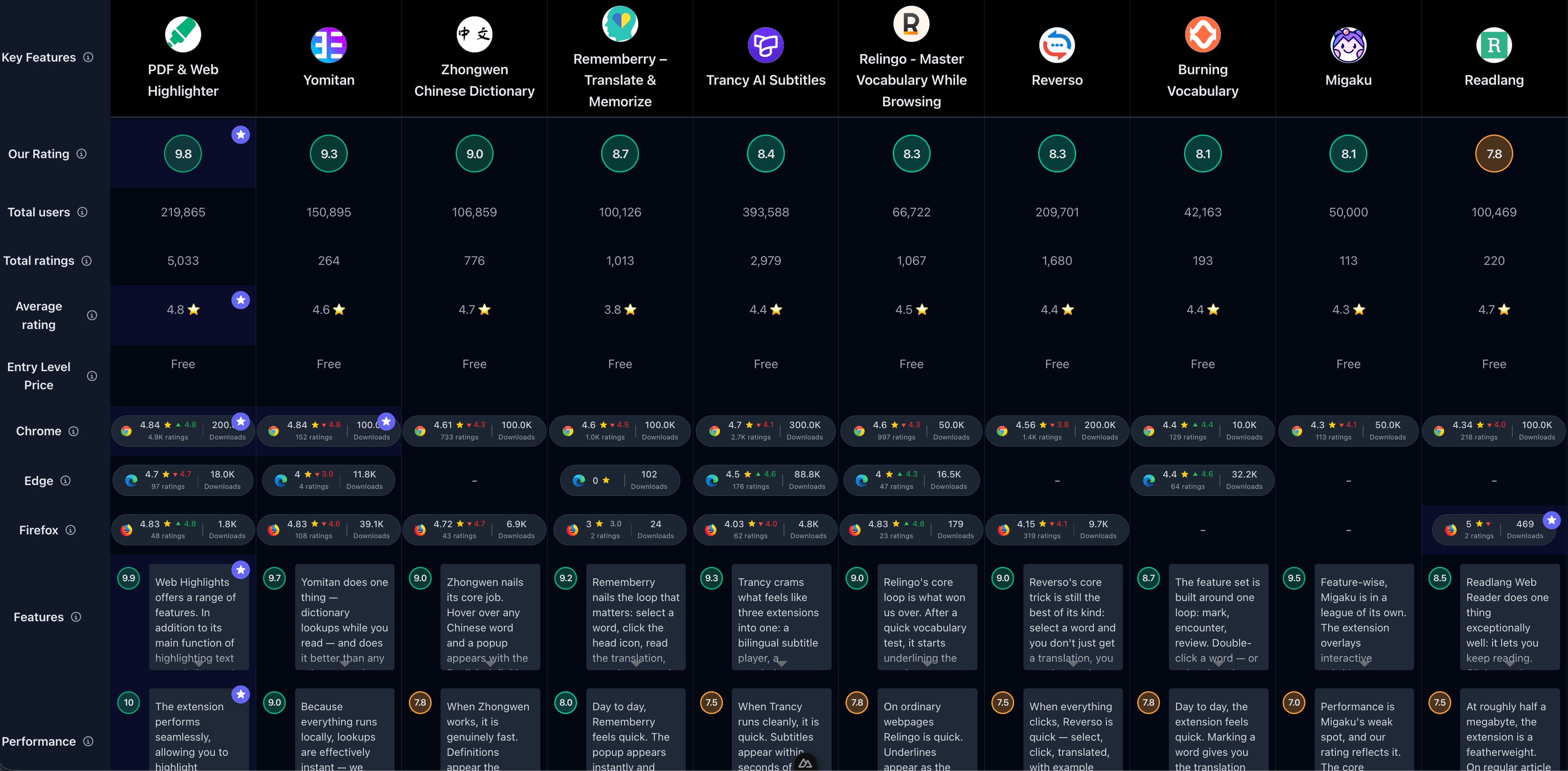
If you prefer a comparison overview, check out the full comparison of all Language Learning extensions:
1. Web Highlights: PDF & Web Highlighter
A highlighter might seem like an odd winner for a language-learning roundup — until you see what Web Highlights does with the words you mark. It has 200,000 downloads and a 4.84-star rating on the Chrome Web Store (across 4,888 reviews), and quality is trending up rather than down, as evidenced by its 4.85 rating for the last 100 reviews. It's on Edge and Firefox too, but Chrome is where the bulk of its audience lives.
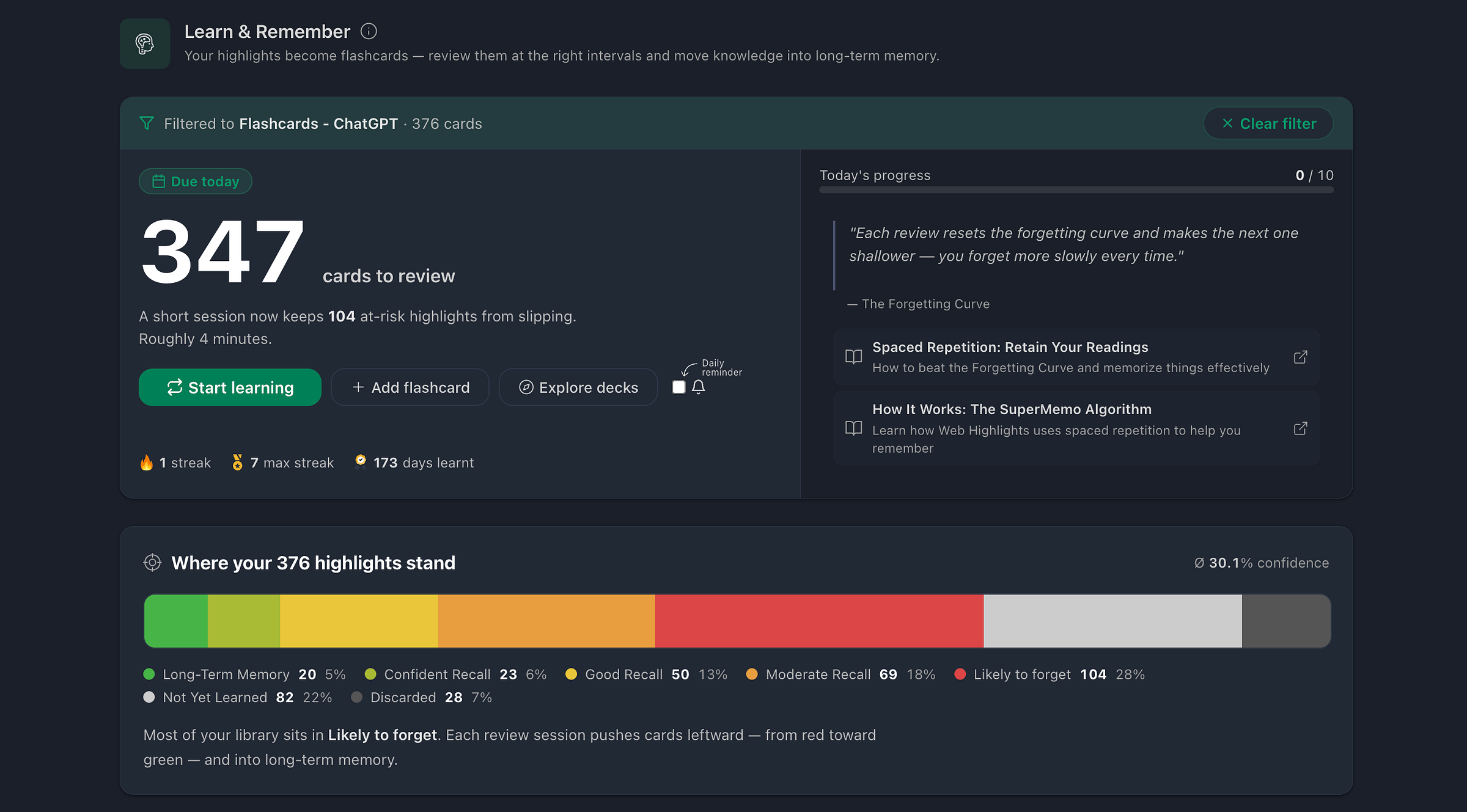
What earns it the top spot is a combination no other extension here offers: highlight a word or sentence on any website, PDF, or YouTube transcript, then turn it into a real question-and-answer flashcard and review it with the SuperMemo spaced-repetition algorithm — the same method serious language learners already rely on.
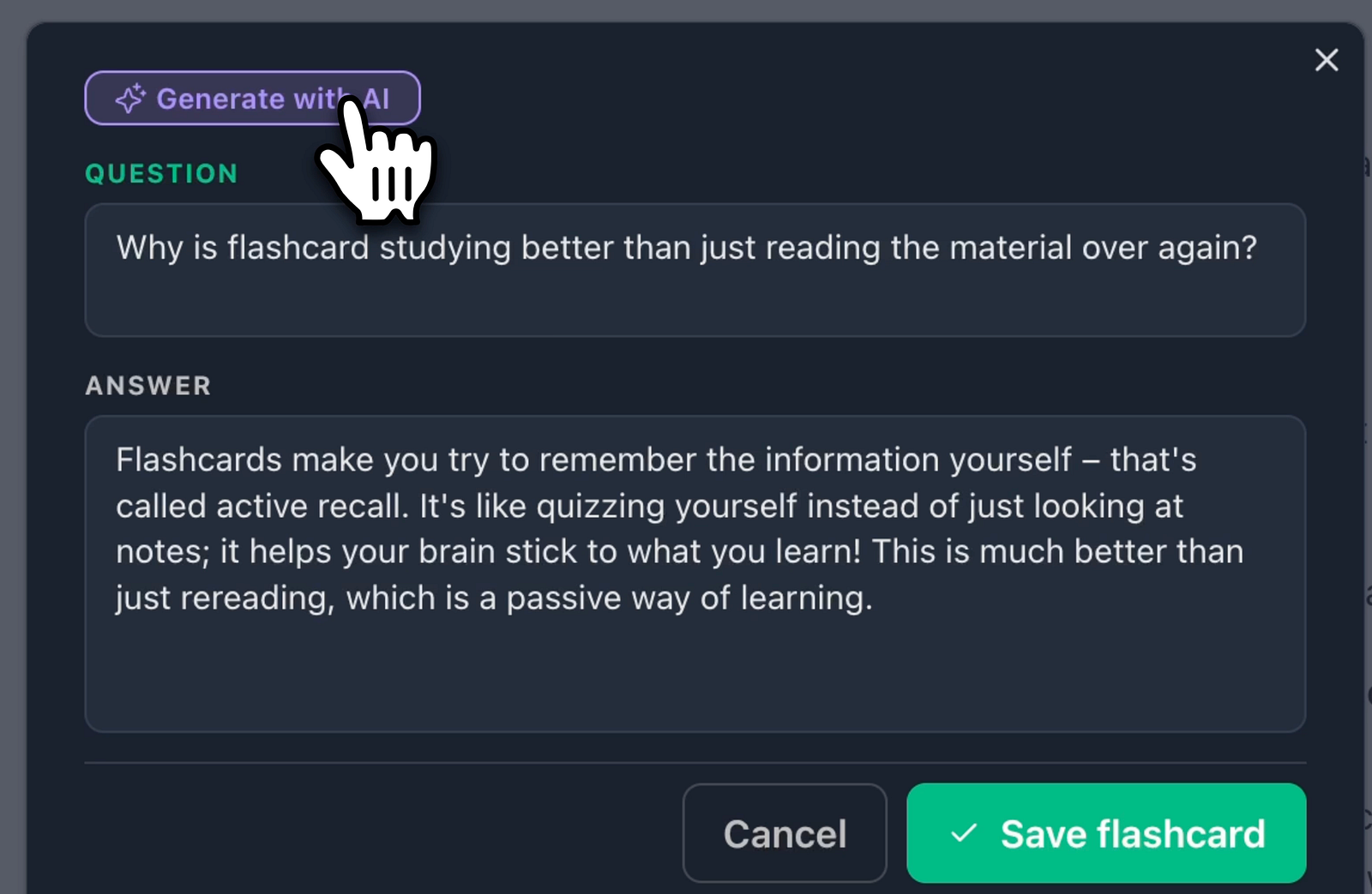
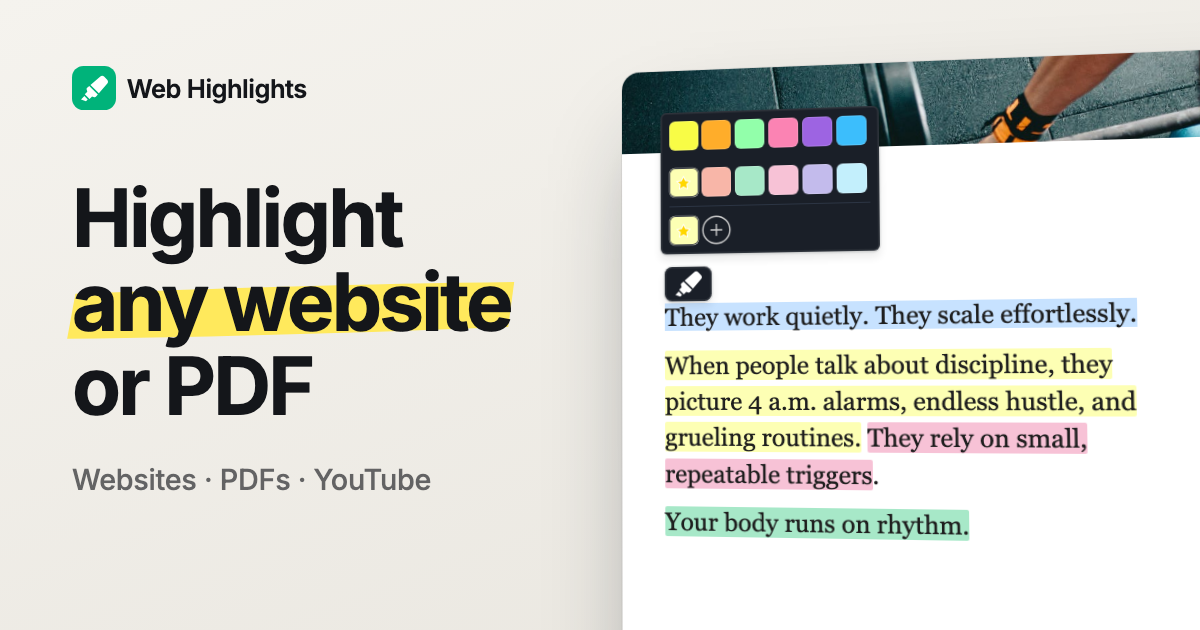
For example, whenever you come across a word you don't know on any website, just select it, highlight it, and create a flashcard. That way, you can build your language learning habit into your daily workflow without any extra effort.
You can build your own decks like "German Verbs" or "Spanish Idioms," or start from ready-made ones. Web Highlights ships three English-vocabulary paths — ideal if you're learning English or prepping for IELTS — each split into levels you can open and study right in the browser, even without installing the extension:
Just visit one of the decks, choose a level, and start learning. Here is an example from Level 1 in IELTS Vocabulary:
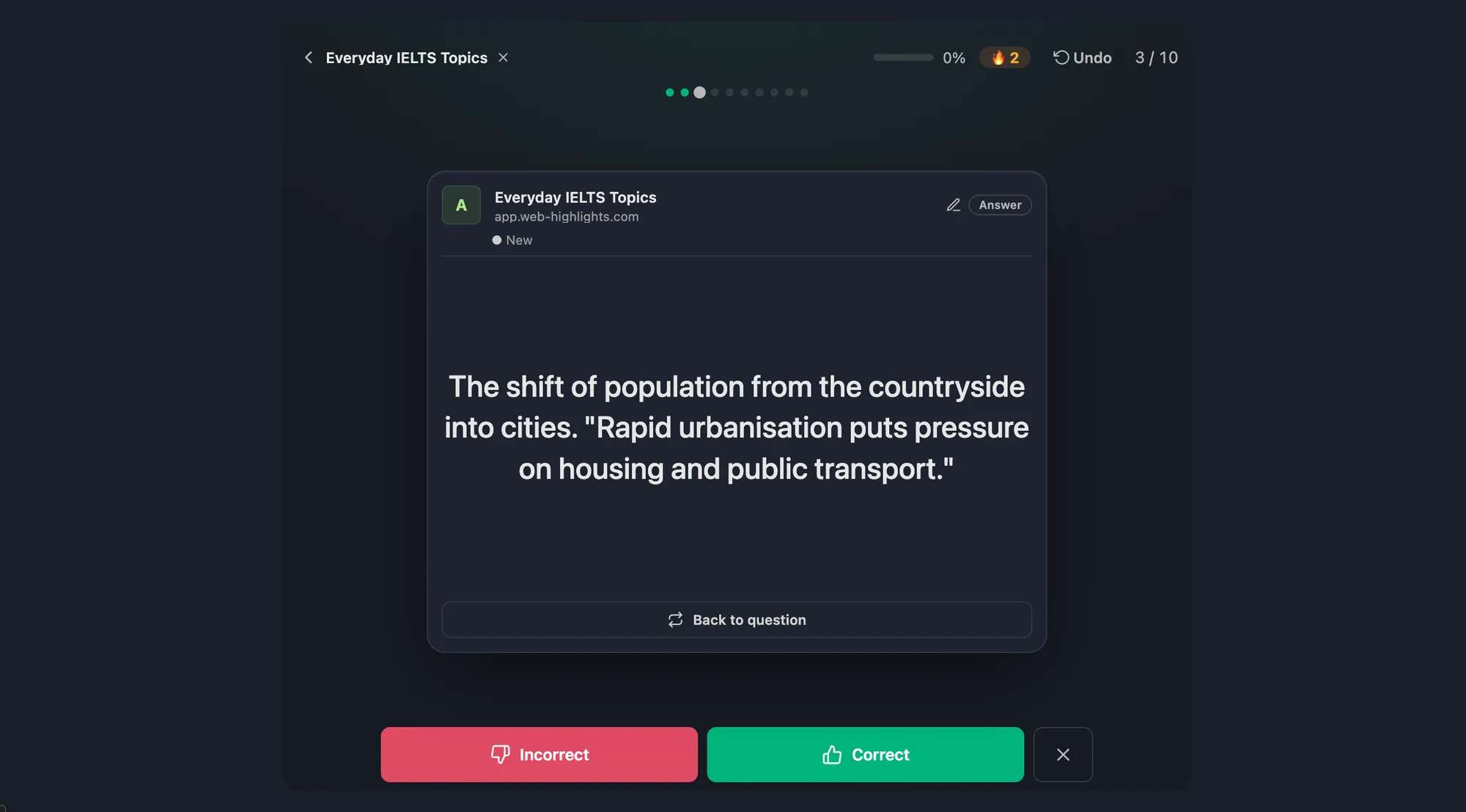
Let the on-device AI generate cards from a bookmarked article, and suddenly the foreign-language reading you were doing anyway becomes your study material. Vocabulary trainers catch single words as you browse — Web Highlights turns whole passages into things you actually remember.
Key Features
- Flashcards & Spaced Repetition – Turn any highlight into a Q/A flashcard, build decks like "English Vocabulary", and review them with the SuperMemo spaced-repetition algorithm — AI can even generate whole decks from a bookmark, entirely on your device
- Website Highlighting – Easily highlight text on any website
- PDF Highlighting – Mark up online, local, and uploaded PDFs (up to 30 MB), then download them with your highlights embedded as real annotations
- AI Summary – Create quick, AI-powered summaries of your highlights and websites
- AI Chat – The local browser LLM understands the full context of the website, so you can chat with it and ask questions about any website, PDF, or YouTube video
- Multiple Colors – Use various colors to organize your highlights
- Note-Taking – Add notes to your highlights, or write standalone page notes with full formatting
- Bookmarking – Save pages as bookmarks for quick access
- Tagging – Organize your highlights and notes with tags
- Collections (Folders) – Organize bookmarks in a nested folder tree with drag & drop, alongside tags
- Cross-Device Sync – Sync highlights across devices via cloud
- Export Options – Export your highlights to Notion, Obsidian, HTML, Markdown, or as PDFs and HTML files
- Reminders – "Snooze" your bookmarks and get reminded about them by email
Pros & Cons
Pros:
- Excellent free version
- No account required
- Spaced-repetition flashcard learning
- Collections, tags & notes
- Image highlighting supported
- Keyboard shortcuts
- Cross-device sync & beautiful web app
Cons:
- Cloud sync requires a paid plan
- No native mobile app yet
Who is this great for?
Web Highlights is perfect for anyone who learns a language primarily through reading — news sites, blogs, Wikipedia rabbit holes, or PDFs and papers in your target language. Instead of letting good sentences scroll past, you mark them once and the spaced-repetition system makes sure they come back right before you'd forget them.
It's especially great for students and self-learners who want one tool for research and vocabulary. The free Learning Hub adds ready-made decks — English vocabulary among them — and the AI deck generators turn any website, PDF, or YouTube video into study material without your text ever leaving the device.
Compared to others
Web Highlights approaches learning from a different angle than the rest of this list. Rememberry and Relingo collect single words while you browse; Web Highlights starts from whole highlighted passages, which suits learners working with real texts rather than word lists. And where a popup dictionary like Yomitan excels at instant lookups, it hands the memorization job off to Anki — Web Highlights keeps the entire read-highlight-review loop in one place.
Detailed comparisons
Web Highlights vs Rememberry • Web Highlights vs Relingo • Web Highlights vs Yomitan
With 200000 Chrome downloads and a 4.84-star rating that its most recent reviews only reinforce, this is as safe a pick as the category offers. Tooltivity gave PDF & Web Highlighter + AI Summary & Notes a score of 9.78/10. Check out the full review here.
2. Yomitan Popup Dictionary

Yomitan is the tool immersion learners eventually point everyone to. It has 100000 downloads and a 4.84-star rating on the Chrome Web Store (152 reviews), remarkably consistent for a volunteer-run project, as evidenced by its 4.8 rating for the last 100 reviews. There's a Firefox build carrying Mozilla's Recommended badge and an Edge port as well, but the workflow is identical everywhere.
Yomitan is the free, open-source successor of the legendary Yomichan, which was delisted in 2023 — a community of developers picked the project up and has kept it moving ever since. The concept is beautifully simple: hold Shift, hover over any word on any website, and a popup shows definitions, readings, and native audio without you leaving the page. Add the one-click Anki flashcard export, and you have the backbone of the sentence-mining method thousands of Japanese learners swear by. It isn't limited to Japanese either — community dictionaries add Korean, Chinese, Spanish, and many more, and lookups work the same way.
Key Features
- Instant Popup Lookups – Hold Shift and hover over any word on any website to see definitions and readings without leaving the page
- Smart Deinflection – Recognizes conjugated verbs and adjectives and traces them back to their dictionary form automatically
- 20+ Languages via Importable Dictionaries – Built for Japanese first, but Korean, Chinese, Spanish, and many more work through community dictionaries
- One-Click Anki Export – Turn any lookup into a flashcard with its full sentence context — the classic sentence-mining workflow
- Audio Pronunciation – Hear native audio for words directly from the popup
- Kanji Breakdowns – Individual characters get their own view with readings, meanings, and composition
- Deep Customization – Profiles, scan modifiers, popup themes, and custom styling for power users
- Free & Open Source – Community-maintained with no account, no ads, and no paid tier
Pros & Cons
Pros:
- Completely free and open source
- Instant lookups on any website
- One-click Anki flashcard export
- Covers 20+ languages via dictionaries
- Native audio pronunciation included
- Deeply customizable for power users
Cons:
- Setup takes real effort
- Dictionary imports can fail
- Flashcards require external Anki
- Occasional freezes on Chrome
Who is this great for?
Yomitan is perfect for anyone serious about learning through real content — especially Japanese learners on the immersion route, where it's borderline mandatory. If you read news sites, blogs, or subtitles in your target language, it turns every unknown word into a two-second lookup instead of a tab switch.
It's especially great for users who already run Anki or are willing to set it up, because the one-click export makes sentence mining almost frictionless. Just know that Yomitan ships empty: budget fifteen minutes to import dictionaries before it does anything. That setup toll is where nearly every complaint in its reviews originates.
Compared to others
Against Zhongwen, the trade is breadth versus convenience: Zhongwen ships with its Chinese dictionary built in and works instantly, while Yomitan covers 20+ languages but expects you to load them yourself. A suite like Migaku wraps similar lookups into a bigger subscription package with built-in flashcards, whereas Yomitan plus Anki gets you the same core loop for free — and for the video side Yomitan doesn't touch, Trancy handles subtitles and shadowing.
Detailed comparisons
Yomitan vs Zhongwen • Yomitan vs Migaku • Yomitan vs Trancy
With 100000 Chrome downloads and a 4.84-star rating that barely moves across its last 100 reviews, Yomitan is one of the best-rated extensions in the whole category — at a price of zero. Tooltivity gave Yomitan Popup Dictionary a score of 9.28/10. Check out the full review here.
3. 10ten Japanese Reader (Rikaichamp)

Japanese is the language where a popup dictionary stops being a convenience and becomes the thing that lets you read at all. 10ten Japanese Reader has 40000 downloads and a 4.67-star rating on the Chrome Web Store (100 reviews), holding steady as evidenced by its 4.63 rating for the last 100 reviews. Its longest history is actually on Firefox, where 21981 downloads and 271 reviews average 4.75, and there is an Edge build plus a Safari version for iPhone, iPad and Mac.
The lineage goes back to Rikaichan and Rikaikun, and the name in brackets is the direct ancestor — Birchill shipped this as Rikaichamp before renaming it. Point at a word, get its reading and meaning. What lifts it above the genre is everything stacked around that: it deinflects verbs, so 食べてた resolves to 食べる whether or not you know the rule yet, it shows pitch accent as a diagram, it animates kanji stroke order, and it quietly converts era years, yen amounts and old measurement units as you read.
Key Features
- Hover Lookups – Point at any Japanese word and a popup shows reading, meaning and part of speech, with an option to require a held key first
- Deinflection – Recognizes inflected and conjugated forms, so 食べてた or a causative passive resolves back to the dictionary entry
- Pitch Accent – Every entry that has accent data shows it as a diagram over the reading, which almost no other browser dictionary does
- Kanji Detail – Components, stroke count, stroke-order animations, and educational, JLPT and kanji kentei levels for the character under the cursor
- Number and Date Conversion – Turns 13億5千万 into 1,350,000,000, converts yen amounts, Japanese-era years and traditional measurements like tatami into modern equivalents
- Self-updating Dictionaries – Word, name and kanji databases refresh twice a week in the background with no manual imports
- Awkward Text Handling – Reads vertical text, text inside SVG images, YouTube subtitles and shogi notation, not just plain paragraphs
- Four Browsers, Including Mobile – The same reader runs on Chrome, Firefox and Edge, plus a Safari build for iPhone, iPad and Mac
Pros & Cons
Pros:
- Completely free and open source
- Instant lookups, no setup
- Pitch accent on entries
- Handles inflected verb forms
- Kanji stroke-order animations
- Also runs on mobile Safari
Cons:
- No monolingual Japanese dictionary
- No audio pronunciation yet
- Occasional activation bugs
- No Google Docs lookups in Safari
- No Anki or flashcard export
Who is this great for?
10ten is perfect for anyone who reads Japanese on the web and wants to start doing it today. Install it, press Alt+R, hover a word — that is the entire onboarding, with no account, no dictionary imports and no settings to visit first. For beginners and intermediates working through news, novels or subtitles, it removes the tab-switching that kills reading momentum.
It's especially great for users on a phone, because the Safari build for iPhone and iPad is close to unrivalled — almost nothing else in this category ships one at all. The gaps to know before you install: there is no monolingual dictionary, no audio, and no way to push a word into Anki, so pronunciation drilling and flashcards still need a second tool.
Compared to others
The obvious comparison is Yomitan, and the trade is sharp: Yomitan is more configurable and lets you import your own dictionaries — including the monolingual ones 10ten's users ask for most — but it ships empty and expects fifteen minutes of setup first. 10ten is reading Japanese while Yomitan is still downloading. Migaku wraps similar lookups into a full immersion suite with flashcards built in, at the cost of a subscription, and Zhongwen is the same zero-setup idea pointed at Chinese instead.
Detailed comparisons
10ten Japanese Reader vs Yomitan • 10ten Japanese Reader vs Migaku • 10ten Japanese Reader vs Zhongwen
With 40000 Chrome downloads and a 4.67-star rating that its most recent reviews hold steady, 10ten is the fastest route from install to actually reading Japanese — and it costs nothing. Tooltivity gave 10ten Japanese Reader (Rikaichamp) a score of 9.23/10. Check out the full review here.
4. Zhongwen: Chinese-English Dictionary

Zhongwen has been putting a Chinese-English dictionary under people's cursors for more than a decade. It has 100000 downloads and a 4.61-star rating on the Chrome Web Store (733 reviews), though its 4.35 rating for the last 100 reviews hints at a bumpier recent stretch. A steadier Firefox build exists too, if Chrome ever gives you trouble.
The idea is disarmingly simple. Hover over any Chinese word and a popup instantly shows the English definition, pinyin with tone colors, and both simplified and traditional forms — Cantonese readings included. Christian Schiller's open-source extension needs no account, no dictionary downloads, and no payment; it works on everything from news articles to webnovels without asking you to configure a single thing. The recent Chrome rating dip has a concrete cause: browser updates broke the extension for a stretch through late 2025. The current 6.3.0 release runs reliably again, but the pattern of breakage after platform changes is worth knowing about.
Key Features
- Instant Hover Dictionary – Point at any Chinese word for an immediate English definition, no clicking required
- Pinyin with Tone Colors – Every syllable is color-coded by tone, so pronunciation sinks in as you read
- Simplified & Traditional – Recognizes both character sets and shows the matching form, with optional zhuyin (bopomofo) display
- Cantonese Support – Shows Cantonese readings alongside Mandarin pinyin
- Built-in Word List – Save words as you read, then export the list for flashcard apps like Anki
- Chinese Grammar Wiki Links – Press G on a word to jump straight to the relevant grammar explanation
- Skritter Integration – Send new vocabulary directly to Skritter for handwriting practice
- Dictionary Shortcuts – One keystroke opens the current word in external dictionaries such as MDBG
Pros & Cons
Pros:
- Completely free and open source
- Instant lookups while reading
- Tone-colored pinyin display
- Word-list export for flashcards
- No account or setup needed
- Cantonese and zhuyin support
Cons:
- Occasional breakages on Chrome
- Few customization options
- No keybind trigger option
- Chinese to English only
Who is this great for?
Zhongwen is perfect for anyone learning Chinese, from the first month of study onward. Beginners get pinyin and tone colors on every word; advanced readers get idiom and proper-name recognition that keeps up with real texts.
It's especially great for users who want zero friction: install it, click the toolbar icon, and start reading. No other tool in this comparison gets you from install to actually reading foreign text faster, and the word-list export means your reading still feeds a flashcard routine in Anki.
Compared to others
The obvious comparison is Yomitan, which brings the same popup-dictionary concept to Japanese and other languages but expects you to import dictionary files first — Zhongwen ships with everything built in. A subscription suite like Migaku adds video subtitles and integrated flashcards that Zhongwen deliberately leaves out, while Relingo spreads itself across many languages with vocabulary tracking; Zhongwen's single-minded Chinese focus means every detail serves that one goal.
Detailed comparisons
Zhongwen vs Yomitan • Zhongwen vs Migaku • Zhongwen vs Relingo
With 100000 Chrome downloads and a 4.61-star rating, Zhongwen has quietly become infrastructure for an entire learning community — the recent dip is about platform breakage, not the tool's design. Tooltivity gave Zhongwen: Chinese-English Dictionary a score of 8.97/10. Check out the full review here.
5. Rememberry - Translate and Memorize with Flashcards

If new words keep slipping away minutes after you look them up, Rememberry was built for exactly that problem. It has 100000 downloads and a 4.6-star rating on the Chrome Web Store (1,011 reviews), though its 4.49 rating for the last 100 reviews lands a touch below that long-term average. The Edge and Firefox listings are recent additions, so Chrome is where its track record lives.
The loop is what sells it: select a word or short phrase on any website, click the little head icon, and you get an instant translation covering more than 100 languages. One more click saves that word as a flashcard, and Rememberry's built-in trainer later quizzes you on it with spaced repetition — right around the time you'd otherwise forget it. Where pure translators answer what a word means and stop there, Rememberry treats every lookup as a vocabulary card waiting to happen. That makes the difference between reading foreign-language pages and actually learning from them.
Key Features
- On-Page Translator – Select any word or short phrase and click the popup icon for an instant translation, no tab switching
- 100+ Languages – Translate between more than 100 source and target languages
- One-Click Flashcards – Save any translation as a flashcard the moment you look it up
- Spaced Repetition Trainer – Built-in review sessions resurface words right before you would forget them
- Decks – Organize saved words into separate decks per language or topic
- Pronunciation & Phonetics – Hear words read aloud and check their phonetic transcription
- Import & Export – Move your decks out as CSV files, for example to back them up or continue in Anki
- Reverse Translations (Pro) – Drill your cards in both directions with the paid plan
Pros & Cons
Pros:
- Instant on-page translations
- Built-in spaced-repetition trainer
- Supports 100+ languages
- One-click flashcard saving
- CSV export to Anki
- Responsive developer
Cons:
- Can slow down YouTube
- Free plan grew stricter
- Pro feels expensive
- Occasional saved-word glitches
- No PDF or mobile support
Who is this great for?
Rememberry is perfect for anyone who does most of their foreign-language reading in the browser — students, expats, or anyone working through articles in another language daily. The natural comparison is Anki: the same core learning principle, but with none of the setup effort, because reading builds your cards for you.
It's especially great for users who want their vocabulary practice to happen automatically. Casual learners saving a handful of words a week can live entirely on the free tier; heavy readers should budget for Pro or use the CSV export to continue their decks in Anki, since the free plan's limits have tightened over the years.
Compared to others
A translator-and-dictionary tool like Reverso stops at the lookup; Rememberry closes the loop with reviews. Against Relingo, the difference is initiative — Relingo highlights words it thinks you don't know, while Rememberry only saves what you choose to look up. And if you'd rather have your words marked on the page itself as you read, Burning Vocabulary approaches the same goal from that angle.
Detailed comparisons
Rememberry vs Reverso • Rememberry vs Relingo • Rememberry vs Burning Vocabulary
With 100000 Chrome downloads and a 4.6-star rating across 1,011 reviews, Rememberry has earned its audience. Tooltivity gave Rememberry - Translate and Memorize with Flashcards a score of 8.70/10. Check out the full review here.
6. Trancy - AI Translator & Dual Subtitles

Trancy is the most ambitious video-learning tool in this lineup. It has 300000 downloads and a 4.7-star rating on the Chrome Web Store (2,741 reviews), though recent months have been bumpier, as evidenced by its 4.12 rating for the last 100 reviews. It's on Edge and Firefox as well, but Chrome carries most of its users.
The pitch: Trancy lays AI-powered bilingual subtitles over YouTube, Netflix, Disney+, and course platforms like Coursera, then turns every video into a lesson. Switch into learning mode and you step through the transcript sentence by sentence, replay a line with a single key, and shadow the speaker until it sticks. Click any word to save it to your vocabulary book, and practice pronunciation against AI feedback. The recent rating dip has a clear cause, too: a wave of HTTP 429 server errors and recurring forced logouts frustrated users — including paying ones — around the time of our review.
Key Features
- AI Bilingual Subtitles – Dual-language subtitles on YouTube, Netflix, Disney+, and learning platforms like Coursera, generated by AI when no captions exist
- Sentence-by-Sentence Learning Mode – Step through the transcript line by line, replay each sentence, and shadow the speaker at your own pace
- One-Click Vocabulary Capture – Click any word in a subtitle to save it with its context, then see it highlighted the next time it appears
- AI Speaking Practice – Record your pronunciation and get detailed AI feedback, or talk to an AI conversation partner
- Full-Page Web Translation – Translate articles and websites on demand, without auto-translating every page you open
- Multiple Translation Engines – Google and Microsoft engines for free, premium AI engines with the Pro plan
- Flashcards & Word Review – Review saved vocabulary with built-in flashcards, dictionaries, and word lists
- Transcript Export – Copy or download subtitles to reuse in your notes or feed to an AI assistant
Pros & Cons
Pros:
- Dual subtitles on major platforms
- Excellent sentence-by-sentence learning mode
- One-click vocabulary saving
- AI speaking and shadowing practice
- Generous free version
- Clean, well-integrated subtitle design
Cons:
- Frequent forced logouts
- Recent server errors (HTTP 429)
- Weaker non-English translation quality
- Netflix support occasionally breaks
- Tight free vocabulary cap
Who is this great for?
Trancy is perfect for anyone who learns through YouTube, Netflix, or online courses and wants structure layered on top of the watching. The sentence-by-sentence learning mode is its standout feature — it turns a conference talk into a shadowing exercise without any copy-pasting.
It's especially great for users who want speaking practice included: the AI pronunciation feedback and conversation partner cover ground that subtitle tools normally ignore. Start on the generous free plan, and upgrade to Pro once the noticeably better AI translation engines start to matter — the yearly price sits below what most language schools charge for a single month.
Compared to others
Trancy's closest in-list rival for video is Relingo, which also lays bilingual subtitles over YouTube and Netflix but centers on vocabulary highlighting rather than a structured learning mode. Migaku courts more committed learners with sentence mining and a built-in SRS at a steeper subscription, while Reverso translates subtitles on hover but stops short of Trancy's shadowing and speaking practice.
Detailed comparisons
Trancy vs Relingo • Trancy vs Migaku • Trancy vs Reverso
With 300000 Chrome downloads and a 4.7-star rating, Trancy has real momentum despite the recent server wobbles. Tooltivity gave Trancy - AI Translator & Dual Subtitles a score of 8.40/10. Check out the full review here.
7. Reverso – Translation, dictionary

Reverso behaves less like a dictionary popup and more like a compact language lab. It has 200000 downloads and a 4.56-star rating on the Chrome Web Store (1,361 reviews), though its 3.75 rating for the last 100 reviews points to a bumpier recent stretch. An older Reverso Context beta lingers on Firefox, but Chrome gets the current build.
What sets it apart is context. Select a word and Reverso doesn't just return a translation — it shows the word working inside real example sentences, so you can tell which of five possible meanings actually fits. Conjugation tables, synonyms, and pronunciation sit one tab away, Netflix and YouTube subtitles translate on hover, and every lookup can go straight into a phrasebook with flashcards. The recent dip has a concrete story behind it: a July 2026 update briefly removed the popup's search bar, and long-time fans were loud about it. To Reverso's credit, the feature was back within days.
Key Features
- Translation in Context – Every lookup shows real example sentences from actual usage, so you pick the meaning that truly fits
- One-Click Translations – Select text on any website and a small icon appears; click it and the translation pops up in place
- Subtitle Translation – Hover over words in Netflix and YouTube subtitles to translate them while you watch
- Conjugation Tables – Full verb conjugations are one tab away from any translation
- Synonyms & Definitions – Explore alternatives and nuances without leaving the popup
- Pronunciation – Hear selected words and phrases read aloud as you browse
- Phrasebook & Flashcards – Save looked-up words to your phrasebook and review them as flashcards later
- Cross-Device Ecosystem – Your saved words sync with Reverso's web, desktop, and mobile apps
Pros & Cons
Pros:
- Context examples with every translation
- Fast one-click, in-page lookups
- Netflix & YouTube subtitle translation
- Built-in conjugation and synonyms
- Phrasebook with flashcard review
- Generous, genuinely useful free tier
Cons:
- Short translation length limits
- Persistent YouTube icon and prompts
- Lookups occasionally fail to trigger
- No full-page translation
- Firefox version lags behind Chrome
Who is this great for?
Reverso is perfect for anyone who wants to understand words rather than just swap them. When one English word maps to five possible French ones, the real-sentence examples are what save you from picking the wrong one — no other tool in this comparison does that as convincingly.
It's especially great for users who want lookup, context, and review in one place without paying: the free tier covers word-level translation, conjugation, pronunciation, subtitles, and flashcards. The catch is length — roughly 150 characters per translation without an account, about 300 with a free one — so paragraph translators will bump into the wall quickly.
Compared to others
If vocabulary drilling matters more than translation depth, Rememberry is the more focused flashcard machine, saving and quizzing you on every word you look up. Relingo adds the full-page, sentence-by-sentence translation that Reverso deliberately doesn't attempt, and for studying subtitles as you watch, Trancy builds an entire learning mode around video that Reverso only touches lightly.
Detailed comparisons
Reverso vs Rememberry • Reverso vs Relingo • Reverso vs Trancy
With 200000 Chrome downloads and a 4.56-star rating from 1,361 reviews, Reverso remains the most learning-friendly translator in this list — the recent dip traces to a brief July 2026 stumble it fixed within days. Tooltivity gave Reverso – Translation, dictionary a score of 8.33/10. Check out the full review here.
8. Relingo - Master vocabulary while browsing websites and watching YouTube

Relingo quietly turns your browsing and YouTube time into vocabulary practice. It has 50000 downloads and a 4.6-star rating on the Chrome Web Store (997 reviews), though its 4.3 rating for the last 100 reviews shows recent feedback dipping below the all-time average. It's on Edge and Firefox too, with Chrome the main home.
Tell Relingo your native language and your level, and it underlines the words on any webpage that you probably don't know yet, with the translation sitting right beside them — like reading with a patient tutor looking over your shoulder. One click saves a word to your word book, and from then on it stays highlighted wherever you meet it again. The trump card is video: bilingual subtitles on YouTube, Netflix, and TED, complete with a full transcript panel, make it just as useful for listening practice as for reading. The recent dip traces to occasional YouTube playback bugs and a rate-us popup that appears far more often than it should.
Key Features
- Smart Vocabulary Highlighting – Detects words above your level on any webpage and underlines them automatically
- Inline Translations – Shows the meaning right next to the word, so you keep reading instead of switching to a dictionary
- Bilingual Video Subtitles – Dual-language subtitles for YouTube, Netflix, and TED, including a full transcript panel
- Word Book & Flashcards – Save words with one click and review them later as flashcards
- Auto-Highlight of Saved Words – Words you've saved stay marked on every future page until you master them
- Full-Page Translation – Immersive, sentence-by-sentence translation of entire articles
- Vocabulary Level Test – Estimates your vocabulary size to calibrate what gets highlighted
- Cross-Device Sync – Your word book follows you into Relingo's mobile apps
Pros & Cons
Pros:
- Level-based vocabulary highlighting
- Bilingual YouTube & Netflix subtitles
- One-click word saving
- Learning in real context
- Useful free version
- Cross-device word sync
Cons:
- Occasional YouTube playback bugs
- Frequent rate-us popups
- Free word book capped
- Broad browser permissions
- Some translations miss nuance
Who is this great for?
Relingo is perfect for anyone learning English, Japanese, or Chinese who reads and watches a lot online and wants the learning to happen without extra effort. The automatic difficulty calibration means you never configure word lists — you just mark words as known or unknown as you go.
It's especially great for users who want reading and listening practice in one tool: the same word book collects vocabulary from articles and video subtitles alike, then syncs it into Relingo's mobile apps for review on the go. If your target language is less common — Turkish, Persian, or Hindi, say — expect gaps in coverage.
Compared to others
Relingo sits in a crowded family. Burning Vocabulary follows a nearly identical mark-and-review concept but leaves the choosing to you, while Rememberry saves only the words you deliberately look up rather than flagging them for you. Relingo's bilingual video subtitles are what neither matches. If you'd prefer a dedicated reading environment over an on-page overlay, Readlang Web Reader is the better fit.
Detailed comparisons
Relingo vs Burning Vocabulary • Relingo vs Rememberry • Relingo vs Readlang Web Reader
With 50000 Chrome downloads and a 4.6-star rating from 997 reviews, Relingo has built a loyal following around a loop that simply works. Tooltivity gave Relingo a score of 8.27/10. Check out the full review here.
9. Burning Vocabulary - Learn words from reading

Burning Vocabulary takes a clever approach to the words you keep looking up without ever learning: mark a word once, and it stays highlighted everywhere you read. It has 10000 downloads and a 4.4-star rating on the Chrome Web Store (129 reviews), as evidenced by its steady 4.42 rating for the last 100 reviews. It has quietly built an even bigger audience on Edge, where recent feedback trends a little higher still.
The workflow could hardly be leaner. Double-click an unknown word on any webpage, YouTube subtitle, or PDF, and the extension translates it, reads it aloud, and files it away together with the sentence you found it in. From then on, that word shows up underlined on every page you visit — reading itself becomes revision, a bit like backlinks in a note-taking app — and built-in flashcards with spaced repetition close the loop. When a card comes up for review, one click takes you back to the exact article or video where you met the word.
Key Features
- One-Click Word Marking – Double-click or right-click any unknown word to save it instantly, together with the sentence you found it in
- Highlights Everywhere – Marked words stay underlined on every website you visit afterwards, so you keep re-encountering them until they stick
- Subtitle Marking – Save words straight from YouTube subtitles while watching videos in your target language
- PDF Support – Mark vocabulary in PDFs opened in your browser — handy for papers and study material
- Flashcards & Spaced Repetition – Auto-generated cards resurface your words at growing intervals, each one linking back to its source article or video
- Instant Translation & Pronunciation – See a quick translation and hear the word spoken the moment you mark it
- Mobile Review – A companion web app lets Pro users flip through their deck on the phone during idle minutes
Pros & Cons
Pros:
- Marks words on any webpage
- Works on YouTube subtitles
- Saved words highlighted everywhere
- Spaced-repetition flashcards built in
- Instant translation and pronunciation
- Lightweight and quick to use
Cons:
- Free plan caps saved words
- Subtitle marking occasionally breaks
- No dark mode
- Dashboard design feels dated
- Pro is subscription-only
- Weak phrase and idiom support
Who is this great for?
Burning Vocabulary is perfect for anyone who already spends their days reading articles, papers, or subtitles in a foreign language and wants new words to accumulate on the side. The persistent cross-page highlighting is its genuinely special trick — words you marked on Monday follow you around the web all week.
It's especially great for users who value speed: it's lightweight and quick to use, and for a tool you trigger dozens of times per reading session, that responsiveness matters. The free plan caps out around 40 saved words though — enough to test the concept, too little for serious study — so daily readers should budget for the yearly Pro subscription.
Compared to others
Relingo automates what Burning Vocabulary leaves manual — it decides which words to underline, while Burning Vocabulary trusts you to pick them. Rememberry gives you translation flashcards without a word cap, but lacks the cross-page highlighting that makes this extension special. And Readlang Web Reader builds its flashcards from click-to-translate reading rather than words you mark yourself.
Detailed comparisons
Burning Vocabulary vs Relingo • Burning Vocabulary vs Rememberry • Burning Vocabulary vs Readlang Web Reader
With 10000 Chrome downloads and a 4.4-star rating whose recent reviews hold steady, Burning Vocabulary punches above its size. Tooltivity gave Burning Vocabulary - Learn words from reading a score of 8.10/10. Check out the full review here.
10. Migaku: Really Learn Languages

Migaku wants to be your entire study system, not just a browser add-on. The extension has 50000 downloads and a 4.3-star rating on the Chrome Web Store (113 reviews), though its 4.06 rating for the last 100 reviews dips slightly below that all-time average — recent versions have drawn bug complaints alongside a lot of love. One structural limit up front: it's currently Chrome-only.
Open Netflix or YouTube and Migaku layers interactive subtitles over the video. Every word is clickable — a popup shows the definition and reading, and one more click turns the whole sentence into a flashcard with the screenshot and audio clip captured automatically. Everything feeds into Migaku Memory, the companion spaced-repetition app, and the extension tracks which words you already know across more than ten languages, so you can see at a glance whether a video sits in your comprehension sweet spot.
Key Features
- Interactive subtitles – Layers clickable dual subtitles over Netflix, YouTube, and other streaming sites
- Instant word lookups – Click any word for a dictionary popup with definitions, readings, and pitch accent — including furigana for Japanese
- One-click sentence mining – Turns the current subtitle line into a flashcard with the screenshot and audio clip captured automatically
- Built-in spaced repetition – Cards land in Migaku Memory, the companion SRS app, so no extra flashcard setup is needed
- Word knowledge tracking – Marks every word as known or unknown, so you see at a glance how difficult a video is for you
- AI-assisted explanations – Context-based explanations and example sentences help you decode tricky grammar on the spot
- Subtitle generation – Creates subtitles for videos that do not ship with usable ones
- Beginner courses – Hand-crafted Academy courses cover the basics before you dive into native content
Pros & Cons
Pros:
- One-click sentence mining
- Interactive subtitles on streaming sites
- Built-in spaced-repetition flashcards
- Tracks known words automatically
- Supports more than ten languages
- Responsive devs, active Discord community
Cons:
- Recurring bugs on streaming sites
- No permanent free tier
- Chrome-only, no Firefox support
- Some legacy features still missing
Who is this great for?
Migaku is perfect for anyone serious about learning a language through the content they love — the kind of learner who studies daily and wants watching, mining, and reviewing unified in one subscription. For that person, it replaces a popup dictionary, subtitle helpers, a flashcard app, and a progress tracker in one go.
It's especially great for users who found the classic Yomitan-plus-Anki stack too fiddly: Migaku delivers the same sentence-mining workflow with the plumbing already connected. Casual viewers who only want dual subtitles should look elsewhere, though — there's no permanent free tier, and the trial asks for payment details up front.
Compared to others
Lighter tools like Trancy and Relingo focus on dual subtitles and translation; Migaku goes further with word tracking and integrated spaced repetition, at the cost of a mandatory subscription. On the lookup side, Yomitan handles instant dictionary popups for free — Migaku's pitch is that the integrated whole is worth paying for.
Detailed comparisons
Migaku vs Trancy • Migaku vs Relingo • Migaku vs Yomitan
With 50000 Chrome downloads and a 4.3-star rating from 113 reviews, Migaku has carved out a devoted following among immersion learners. Tooltivity gave Migaku: Really Learn Languages a score of 8.08/10. Check out the full review here.
11. Readlang Web Reader

Readlang Web Reader is built for one thing: reading the web in the language you're learning. The extension has 100000 downloads and a 4.34-star rating on the Chrome Web Store (218 reviews), though its 4 rating for the last 100 reviews shows recent users being a bit more critical — mostly about free-plan limits rather than the reading experience itself. A much newer Firefox listing exists, but Chrome is the mature one.
Browse any website in your target language, click a word you don't know, and the translation appears right in the text — no new tab, no copy-paste. Every word you look up is saved with its original sentence and turned into a flashcard on readlang.com, where a spaced-repetition scheduler handles your practice. Between the free graded reading library, imported EPUB ebooks, and unlimited single-word lookups on the free plan, it's a complete reading-first study system.
Key Features
- Click-to-Translate – Click any word on a webpage and the translation appears instantly, right inside the text
- Phrase Translations – Select several words at once for a context-aware translation of the whole phrase (limited per day on the free plan)
- Automatic Flashcards – Every word you translate is saved with its original sentence and turned into a flashcard
- Spaced Repetition – Practice your saved words on readlang.com with a scheduler that resurfaces them right before you forget
- Reading Library – Free graded texts and videos with synced transcripts, sorted by difficulty level
- Import Your Own Texts – Upload articles or DRM-free EPUB ebooks and read them in the same click-to-translate reader
- Word List Export – Export your vocabulary lists for use in other flashcard tools, or import existing ones
- Text-to-Speech – Hear words and flashcards read aloud (audio auto-plays on the paid plan)
Pros & Cons
Pros:
- In-context word translations
- Automatic flashcard creation
- Built-in spaced repetition
- Free graded reading library
- Supports many languages
- Unlimited free word lookups
Cons:
- Daily phrase-translation cap
- Requires third-party cookies
- Broad site permissions
- No mobile version
Who is this great for?
Readlang is perfect for intermediate learners who can already limp through real texts and want reading to be their main study method. Beginners will hit too many unknown words for click-by-click lookups to stay fun — the graded library is the better starting point there.
It's especially great for users who want studying to organize itself: you just read, and the flashcards build themselves in the background, each one showing the word inside its original sentence. Go in aware of the two complaints that dominate recent feedback — the daily phrase-translation cap on the free plan, and the hard dependency on third-party cookies that trips up strict privacy setups.
Compared to others
Relingo covers similar vocabulary-capture ground with a different free-versus-paid split worth comparing, while Burning Vocabulary marks only the words you choose rather than every one you click. And if you'd rather your saved words became translate-and-memorize flashcards in a dedicated trainer, Rememberry leans harder into the review side than Readlang's reading-first approach.
Detailed comparisons
Readlang Web Reader vs Relingo • Readlang Web Reader vs Burning Vocabulary • Readlang Web Reader vs Rememberry
With 100000 Chrome downloads and a 4.34-star rating from 218 reviews, Readlang has earned its long-running reputation among reading-focused learners. Tooltivity gave Readlang Web Reader a score of 7.83/10. Check out the full review here.
Final Thoughts
Looking at all 11 of these Chrome extensions side by side, our overall winner is PDF & Web Highlighter + AI Summary & Notes at 9.78/10. No other tool here closes the loop from reading to remembering as completely: highlight real texts in your target language, and the SuperMemo-based spaced-repetition flashcards — with AI-generated decks built entirely on your device — turn them into vocabulary that sticks. In a category where several big names are sliding, its recent reviews sitting above its all-time average tell you the quality is holding.
The free popup dictionaries are the other easy recommendations: Yomitan is borderline mandatory for Japanese immersion learners willing to spend fifteen minutes on setup, 10ten Japanese Reader gets you reading Japanese in a single keystroke if that setup puts you off, and Zhongwen remains the fastest route from install to actually reading Chinese. For learning through video, Trancy is the most dependable pick, built around a sentence-by-sentence learning mode, while Migaku justifies its subscription for daily immersion students who want watching, mining, and reviewing in one place. Reverso is the translator to reach for when you want to understand words in context rather than just swap them.
Vocabulary collectors should choose by temperament: Rememberry for translate-and-memorize, Relingo for automatic highlighting plus bilingual video subtitles, Burning Vocabulary for marking words yourself and having them follow you across the web, and Readlang Web Reader if focused reading is your method. The good news is that nearly everything here is free to try. Install two or three that fit how you actually spend your time in Chrome, give them a week, and keep the one you stop noticing. If you'd like the numbers side by side first, the full comparison table of all Language Learning extensions has every rating in one place. We've run the same comparison on Chrome bookmark managers and Chrome email finder tools too.