A page isn't ranking and nobody can tell you why. The title looks fine in the browser tab, the content reads well, and the client is on the call in ten minutes. So you open the source, hit Ctrl+F, and start hunting for a canonical tag through four hundred lines of minified markup — which is roughly where every SEO audit has begun since 2006, and roughly where every SEO extension has promised to end.
The promise splits into three jobs that get lumped under one label, and telling them apart before you install anything will save you an afternoon. Some of these tools read the page in front of you and report what it declares: title, headings, schema, hreflang, the things you can fix yourself this afternoon. Others answer questions about demand — how many people search a term, what it costs, whether interest is climbing. A third group estimates what other sites are getting: traffic, backlinks, domain authority. Almost nobody needs all three, and a tool that's excellent at one is usually mediocre at the others.
This comparison looks at eleven SEO extensions on the Chrome Web Store, judging them on whether the numbers hold up, how much of the tool survives the free tier, what happens to your browsing data, and — a question this category makes unavoidable — how the vendor behaves when it decides to move the paywall. Three of the eleven have been through exactly that since 2023, and two of those ratings still carry the scars. What follows ranks all eleven with real Chrome download counts and store ratings behind every claim. Every store number below comes from the Chrome Web Store, the only listing Tooltivity tracks for these eleven.
Key takeaways
- Detailed SEO Extension (9.25/10) wins on the job most people actually need — read the page, show what it declares — free, with no account and the clearest panel of the eleven.
- SEO META in 1 CLICK (9.08) is the privacy pick: it asks only for activeTab and scripting, and its last 100 reviews average 4.93, the highest in this list.
- Ahrefs SEO Toolbar (8.17) is the technical choice — redirect chains, indexation and what Googlebot sees. Diagnostics are free; the famous metrics need a subscription.
- Ubersuggest (8.08) is the best starting point for keyword research and the only tool here with a lifetime plan instead of a renewal.
- Watch the paywall history – Keywords Everywhere moved search volume behind payment in 2023, and its rating still shows it. SEO Minion went behind a paid plan the same year, and its maker now offers it free. Ahrefs pulled Domain Rating from free users in early 2025, then brought it back behind a free account.
- Read what each one asks for – Similarweb needs your whole browsing clickstream to work, and SEOquake's default SEObar sends each page's address to Semrush, though its listing declares no data collection.
How this list was made: the scores come from Tooltivity, a review site run by my company — the same one that makes Web Highlights. It rates each extension from its Chrome Web Store listing, its ratings and what recent reviews report, and this list is ordered by that score. The descriptions below summarize each listing and what its users report. Store figures are from Tooltivity's crawl of the Chrome Web Store on October 25–28, 2026, and the scores are from November 4, 2026.
List of the Best SEO Extensions for Chrome:
- Detailed SEO Extension
- SEO META in 1 CLICK
- Ahrefs SEO Toolbar
- Ubersuggest - SEO and Keyword Discovery
- META SEO inspector
- GMB Everywhere - GBP Audit for Local SEO
- Glimpse – Google Trends Supercharged
- Similarweb - Website Traffic, AI Traffic & SEO Checker
- SEO Minion
- Keywords Everywhere - Keyword Tool
- SEOquake: On-Page SEO Checker
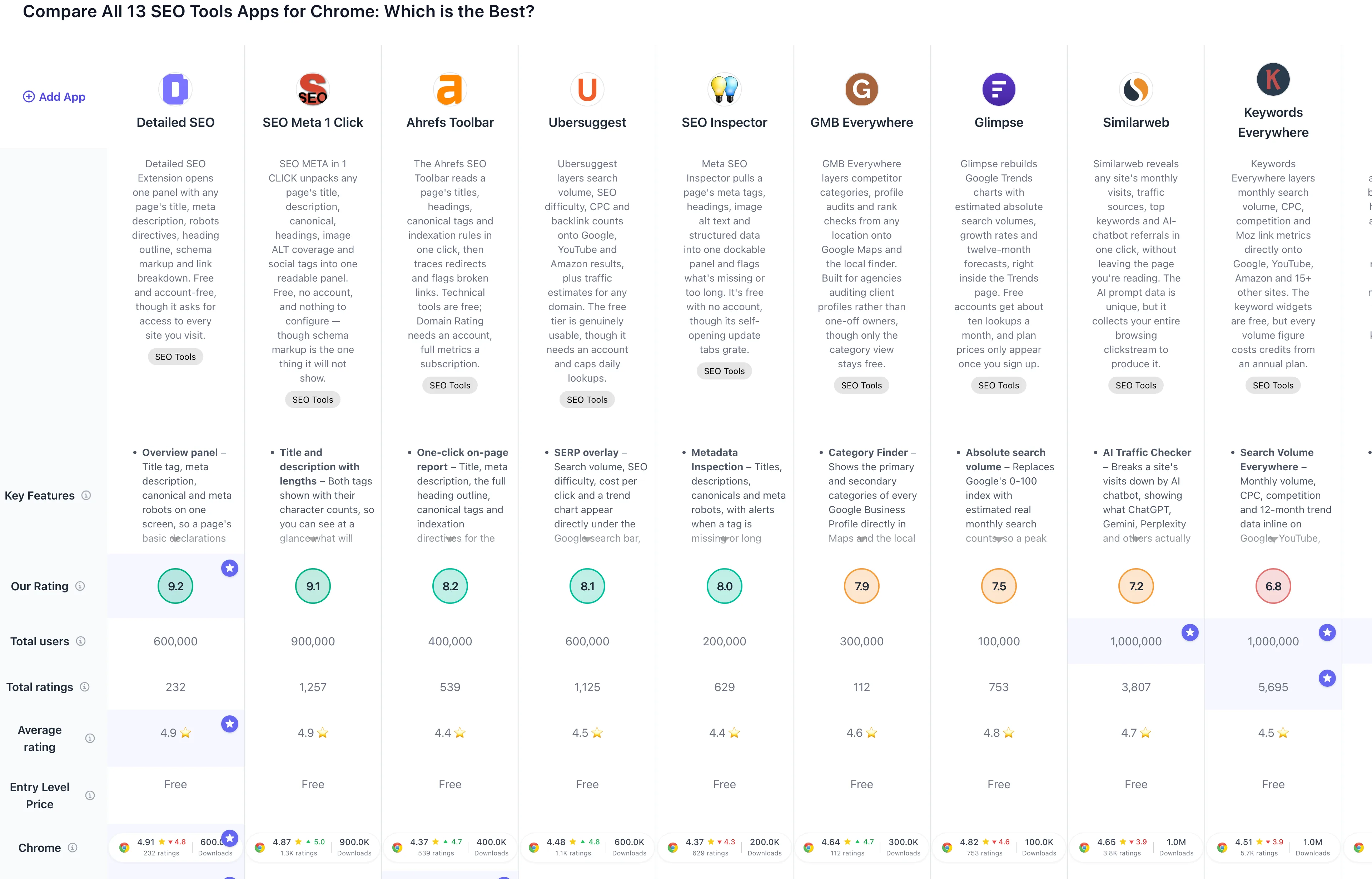
If you prefer a comparison overview, check out the full comparison table of all SEO extensions:
1. Detailed SEO Extension

Detailed SEO Extension has 600,000 downloads and a 4.84-star rating on the Chrome Web Store from 233 reviews, as evidenced by its 4.83 rating for the last 100 reviews. Both sit a little below the 4.90 across its last 500, the first time this tool has drifted the wrong way. It's a step, not a slide, and the complaints behind it are specific.
The pitch is one button. Click it on any page and you get the title tag, meta description, canonical and robots directives, the complete heading outline, the schema markup laid out readably, internal and external links split by followed and no-follow, images with their ALT text, a word count and the hreflang alternates. Built by working SEOs for their own use, and it shows in what got included and what didn't.
Key Features
- Overview panel – Title tag, meta description, canonical, meta robots and the X-Robots-Tag header on one screen, so a page's basic declarations take a single click to confirm
- Heading structure – The full H1 to H6 outline with multiple H1s flagged, plus a copy button that lifts every heading out as text
- Schema viewer – Structured data laid out readably instead of as raw JSON-LD, the feature most of its daily users name first
- Link breakdown – Internal and external links split by followed and no-follow, listed rather than counted
- Image audit – Every image with its ALT text, exportable when you need the list outside the browser
- Word count – The page's content length, without pasting anything into a separate tool
- Hreflang – Declared language and region alternates, which for international sites is the tab that earns the install on its own
- Research shortcuts – Jumps from the current page into external SEO tools and search operators
Pros & Cons
Pros:
- Clean, genuinely readable panel
- Schema shown without raw JSON
- Copy all headings at once
- Free with no account
- Light on browser resources
Cons:
- Stale on JavaScript-heavy sites
- Social tab lost Open Graph detail
- Some features need extra permissions
- Interface ships in English only
Who is this great for?
Detailed SEO Extension is perfect for anyone who checks pages in front of other people. Showing a client their broken heading structure from this panel is a conversation; doing the same from developer tools is a lecture. The information is identical — the reception isn't.
It's especially great for users who work with structured data or international sites. The schema viewer turns "is this job posting marked up correctly?" into a two-second glance, and the hreflang tab justifies the install on its own if you run anything multilingual. Everything is free, with no account and no metered tab.
Compared to others
Its closest rival is SEO Meta 1 Click, which covers similar ground with more raw detail in a denser layout — this one is the better-organized panel with a proper schema viewer, that one digs deeper into image and link specifics and never asks for wider site access. Against META SEO inspector it's faster for a surface check but slightly shallower on structured data. Neither it nor its rivals replace Ahrefs SEO Toolbar, which answers a question about a domain's authority rather than a page's contents.
Detailed comparisons
Detailed SEO vs SEO Meta 1 Click • Detailed SEO vs Ahrefs Toolbar • Detailed SEO vs SEO Inspector
Rating Summary
Detailed SEO Extension has 600,000 downloads on Chrome with a 4.84-star rating from 233 reviews. Tooltivity gave Detailed SEO Extension a score of 9.25/10, the highest score in this comparison. Check out the full review here.
2. SEO META in 1 CLICK

SEO META in 1 CLICK has 1,000,000 downloads and a 4.91-star rating on the Chrome Web Store from 1,269 reviews, as evidenced by its 4.93 rating for the last 100 reviews — a touch ahead of the 4.88 across its last 500, which is a rare direction of travel for an extension this old. Where most tools in this category drift downward as free tiers shrink, this one is being received slightly better now than it was.
The proposition hasn't changed in years: click the icon and the page's SEO facts appear in a single panel. Title and description with character counts, the canonical, meta robots, every heading in the order the HTML declares them, how many images carry ALT text and how many don't, link counts, and the Open Graph and Twitter tags. No dashboard, no account, no queue.
Key Features
- Title and description with lengths – Both tags with character counts, so you can see at a glance what will truncate in the results page
- URL and canonical – The page URL beside the declared canonical, the fastest way to catch a self-referencing tag pointing somewhere else
- Meta robots – Index and follow directives surfaced without opening the source
- Heading outline – H1 through H6 in the order they appear in the HTML, so a broken hierarchy is obvious rather than inferred
- Image ALT audit – A count of images with and without ALT text on the current page
- Link breakdown – Internal, external and unique link counts for the page you're on
- Social tags – Open Graph and Twitter card data, checked in the same pass as the rest
- Robots.txt, sitemap and Tools tab – Direct jumps to robots.txt and sitemap.xml, plus shortcuts out to validators
Pros & Cons
Pros:
- Genuinely free, no account
- Everything on one screen
- Heading order shown as written
- Minimal permissions, activeTab only
- Fast on ordinary pages
Cons:
- No schema markup view
- Tools tab feels cluttered
- No export of findings
- ALT detection occasionally disagrees
Who is this great for?
SEO META in 1 CLICK is perfect for anyone whose question is simply "what does this page actually declare?". It answers that faster than opening the inspector, which is the entire reason a tool this narrow has survived a decade in a category full of platforms.
It's especially great for users who care about what an extension can reach. This one asks only for activeTab and scripting — it sees the tab you clicked on and nothing else — which is a meaningfully smaller ask than the all-sites access several of its rivals hold. If you're installing an SEO tool on a machine that also handles client work, that difference matters more than a feature list.
Compared to others
Against Detailed SEO Extension, it trades looks and a schema viewer for raw detail and a slightly smaller permission footprint — the schema gap is the one real reason to pick the other. META SEO inspector covers comparable ground and does show structured data, but it interrupts you with its own tabs; this one never does. Compared to SEOquake, it does less and does it reliably, which right now is the better trade.
Detailed comparisons
SEO Meta 1 Click vs Detailed SEO • SEO Meta 1 Click vs SEO Inspector • SEO Meta 1 Click vs SEOquake
Rating Summary
SEO META in 1 CLICK has 1,000,000 downloads on Chrome with a 4.91-star rating from 1,269 reviews, and its last 100 reviews average 4.93 — the highest recent average in this comparison. Tooltivity gave SEO META in 1 CLICK a score of 9.08/10. Check out the full review here.
3. Ahrefs SEO Toolbar

Ahrefs SEO Toolbar has 400,000 downloads and a 4.71-star rating on the Chrome Web Store from 560 reviews, as evidenced by its 4.73 rating for the last 100 reviews — well clear of the 4.36 across its last 500. The recovery is the interesting part: this extension took a beating in early 2025 and has spent the time since winning people back.
What it does, it does more thoroughly than anything else here. One click produces a full on-page report read from the page source rather than the rendered text, which is why it catches headings other tools misread on sites using decorative fonts. Beyond that sit link highlighting, redirect chains with status codes at every hop, broken-link detection, CSV export, user-agent switching so you can load a page as Googlebot, and SERP region switching that shows another country's results without a VPN.
Key Features
- One-click on-page report – Title, meta description, full heading outline, canonical tags and indexation directives, read from the source
- Domain Rating on any site – The metric most people install this for, available once you have a free Ahrefs account
- Link analysis – Highlight every link on a page, filter outgoing ones, spot broken links and export to CSV
- Redirect tracing – Follow a chain hop by hop with the status code at each step, which turns a migration audit into a few clicks
- SERP region and language switching – See results as someone in another market would, without a VPN
- User-agent switching – Load a page as Googlebot to see what the crawler sees, alongside raw HTTP headers
- Position numbers in search results – Every organic result carries its rank, saving you counting down the page
- Full Ahrefs metrics for subscribers – Keyword counts, traffic estimates and referring domains on every result
Pros & Cons
Pros:
- Deepest on-page report available
- Accurate header and canonical detection
- Broken links and redirect chains
- Region and user-agent switching
- Core technical tools genuinely free
Cons:
- Free Ahrefs account required
- Best metrics need a subscription
- Free limits never shown clearly
- Occasional glitches on search pages
- Figures can differ from the dashboard
Who is this great for?
Ahrefs SEO Toolbar is perfect for anyone who diagnoses pages rather than picks keywords. If your week involves migrations, redirect chains, indexation problems or a crawler seeing something different from what you see, nothing else in this comparison is close.
It's especially great for users who already pay Ahrefs, because the toolbar becomes an extension of a dashboard they're renting anyway. If you don't, be honest about which half you need: the diagnostic tools are free forever and don't even need an account, while the metrics the brand is famous for stay behind a subscription.
Compared to others
Against Detailed SEO Extension, Ahrefs wins on technical depth and loses on friction — the other does the on-page half with no account at all. Compared to Ubersuggest, the split is philosophical: Ubersuggest hands you traffic and backlink estimates on a free account and sells you volume, while Ahrefs hands you diagnostics and sells you the data. For traffic estimates specifically, Similarweb reads a domain faster, though at a privacy cost Ahrefs doesn't ask you to pay.
Detailed comparisons
Ahrefs Toolbar vs Detailed SEO • Ahrefs Toolbar vs Ubersuggest • Ahrefs Toolbar vs Similarweb
Rating Summary
Ahrefs SEO Toolbar has 400,000 downloads on Chrome with a 4.71-star rating from 560 reviews, and recent sentiment holds at 4.73 across the last 100. Tooltivity gave Ahrefs SEO Toolbar a score of 8.17/10. Check out the full review here.
4. Ubersuggest - SEO and Keyword Discovery

Ubersuggest has 600,000 downloads and a 4.76-star rating on the Chrome Web Store from 1,141 reviews, as evidenced by its 4.77 rating for the last 100 reviews, level with the 4.79 across its last 500. That's steady rather than climbing, and steady at this height is the shape you want to see.
It does more than the name suggests. Search in Google and a strip appears under the search bar with monthly volume, SEO difficulty, cost per click and a trend chart split by mobile and desktop. Each organic result picks up a traffic estimate. The same overlay works on YouTube and Amazon, which almost nothing else attempts. Then there's the toolbar button, which is really a second product: click it on any site for organic keyword counts, estimated traffic, domain score, backlinks and six months of history.
Key Features
- SERP overlay – Search volume, SEO difficulty, cost per click and a trend chart under the Google search bar, split by mobile and desktop
- Traffic estimates per result – Every URL on the results page carries an estimated monthly traffic figure
- Backlink summary – Average domain score and referring-domain count of the pages ranking, a fast read on how hard a term will be
- YouTube and Amazon support – The same keyword data on YouTube and Amazon searches, which very few rivals bother with
- Domain overview button – Organic keyword count, estimated traffic, domain score and backlinks for any site
- Historical traffic and top pages – Six months of organic traffic, plus best-performing pages and keywords by country
- Related and long-tail ideas – "People also search for", trending terms and long-tail variants beside the main figures
- Location and language control – Set the market you want data for, across nine interface languages
Pros & Cons
Pros:
- Metrics inside Google, YouTube, Amazon
- Fast, uncluttered SERP overlay
- Domain data from any page
- Free tier is genuinely usable
- Lifetime plan instead of subscription
Cons:
- Account required before anything works
- Signs you out every few days
- Daily lookup cap when free
- Dollar pricing steep outside the US
- Auto-renews with no refunds
Who is this great for?
Ubersuggest is perfect for anyone starting out in keyword research. The numbers are in plain language, the panel doesn't demand interpretation, and the free daily allowance is large enough to do real work rather than just tease you.
It's especially great for users who'd rather buy something once than rent it forever. The lifetime plan is the thing owners bring up most often and most warmly, and it changes the maths against every subscription tool here. The trade-off is the account: nothing appears until you sign in, and it logs you out every few days.
Compared to others
Against Ahrefs SEO Toolbar, Ubersuggest is the breadth-for-a-small-budget option — Ahrefs is still the deeper well for link data you'd build a strategy on. Compared to Keywords Everywhere, it gives you volume on a free account where the other charges credits for every figure, though Keywords Everywhere reaches far more sites. For competitor traffic specifically, Similarweb is more detailed, and it's the kind of panel Ubersuggest is quietly giving away.
Detailed comparisons
Ubersuggest vs Keywords Everywhere • Ubersuggest vs Ahrefs Toolbar • Ubersuggest vs Similarweb
Rating Summary
Ubersuggest has 600,000 downloads on Chrome with a 4.76-star rating from 1,141 reviews, holding 4.77 across the last 100. Tooltivity gave Ubersuggest a score of 8.08/10. Check out the full review here.
5. META SEO inspector

META SEO inspector has been in the Chrome Web Store since 2012, back when checking your meta tags was most of the job, and it's still doing exactly that. It has 200,000 downloads and a 4.31-star rating from 628 reviews, as evidenced by its 4.26 rating for the last 100 reviews — a fraction under the store figure, which for a tool this old counts as remarkable steadiness.
Click the icon and you get the page's title, description, canonical and robots directives, its full heading outline, images missing alt text, link counts, Open Graph and Twitter tags, and any JSON-LD or microdata it can find — with a copy button beside each value and a warning wherever something is absent or long enough to be cut off. A broken-link checker joined the panel more recently.
Key Features
- Metadata inspection – Titles, descriptions, canonicals and meta robots, with alerts when a tag is missing or long enough to be truncated
- Heading outline – The full H1 to H6 structure, so a missing or duplicated heading is obvious at a glance
- Image alt audit – Lists images without alt text instead of making you hunt through the DOM
- Structured data viewer – Extracts JSON-LD and microdata blocks and lets you copy them out in one click
- Social tags – Open Graph and Twitter card values, where most sharing bugs actually live
- Broken link checker – A newer addition that scans the page's links and reports the failures
- Dockable sidebar – Keeps the report open beside the page while you edit, rather than closing every time you click away
- Copy and export – A copy button next to each tag plus report export, in eleven interface languages
Pros & Cons
Pros:
- Genuinely free, no account
- Clean, well-organised report panel
- Covers metadata and structured data
- Copy button on every tag
- Light and fast on any page
Cons:
- Self-opening changelog and donation tabs
- Options-page changelog switch does nothing
- Occasional false positives in checks
- No documentation for newcomers
Who is this great for?
META SEO inspector is perfect for developers and SEOs who want the deepest free metadata reader available and don't mind a rough edge. Structured data, social tags and alt-text gaps all land in one dockable panel that stays open while you edit — which is a genuinely better workflow than a popup that closes every time you click the page.
It's especially great for users willing to trade a little irritation for depth. The extension opens its own tab after an update, on a page where the release notes sit next to a donation ask, and the checkbox on the options page that looks like the fix doesn't stop it. Enough people have concluded they installed adware that "virus" and "malware" appear in the recent ratings. Use the toggle in the popup's Info panel and the problem goes away; leave it, and it'll interrupt you mid-task.
Compared to others
It sits between Detailed SEO Extension, which is faster for a quick look but shallower on structured data, and SEO Meta 1 Click, which gives you the same core information without ever interrupting you — but with no schema view at all. Against SEOquake it has the steadier recent record: its last 100 reviews average 4.26 against SEOquake's 2.42.
Detailed comparisons
SEO Inspector vs Detailed SEO • SEO Inspector vs SEO Meta 1 Click • SEO Inspector vs SEOquake
Rating Summary
META SEO inspector has 200,000 downloads on Chrome with a 4.31-star rating from 628 reviews, holding 4.26 over the last 100. Tooltivity gave META SEO inspector a score of 8.00/10. Check out the full review here.
6. GMB Everywhere - GBP Audit for Local SEO

Most extensions in this category read a web page. GMB Everywhere reads a business. It lays category data, audits and rank checks over Google Maps and the local finder, which is a different job entirely. It has 300,000 downloads and a 4.48-star rating on the Chrome Web Store from 114 reviews, as evidenced by its 4.67 rating for the last 100 reviews.
That trend line needs a caveat. Barely a hundred ratings sit against 300,000 installs, so the recent window and the store figure are close to the same handful of people, and the written feedback says more than the score. What that feedback shows is who bothers to write it: local SEO consultants and agencies auditing client profiles, not people who set up one listing and moved on.
Key Features
- Category Finder – Primary and secondary categories of every Google Business Profile directly in Maps, with a star marking the primary one
- Local Scan – Reads a whole result set in one pass, returning categories, services, products and attributes for an entire local pack
- GBP Audit – A completeness check across description, hours, attributes, photos, products and the fields that usually sit half-filled
- Review Audit – Breaks reviews down over time, including a cumulative chart that makes a sudden burst obvious
- Post Audit – How often a competitor posts, about what, and how recently — the easiest gap to close on most client profiles
- Teleport – Re-runs a Maps search as if you were somewhere else, so you can check map-pack rankings without a proxy
- AI tools – Drafts posts, review replies, Q&A answers and business descriptions from the profile you have open, with an image generator and an AI visibility checker alongside
- Profile shortcuts – Pulls the Place ID and short review link without a detour through Google's help pages
Pros & Cons
Pros:
- Categories visible right inside Maps
- Fast competitor audits for agencies
- Teleport rank checks without proxies
- Responsive, hands-on developer support
- Frequent updates and new features
Cons:
- Free tier stops at five views
- Category data is English-first
- Billing issues only reachable via chat
- No on/off toggle for overlays
- Patchy outside google.com domains
Who is this great for?
GMB Everywhere is perfect for anyone who bills for local SEO. Category research that used to mean opening page sources one listing at a time now takes a single scan, and no other extension in this comparison audits Google Business Profiles at all.
It's especially great for users running weekly client audits, because that's who the pricing assumes. At $30 a month, or $180 a year, an agency recovers it in one saved hour; the owner of a single restaurant almost certainly won't. The free tier is narrow: category lookups on Maps stay free, while the audits, Teleport and the AI tools share five views a month. That's still worth installing for if you touch local SEO a few times a year.
Compared to others
Nothing else here does its job, so the honest comparison is about whether you need that job done. If you don't manage Google Business Profiles, a page-level toolbar like Detailed SEO Extension or a keyword tool like Keywords Everywhere will serve you far better. Ahrefs SEO Toolbar covers the organic side of the same client work, and the two sit together well rather than competing.
Detailed comparisons
GMB Everywhere vs Detailed SEO • GMB Everywhere vs Ahrefs Toolbar • GMB Everywhere vs Keywords Everywhere
Rating Summary
GMB Everywhere has 300,000 downloads on Chrome with a 4.48-star rating, though from only 114 reviews. Tooltivity gave GMB Everywhere a score of 7.93/10. Check out the full review here.
7. Glimpse – Google Trends Supercharged

Google Trends hands you a shape without a size. The line peaks at 100 and never says whether that peak is a thousand searches or a million, which is fine for curiosity and useless for a budget. Glimpse exists to put numbers on that line. It has 100,000 downloads and a 4.45-star rating on the Chrome Web Store from 749 reviews, and its last 100 reviews average 4.53, well below the 4.80 across its last 500.
That gap is the story. The praise and the criticism aren't about the same thing: the data gets consistently good notes, while the decline is almost entirely about how the product is sold — a ten-lookup free tier, a guided tour that spends some of those lookups for you, and a pricing page that shows no prices until you register.
Key Features
- Absolute search volume – Replaces Google's 0-100 index with estimated real monthly search counts, so a peak has a size as well as a shape
- Growth metrics – Year-over-year and month-over-month change next to every keyword, which turns a chart into a decision
- Forecasting – Projects a trend a year ahead with seasonality stripped out
- Channel breakdown – Where a topic is actually being discussed across TikTok, Reddit, YouTube, Instagram, LinkedIn, X, Facebook and Pinterest
- People Also Search – Related keywords with their own volumes and growth rates, broken out by country
- Trend discovery – A browsable catalogue of trends by category, refreshed daily, for when you don't have a keyword yet
- Trend alerts – Notifications when a keyword you're tracking accelerates or starts to fade
- In-page integration – Everything renders inside trends.google.com, with no separate dashboard to learn
Pros & Cons
Pros:
- Real search volumes, not index scores
- Twelve-month forecasts and growth metrics
- Social channel breakdown adds context
- Works right inside Google Trends
- Raw numbers you can export
Cons:
- Only ten free lookups monthly
- Tutorial spends your free credits
- Prices hidden until you sign up
- Low volumes shown as vague buckets
- Overlaps heavily with free Google Trends
Who is this great for?
Glimpse is perfect for analysts, market researchers and product people who already live in Google Trends and can expense a research subscription. For them the volume estimates alone justify the trip, and the channel breakdown — knowing a topic lives on TikTok rather than Reddit — is context no keyword tool gives you.
It's especially great for users whose question is about demand rather than pages. But spend the free lookups deliberately: decide in advance which searches will tell you whether the estimates are precise enough for your work, and skip the tour, because it will eat a couple of your ten before you've searched for anything yourself.
Compared to others
Glimpse works on trends and time, where Keywords Everywhere and Ubersuggest work in the results page, per keyword — for occasional keyword work either of those gets you further for less. If your question is really about traffic rather than demand, that's Similarweb territory. Like GMB Everywhere at the local end, Glimpse is a specialist, and specialists are worth it only when their one job is your job.
Detailed comparisons
Glimpse vs Keywords Everywhere • Glimpse vs Ubersuggest • Glimpse vs Similarweb
Rating Summary
Glimpse has 100,000 downloads on Chrome with a 4.45-star rating from 749 reviews, slipping from 4.80 across the last 500 to 4.53 across the last 100. Tooltivity gave Glimpse a score of 7.45/10. Check out the full review here.
8. Similarweb - Website Traffic, AI Traffic & SEO Checker

Similarweb has 1,000,000 downloads and a 4.55-star rating on the Chrome Web Store from 3,806 reviews, and it holds 4.60 across the last 500 — but as evidenced by its 3.74 rating for the last 100, something has shifted. Most of that isn't the product. It's what people started finding in the privacy policy, joined lately by complaints that the panel doesn't work at all.
Click the icon on any site and you get an immediate read: monthly visits and the trend behind them, bounce rate, pages per session, traffic split across direct, search, social, referral, email and display, top countries by share, global and category rank, and the keywords bringing in search traffic. The newest addition is genuinely novel — a breakdown of how much traffic arrives from AI chatbots, and the top prompts that led people there. No other extension in this list does this.
Key Features
- AI Traffic Checker – Visits broken down by AI chatbot, showing what ChatGPT, Gemini, Perplexity and others actually send, tracked over time
- Top Prompts – The prompts driving AI traffic to a domain, month over month
- Visits Over Time – Monthly visits and the trend behind them, plus bounce rate, pages per session and average visit duration
- Traffic Sources – The split across direct, search, social, referral, email and display advertising
- Top Keywords – The terms bringing a site organic and paid traffic, with cost-per-click context
- Traffic by Geography – The countries sending visits and the share each contributes
- Website Rank – Global, country and category position for any domain you land on
- One-Click Access – Every metric from the toolbar icon, without leaving the page you're reading
Pros & Cons
Pros:
- Instant traffic read, any site
- AI chatbot traffic breakdown
- Top AI prompts per domain
- Fast, clean one-click panel
- Free tier covers spot checks
Cons:
- Collects your entire browsing clickstream
- Policy permits sharing sensitive data
- Estimates can be badly inflated
- Free lookups run out fast
- Occasional multi-week outages
Who is this great for?
Similarweb is perfect for sales and market research on a work machine. As a product it's arguably the best thing in this comparison — a competitive snapshot that used to take a paid dashboard and ten minutes now takes one click, and nothing else here has its AI prompt data.
It's especially great for users who understand what they're trading. The extension works by recording where you go, and the policy covers browsing history, AI prompts, attachments and responses, and data it labels sensitive, and says several of those categories may be disclosed to business partners. Turning collection off in settings turns the extension off with it. On a personal browser where you also chat with AI assistants, we'd skip it.
Compared to others
Nothing else here reads traffic this well — SEOquake and Ahrefs SEO Toolbar give you rougher estimates without recording your clickstream, which for many people is the better deal. Against Ubersuggest, Similarweb is more detailed on traffic, but past the free lookups you're buying its platform, with business and enterprise pricing quoted by sales rather than published.
Detailed comparisons
Similarweb vs SEOquake • Similarweb vs Ahrefs Toolbar • Similarweb vs Ubersuggest
Rating Summary
Similarweb has 1,000,000 downloads on Chrome with a 4.55-star rating from 3,806 reviews, but the last 100 average just 3.74. Tooltivity gave Similarweb a score of 7.08/10. Check out the full review here.
9. SEO Minion

SEO Minion spent years as the extension every on-page checklist pointed to. It has 200,000 downloads and a 1.6-star rating on the Chrome Web Store from 796 reviews, as evidenced by its 1.65 rating for the last 100 reviews. Those numbers record the paid years: on June 1, 2023, Keywords Everywhere acquired SEO Minion and limited it to customers on its Silver plan or higher, and almost every rating since says a version of the same complaint.
That has changed. The maker's page now says "Free for everyone, no account or API key needed", and Tooltivity's review of version 3.20 says the same. The Chrome Web Store listing still says it's only for Silver customers, and the newest reviews Tooltivity read, from August, still call it paid. What comes back is a wide toolkit: on-page analysis, a broken-link crawler with CSV export, hreflang validation, a SERP preview and a Google simulator that shows results as they'd appear from another country.
Key Features
- On-Page SEO Analysis – Titles, meta descriptions, heading structure, canonicals and image alt text for whatever page you're standing on
- Broken Link Checker – Walks every link on a page, flags the dead ones, and lets you export the list rather than copy it by hand
- SERP Preview – Shows how a title and description will actually render in a Google result before you publish it
- Multi-Location SERP – Runs a query as if you were searching from another country or in another language, or puts two result sets side by side so the differences are visible instead of guessed at
- Hreflang Validation – Checks hreflang annotations across an international site for missing or mismatched pairs
- Link Highlighting – Colour-codes internal and external links directly on the page you're auditing
- HTML vs Rendered DOM – Compares raw source against what the browser ends up rendering, and surfaces structured data along the way
- People Also Ask – Pulls People Also Ask questions from Google as a list or a tree, alongside downloads of the other SERP listings
Pros & Cons
Pros:
- Wide on-page audit toolkit
- Thorough broken-link crawler with export
- Country-level SERP simulation
- Free, no account or key, says its maker
- Results download as CSV
Cons:
- Store listing still says paid
- Reload prompt slows bulk checks
- SERP download sometimes comes back empty
- Overlay sometimes fails on Google
- No region targeting within a country
Who is this great for?
SEO Minion is perfect for anyone who wants breadth from one on-page toolkit: page audits, broken links, hreflang pairs and how a Google result looks from another country, all from a browser sidebar.
It's especially great for users who audit international sites, because hreflang validation and two-location SERP comparison are the tools Detailed SEO Extension and META SEO inspector don't offer. Before you build a team's workflow around it, remember this deal has already changed once: it launched free in 2020 and became a paid perk in 2023, and the maker's changelog doesn't record the switch back, so nobody can promise it's permanent.
Compared to others
Detailed SEO Extension is quicker for the on-page basics, and META SEO inspector goes deeper on metadata and structured data, so SEO Minion earns its place with the wider spread of tools. It shows no search volumes, which is the job of Keywords Everywhere, the company behind it. Ahrefs SEO Toolbar is the other broad option, with a whole platform behind the toolbar.
Detailed comparisons
SEO Minion vs Detailed SEO • SEO Minion vs SEO Inspector • SEO Minion vs Keywords Everywhere
Rating Summary
SEO Minion has 200,000 downloads on Chrome with a 1.6-star rating from 796 reviews, a record of its paid years. Tooltivity gave SEO Minion a score of 6.92/10. Check out the full review here.
10. Keywords Everywhere - Keyword Tool

Keywords Everywhere has 1,000,000 downloads and a 3.29-star rating on the Chrome Web Store from 5,693 reviews. That store figure read 4.51 until October, so the rating now shows the rough stretch the old average was hiding: the last 500 reviews average 3.05, and as evidenced by its 3.87 rating for the last 100, the worst of it is behind the extension rather than ahead of it. The collapse dates to mid-2023, when the signature search-volume numbers moved behind a paywall.
The core pitch is still the best one in keyword research: you never leave Google. Search for anything and monthly volume, CPC, competition and a 12-month trend render inline, with related and long-tail widgets in the sidebar. The same overlay follows you to YouTube, Amazon, eBay, Etsy, Bing, Google Trends, Search Console and Keyword Planner — far more surfaces than anything else here reaches from a single install.
Key Features
- Search Volume Everywhere – Monthly volume, CPC, competition and 12-month trend data inline on Google, YouTube, Amazon, eBay, Etsy, Bing and DuckDuckGo
- Keyword Widgets – Related, topical, long-tail and People Also Search For lists beside the results you're reading
- Moz Link Metrics – Domain Authority, DA trend, spam score, referring domains and backlink counts under every result
- SEO Difficulty Scores – On-page and off-page difficulty plus brand-query share for whatever you searched
- AI SEO Reports – Reports drafted by ChatGPT, Gemini, Claude or DeepSeek from the extension's own metrics
- On-Page Analysis – Point it at any URL for the keywords in the copy and how densely each is used
- Local & YouTube Metrics – Google Maps data for local SEO, plus YouTube video insights and tag extraction
- Search Console Visualization – Turns a raw performance report into readable tables and charts
Pros & Cons
Pros:
- Volume data inside Google itself
- Covers 15+ sites beyond Google
- Moz metrics on every result
- Strong local SEO coverage
- Free tier needs no API key
- Cheap next to full suites
Cons:
- Free tier excludes search volume
- Credits expire after a year
- Annual billing only
- Fiddly API key setup
- Volume data occasionally wrong
- Upgrade prompts clutter the SERP
Who is this great for?
Keywords Everywhere is perfect for anyone who does keyword research weekly and can treat $84 a year as a rounding error. The data lands where the work already happens, so a second tab rarely comes into it, and the breadth, from Moz metrics to local SEO to YouTube tags, is genuinely hard to replace.
It's especially great for users who want more than volume, because the free tier is more real than its reputation suggests: Moz link metrics, SEO difficulty, on-page analysis and local data all work without paying. What it doesn't include is search volume — the one number the extension is named after. Credits are sold annually and expire after twelve months, which turns a big balance into a countdown.
Compared to others
Ubersuggest gives you volume on a free account and a lifetime plan instead of a renewal, which for light users is simply a better deal. Keywords Everywhere wins on reach — no other tool here follows you to Etsy, eBay and Search Console. If what you want is trend context rather than raw numbers, Glimpse answers a different question, though its free tier is far stingier.
Detailed comparisons
Keywords Everywhere vs Ubersuggest • Keywords Everywhere vs Ahrefs Toolbar • Keywords Everywhere vs Glimpse
Rating Summary
Keywords Everywhere has 1,000,000 downloads on Chrome with a 3.29-star rating from 5,693 reviews, recovering to 3.87 over the last 100 from 3.05 across the last 500. Tooltivity gave Keywords Everywhere a score of 6.83/10, level with SEOquake. Check out the full review here.
11. SEOquake: On-Page SEO Checker

SEOquake has 1,000,000 downloads and a 3.52-star rating on the Chrome Web Store from 2,643 reviews, and it holds 3.92 across the last 500 — but as evidenced by its 2.42 rating for the last 100, something broke badly this year. Version 4.0 landed in August 2026, and the redesign took the SEObar out of the browser and the SERP overlay with it. By version 4.3 both are back, with position numbers and Semrush metrics under each Google result and the pages AI Overviews cite. Most recent reviews were written before that, so they can't yet tell you whether it holds up.
The rest is still substantial and still free. Quick View gives you a compact read on the current page; Full Report opens in its own tab with a proper audit covering content, mobile, technical, image, schema and social metadata, plus link analysis with anchor text and HTTP codes. First released in 2006 and now developed by Semrush, SEOquake is the closest thing this category has to an institution — and the trouble is that an audit tool only counts when it renders.
Key Features
- Quick View – A compact read on the page you're on: title tag, meta description, heading structure, canonical tag, indexability and word count
- Full Page Audit – Content, mobile, technical, image, schema and social metadata issues collected into one report in its own tab, with a PDF export
- SERP Overlay – Position numbers and Semrush metrics under each Google result, in the country and language you pick, plus the pages AI Overviews cite
- SEObar – A toolbar of traffic estimates and backlink counts that stays visible as you browse, showing the metrics you choose
- Link Analysis – Internal and external links with anchor text, follow status, broken links and HTTP status codes
- Keyword Density Report – Single words through four-word phrases, and whether each appears in the title tag, meta description and H1
- URL & Domain Comparison – Traffic estimates, backlinks and other Semrush metrics for several addresses side by side, with CSV export
- Built-in Semrush Metrics – Semrush Rank, estimated US organic traffic, traffic cost and backlink counts for free; a free Semrush account adds Authority Score and referring domains
Pros & Cons
Pros:
- Genuinely free, no account
- Thorough page-level audit
- Keyword density done properly
- PDF and CSV export
- SEObar and SERP overlay back
- No data collection declared
Cons:
- Metrics have failed for weeks
- Tabbed layout slows quick checks
- Default bar looks up every page
- Traffic figures show as zero
- Breaks after Google UI changes
Who is this great for?
SEOquake is perfect for anyone who audits pages one at a time and wants a thorough free report with no account attached. The Full Report is excellent, the keyword density breakdown still beats paid competitors, and there's no credit balance, no seat count and no trial clock.
It's especially great for users who value restraint — nothing in it nags you toward a subscription. Daily use is the open question. Reviewers reported empty metric panels and zero traffic on domains Semrush plainly has data for through most of 2026, and the restored SERP overlay has barely been reviewed yet. With default settings the SEObar also sends the address of each page you open to Semrush to look up its metrics, so set it to load on request, or switch it off, if you'd rather it didn't.
Compared to others
Anyone who left over the old SERP overlay should give it another look before settling on Ahrefs SEO Toolbar, which also puts metrics beside search results, while Similarweb remains the quicker read on traffic estimates. For plain on-page work, Detailed SEO Extension does the same job with a far better recent record.
Detailed comparisons
SEOquake vs Ahrefs Toolbar • SEOquake vs Detailed SEO • SEOquake vs Similarweb
Rating Summary
SEOquake has 1,000,000 downloads on Chrome with a 3.52-star rating from 2,643 reviews, though the last 100 average just 2.42. Tooltivity gave SEOquake a score of 6.83/10, level with Keywords Everywhere. Check out the full review here.
Final Thoughts
Work through all eleven and a pattern emerges that has nothing to do with features: the two tools at the top of this list have no paywall to move. Detailed SEO Extension takes first place at 9.25/10 because it does the job most people actually need — read the page, show me what it declares — better and more legibly than anything else, for free, with no account. SEO META in 1 CLICK (9.08/10) is a hair behind and beats it on two counts worth caring about: it asks only for activeTab and scripting, and its last 100 reviews average 4.93, the highest in this list. Pick the first for schema and looks, the second for depth and the smallest permission footprint. Ahrefs SEO Toolbar (8.17/10) is the one to install when the question is technical rather than cosmetic — redirect chains, indexation, what Googlebot sees.
For specific situations: Ubersuggest is where we'd send anyone new to keyword research, and it has the only lifetime plan in this whole list. META SEO inspector is the deepest free metadata reader if you can live with its self-opening tab. GMB Everywhere is irreplaceable if you bill for local SEO and pointless if you don't. Glimpse puts real numbers on Google Trends, but ten free lookups a month and hidden pricing make it hard to evaluate honestly. Similarweb is the best product here and the one we'd be most careful about installing — it needs your entire clickstream, and its policy says several categories of that data may be disclosed to business partners. SEO Minion is free again according to its maker, though its store listing hasn't caught up and the deal has already changed once. Keywords Everywhere is excellent and still paying for the 2023 decision to charge for the number in its own name. SEOquake is a great free tool coming out of a bad patch: the SEObar and SERP overlay are back in version 4.3, so keep it installed and re-check it in a few releases.
Two things worth doing before you settle. Install one page-level reader and one demand tool, not five of each — the overlap between these is enormous, and a toolbar you check once a month is just another extension slowing down your browser. And read what each one asks for before you accept it, because the spread here is wide. Similarweb is candid that recording where you browse is how it produces its numbers, and SEOquake's default SEObar sends the address of each page you open to Semrush for its metrics, even though its listing declares no data collection. At the other end, our top pick has no standing access to any site unless you turn on features such as link highlighting, and SEO META in 1 CLICK runs on activeTab alone — which, if that matters to you, is a reason to pick one of those two before you weigh a single feature. Start with the full comparison table, pick two, and give them a week.
If you're auditing the rest of your browser setup while you're at it, we've run the same treatment on bookmark manager extensions, email finder extensions, and PDF extensions for Chrome. On the strategy side rather than the tooling side, there's what we learned from the SEO work that brought us 2,000 users in two months and a rundown of technical SEO strategies every writer should know.