
You sat through the webinar, you have the replay link, and there is no download button anywhere on the page. Right-click the player and Chrome offers you nothing useful. That isn’t sloppiness on the site’s part — the video simply isn’t a file sitting on a server anymore. It arrives as an m3u8 playlist chopped into hundreds of short fragments, streamed as you watch and gone the moment you close the tab.
Extension developers have turned that into an arms race. Specialists like FetchV and Stream Recorder rebuild fragmented HLS streams into one playable file. The veteran Video DownloadHelper has spent years accumulating support for over a thousand sites. And a wave of all-rounders promises one-click saves from almost anywhere — several of which turn out to have a very specific idea of what “free” means.
I compared the 10 best video downloader extensions on the Chrome Web Store, ranked by score. A few also ship on Edge and Firefox, and I’ll say so where it changes the picture, but the focus is the Chrome build throughout — and if you are on Edge, every one of them installs straight from the Chrome Web Store anyway ( here is the two-minute version ).
How this list was made: the scores come from Tooltivity, a review site run by my company — the same one that makes Web Highlights. It rates each extension from its Chrome Web Store listing, its ratings and what recent reviews report, and this list is ordered by that score. The descriptions below summarize each listing and what its users report.
One caveat applies to the whole category, and the honest tools state it on their own store listings: none of these download from YouTube — Chrome’s store policy forbids it — and none can touch DRM-protected services like Netflix. Beyond that, what you’re allowed to save depends on the site’s terms and the law where you live, so it’s worth checking both before you download something that isn’t yours.
List of the Best Video Downloader Extensions for Chrome:
- FetchV - Video Downloader for m3u8 & hls
- Video Downloader for Chrome - M3U8 Video Downloader | 4saved
- Video Downloader Professional
- Stream Recorder - HLS & m3u8 Video Downloader
- Video Downloader - MPMux
- video downloader - CocoCut
- Live Stream Downloader
- Video Download Helper
- Video Downloader Plus
- VideoPlus - Free Video Downloader
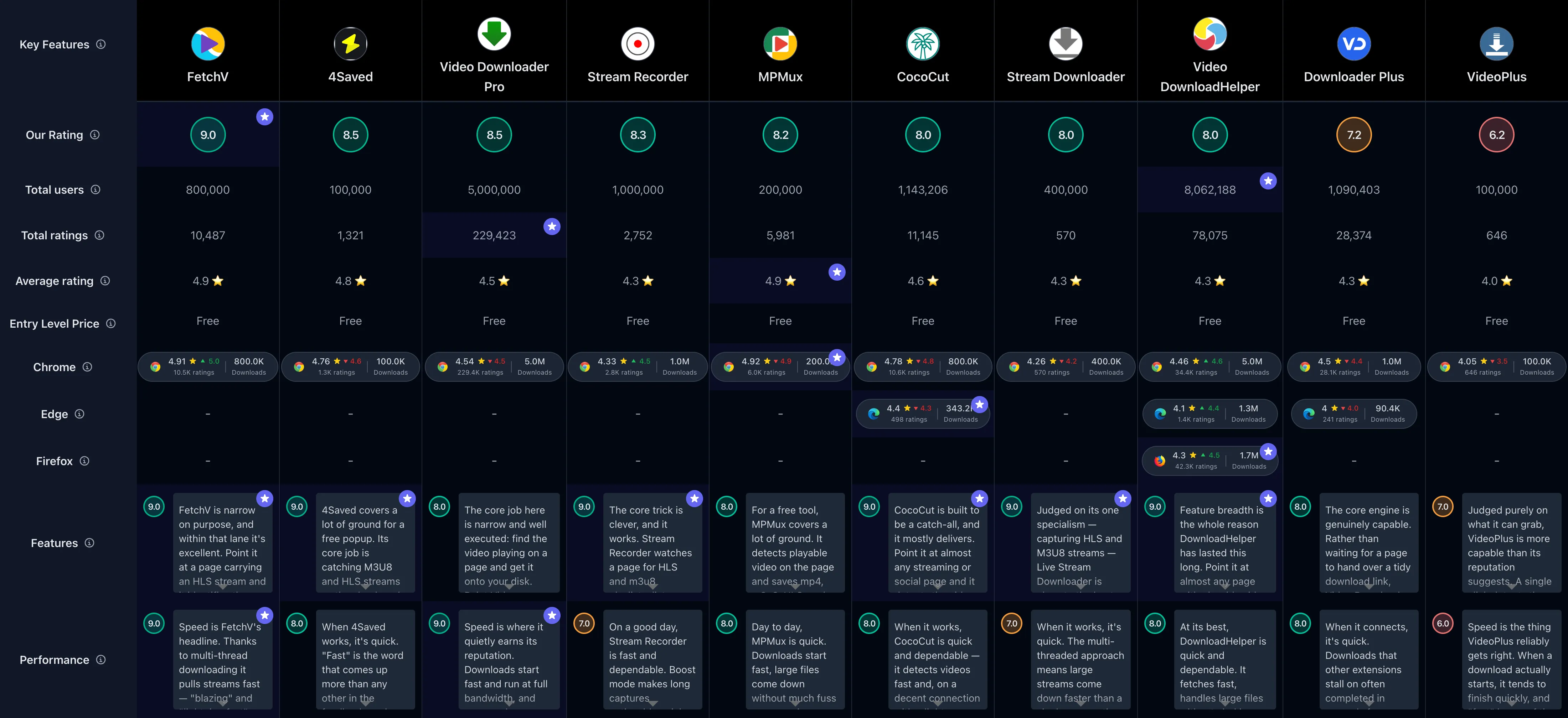
If you’d rather see everything side by side, here’s the comparison table of all Chrome video downloader extensions :
1. FetchV - Video Downloader for m3u8 & hls

FetchV is the tool people install after a string of others has failed them. It has 800,000 downloads and a 4.91/5 rating on the Chrome Web Store from 10,487 reviews, and the recent numbers run higher still — 4.96 across the last 100. For a free utility doing a fairly technical job, that combination is rare.
What earns it the top spot is its refusal to be everything at once. FetchV concentrates entirely on HLS and m3u8 streams — the fragmented format behind most modern video players — pulling hundreds of tiny segments in parallel and stitching them into one clean MP4. That puts it in the same lane as Stream Recorder and Live Stream Downloader, yet reviewers say it reaches streams that broad grabbers like Video DownloadHelper walk straight past. And it does all of it for free, with no caps, no watermarks, and no account.
Key Features
- HLS & m3u8 Detection – Sniffs out .m3u8 playlists on a page and locks onto the underlying HLS stream automatically
- Single-File MP4 Output – Downloads the hundreds of .ts fragments a stream is split into and stitches them back into one playable MP4
- Live Stream Capture – Records streams as they broadcast, not just finished videos already sitting on a server
- Blob & Recording Mode – Falls back to capturing blob-based or awkward-player video when no clean download link is exposed
- Multi-Thread Downloads – Pulls many segments in parallel, so an hour-long video finishes in a fraction of the time
- Quality Selection – Shows the resolutions a stream offers so you can grab the version you actually want
- Wide Site Coverage – Works on the large majority of streaming and course sites, including plenty that other tools quietly fail on
- Unlimited & Account-Free – No download limits, no sign-up, no ads getting between you and the file
Pros & Cons
Pros:
- Fast multi-threaded m3u8 downloads
- Completely free with no limits
- Grabs streams other tools miss
- Merges segments into single MP4
- Simple, no-account setup
- Handles live streams well
Cons:
- No custom file naming
- Wrong file creation timestamps
- Occasional failed or stuck downloads
- Cannot grab DRM-protected streams
- Interface can feel utilitarian
Who is this great for?
FetchV is perfect for anyone whose download problem involves the letters m3u8 — webinar attendees, online-course students who are entitled to rewatch material offline, and people archiving their own live broadcasts. If a page streams its video instead of serving a plain file, this is the first extension to try.
It’s especially great for users who’ve been burned by fake-free downloaders. There’s no paywall anywhere near the core feature, so the only cost is your bandwidth. Just know the limits going in: DRM-protected services stay locked, and Chrome’s policies keep YouTube off the table — deliberately so.
Compared to others
Within the stream-specialist niche, FetchV currently edges out Stream Recorder on reliability — Stream Recorder’s recent updates split some recordings into separate audio and video files, while FetchV keeps producing single playable MP4s. Live Stream Downloader matches it on detection but stumbles more often mid-download. And where an all-rounder like video downloader - CocoCut covers far more site types, FetchV digs deeper into the streams CocoCut occasionally can’t crack.
Detailed comparisons
FetchV vs Stream Recorder • FetchV vs Live Stream Downloader • FetchV vs CocoCut
Rating Summary
FetchV has 800,000 downloads on Chrome with a 4.91/5 rating from 10,487 reviews, and its last 100 reviews average higher still at 4.96 — the most consistently liked downloader in this list. Tooltivity gave FetchV - Video Downloader for m3u8 & hls a score of 9.00/10 . Check out the full review here .
2. Video Downloader for Chrome - M3U8 Video Downloader | 4saved

4Saved flies under the radar with 100,000 downloads, but the people who find it clearly like what they get: a 4.76/5 rating across 1,321 Chrome Web Store reviews. The recent picture softens only slightly, at 4.61 for the last 100 — still comfortably above where most downloaders land.
Its trick is range in a single popup. Where FetchV lives entirely in m3u8 territory, 4Saved pairs the same stream capture with genuinely dependable social-media grabs — Facebook, X, Instagram, TikTok, and Twitch — coverage that usually takes two or three separate tools to match. An in-popup preview and a resolution picker mean you see what you’re saving before you commit, and the whole thing runs without an account or a download limit.
Key Features
- M3U8 & HLS Stream Capture – Detects streaming playlists on the page and stitches them into a single saved video
- Social Media Downloads – Pulls clips from Facebook, X, Instagram, TikTok, and Twitch
- Broad Site Support – Also handles Vimeo, Dailymotion, Pinterest, and countless embedded players
- Resolution Picker – Lists the available quality options so you choose before downloading
- In-Popup Preview – Shows the detected video inside the extension before you commit
- No Download Limits – Unlimited saves with no daily cap, queue, or watermark
- Offline Viewing – Files download straight to your device for watching without a connection
- Completely Free – No account, no signup, and no paid tier gating the core features
Pros & Cons
Pros:
- Fast, efficient video downloads
- Reliable across most sites
- No download limits
- Strong social-media platform coverage
- Simple, beginner-friendly interface
Cons:
- VK downloads often unreliable
- Not every site supported
- Some files fail to play
- No YouTube or DRM downloads
- Occasional save-button glitches
Who is this great for?
4Saved is perfect for anyone who saves more social clips than raw streams. If your downloads mostly come from Facebook, X, Instagram, TikTok, or Twitch — your own posts, clips you’ve been given permission to reuse, material under open licenses — this covers all of them from one toolbar icon.
It’s especially great for users who want one free tool instead of three. The M3U8 capture handles the occasional streaming page, the social coverage handles everything else, and there’s no daily cap waiting to interrupt you. Heavy VK users are the exception; that’s the one platform where it misses too often.
Compared to others
4Saved occupies a sweet spot the bigger names leave open. video downloader - CocoCut casts a wider net but now caps free daily downloads, while 4Saved stays unlimited at no cost. Against FetchV it trades some stream-capture depth for far better social-platform reach. And compared with the freemium Video Downloader Plus , it simply never asks for money.
Detailed comparisons
4Saved vs CocoCut • 4Saved vs FetchV • 4Saved vs Video Downloader Plus
Rating Summary
100,000 downloads and a 4.76/5 rating from 1,321 reviews won’t headline any charts, but for a completely free tool with this much platform coverage the numbers are quietly excellent, and the last 100 hold at 4.61. Tooltivity gave Video Downloader for Chrome - M3U8 Video Downloader | 4saved a score of 8.50/10 . Check out the full review here .
3. Video Downloader Professional

Video Downloader Professional is the crowd favourite by sheer volume: 5 million downloads and a 4.54/5 rating built from a staggering 229,423 Chrome reviews. What’s striking is how little that number moves. The last 100 reviews average 4.49 — within a rounding error of a lifetime score accumulated over years, which is not something many tools this old can claim.
The appeal is focus. It skips the streaming arms race that FetchV and CocoCut compete in and simply nails ordinary web video: click the icon, see every downloadable file tagged by resolution, and grab the highest quality by default. Small touches carry it — files keep their original names instead of a random string of numbers, and a collect mode lets you queue clips for later. For the everyday “save this video” moment, it’s about as frictionless as the category gets.
Key Features
- One-Click Web Video Download – Detects the clip playing on a page and saves it in a single click
- Resolution Picker – Lists every available quality and grabs the highest version by default
- Original File Names – Saves with the real video title instead of a generic string of numbers
- Collect Mode – Add clips to a video list and come back to download them later
- Broad Site Coverage – Pulls standard MP4 and web video from a wide range of sites
- Blob & Embedded Capture – Catches embedded and blob videos that some tools walk straight past
- No Account, No Ads – Core downloading works instantly with no sign-up and nothing to dismiss
- Fast Local Downloads – Files save straight to your device at full speed
Pros & Cons
Pros:
- Simple one-click downloading
- Reliable across most websites
- Auto-grabs the highest resolution
- Keeps original video file names
- Completely free, no account
- Fast, full-speed downloads
Cons:
- No YouTube or social media
- Misses some m3u8 live streams
- Needs a page refresh sometimes
- Embedded ads clutter the list
- Pushes a paid desktop companion
Who is this great for?
Video Downloader Professional is perfect for anyone who wants downloading to be a two-click afterthought rather than a hobby. If your needs are standard web video — no live streams, no social platforms — its one-click flow and automatic best-quality selection make it the least demanding tool in this list.
It’s especially great for users who save clips in batches. Real file names and the collect mode turn what’s normally a rename-everything chore into something organized from the start. Just don’t expect it to chase m3u8 live streams; that’s simply not its job.
Compared to others
Against the veteran Video Download Helper , Video Downloader Professional trades site breadth for a free tier with no rate limit — a trade that got a lot more interesting after DownloadHelper started throttling free downloads. video downloader - CocoCut beats it on HLS streams and site coverage but caps free daily use. And next to VideoPlus - Free Video Downloader , it’s the tool that actually delivers the “free” its rival only promises.
Detailed comparisons
Video Downloader Pro vs Video DownloadHelper • Video Downloader Pro vs CocoCut • Video Downloader Pro vs VideoPlus
Rating Summary
Five million downloads, a 4.54/5 rating from 229,423 reviews, and a recent average of 4.49 that barely differs from it — few tools this old stay this steady. Tooltivity gave Video Downloader Professional a score of 8.50/10 . Check out the full review here .
4. Stream Recorder - HLS & m3u8 Video Downloader

Stream Recorder has passed 1 million downloads on the Chrome Web Store, where it holds a 4.33/5 rating across 2,752 reviews. The recent trend points up rather than down, at 4.45 for the last 100 — though we’ll be honest about the rough patch hiding inside that number.
Like FetchV, this is a pure HLS specialist, and its core trick is genuinely good: it reassembles fragmented .ts segments into one MP4 without re-encoding, so quality is preserved exactly. Two touches stand out — you can close the source tab and let a live recording keep running in the background, and boost mode fetches segments in parallel to speed up long captures. What keeps it a step behind FetchV is a recent regression that splits some recordings into separate audio and video files you then have to re-join yourself.
Key Features
- Automatic Stream Detection – Spots every HLS and m3u8 source on a page as it loads, no URL hunting
- In-Browser MP4 Export – Reassembles the fragmented .ts segments into one MP4 without re-encoding, so quality is preserved
- Live Stream Recording – Captures ongoing broadcasts, and keeps running even after you close the source tab
- Boost Mode – Fetches segments in parallel to noticeably speed up long downloads
- Title-Aware Saving – Names the file after the source page so your downloads stay organised
- No Manual Merging – Replaces the old routine of grabbing hundreds of segments and stitching them by hand
- Account-Free & Ad-Light – Works straight after install with no sign-up or paywall
- Lightweight Footprint – A tiny install that does all its work locally in the browser
Pros & Cons
Pros:
- Auto-detects every on-page stream
- Saves HLS/m3u8 as clean MP4
- Completely free, no subscription
- Fast boost download mode
- Simple, uncluttered interface
- Captures live streams in-browser
Cons:
- Recently splits audio and video
- Can’t grab DRM or YouTube
- Can spawn duplicate stream entries
- Occasional failed or partial downloads
- No subtitle downloads
Who is this great for?
Stream Recorder is perfect for anyone who records live broadcasts they’re entitled to keep — webinars, streams of their own events, course sessions. The ability to start a capture and close the source tab while it keeps running is a small freedom no one gives back once they’ve had it.
It’s especially great for users who want quality preserved bit-for-bit, since the MP4 export skips re-encoding entirely. If you hit the current audio-video split issue on your sites, though, be prepared to re-join files — or to keep a second stream tool installed until a fix lands.
Compared to others
FetchV is the obvious head-to-head, and right now FetchV wins on output reliability while Stream Recorder counters with background live recording. Live Stream Downloader hunts streams in stranger places — blob URLs, buried embeds — but finishes downloads less dependably. And Video Downloader - MPMux makes a strong alternative if you want stream capture plus ordinary MP4 grabbing in one simpler package.
Detailed comparisons
Stream Recorder vs FetchV • Stream Recorder vs Live Stream Downloader • Stream Recorder vs MPMux
Rating Summary
Stream Recorder has 1 million downloads on Chrome with a 4.33/5 rating from 2,752 reviews, rising to 4.45 across the last 100 — a specialist that still delivers, current rough edges included. Tooltivity gave Stream Recorder - HLS & m3u8 Video Downloader a score of 8.33/10 . Check out the full review here .
5. Video Downloader - MPMux

On raw store rating, nothing in this list beats MPMux: a 4.92/5 average across 5,981 Chrome reviews, earned on a comparatively modest 200,000 downloads. And it’s no legacy halo either — the last 100 reviews average 4.91, so recent users are just as satisfied as the ones who found it years ago.
MPMux sits neatly between the specialists and the all-rounders. It saves mp4, m3u8, HLS, and live streams as one finished MP4, shows you the available resolutions before you commit, and falls back to a built-in record mode when a site blocks a direct grab — a spread that neither FetchV’s narrow focus nor CocoCut’s capped free tier quite matches. It ranks below the bigger names here mostly on ecosystem: it’s a smaller extension from a less-established developer, with thinner privacy documentation than we’d like.
Key Features
- Broad Format Support – Saves mp4, m3u8, HLS, and live streams as a single ready-to-play MP4
- On-Page Video Detection – Automatically spots playable video on the current tab, no URL hunting required
- Resolution Picker – Lists the available qualities so you choose before the download begins
- Built-In Record Mode – Captures playback as a fallback on sites that block a direct grab
- Handles Large Files – Pulls multi-hundred-megabyte videos quickly and without stalling
- No Account Needed – Works the moment it’s installed, with no sign-up or login
- Free, No Usage Limits – Full functionality with no caps on how much or how often you download
- Works Where Others Fail – Reliably grabs clips that simpler downloaders miss
Pros & Cons
Pros:
- Works when other downloaders fail
- Fast downloads, even large files
- Clean, simple, no-clutter interface
- Free with no usage limits
- Handles m3u8, HLS and live streams
- Detects video resolutions before downloading
Cons:
- No YouTube or DRM downloads
- Occasional breakage after site changes
- Record mode sometimes shows blank pages
- Light ads in the interface
- No subtitle downloading
Who is this great for?
MPMux is perfect for anyone who wants one free tool covering both ordinary web video and the trickier m3u8 and HLS streams, without learning two different workflows. Its automatic detection means you never copy stream URLs or dig through network tabs — you just pick a resolution and go.
It’s especially great for users who have already worked through a pile of downloaders that didn’t stick. The recurring theme in its reviews is exactly that journey, and the near-identical all-time and recent ratings suggest people who land here tend to stay. A few light ads are the entire price.
Compared to others
Against FetchV , MPMux is less surgical on pure m3u8 work but more forgiving across the everyday web. It’s currently the steadier pick over Stream Recorder , which is wrestling with an audio-video split regression MPMux doesn’t share. And where video downloader - CocoCut counters with broader site coverage, CocoCut’s free tier caps daily downloads while MPMux stays unlimited.
Detailed comparisons
MPMux vs FetchV • MPMux vs Stream Recorder • MPMux vs CocoCut
Rating Summary
A 4.92/5 rating from 5,981 reviews with a 4.91 across the last 100 is the most consistent scorecard in this comparison, even from a smaller install base of 200,000. Tooltivity gave Video Downloader - MPMux a score of 8.17/10 . Check out the full review here .
6. video downloader - CocoCut

CocoCut has built one of the larger followings in this category, with 800,000 Chrome downloads and a strong 4.78/5 rating across 10,647 reviews — enthusiasm that holds in the recent data at 4.76 for the last 100. Its Edge build adds another 343,206 downloads, though that audience is noticeably cooler on it, at 4.4 stars from 498 reviews.
Breadth is the pitch. CocoCut pulls video and audio from thousands of sites, reassembles HLS and M3U8 streams, records live broadcasts, and screen-captures as a fallback when a stream refuses to download — a wider toolkit than either FetchV or Video Downloader Professional carries. Its calling card is stubbornness: reviewers keep reporting that it clears pages that stopped other extensions cold. What drags the score below the tools above it is the free tier, which now caps daily downloads and throttles speed on large files.
Key Features
- Downloads From Thousands of Sites – Pulls video and audio from most streaming and social pages in a single click
- HLS / M3U8 Stream Capture – Reassembles fragmented .m3u8 stream chunks into one playable MP4
- Recording Mode – Screen-records a stream as a fallback when it refuses to download directly
- Live Broadcast Downloading – Saves live streams while they are still playing
- Quality Selection – Choose the resolution you want and save it as a standard MP4
- In-Popup Preview – Play a detected clip inside the extension to confirm you’re grabbing the right file
- Auto-Named Files – Saves each download using the original video title instead of a random string
- Audio & Music Extraction – Grab just the audio track from a page when you don’t need the video
Pros & Cons
Pros:
- Downloads from thousands of sites
- Grabs HLS/M3U8 streams reliably
- Simple, one-click, easy to use
- Works where other downloaders fail
- Recording mode as a fallback
- Free to install, no ads
Cons:
- Free tier caps daily downloads
- Throttled speed without Pro
- No YouTube (Chrome policy)
- Occasional corrupted or out-of-sync files
- Slow, unresponsive customer support
Who is this great for?
CocoCut is perfect for anyone who wants one downloader for everything — regular web video, streams, live broadcasts, and audio extraction — and only saves a handful of files a day. Inside the free tier’s daily cap, it’s one of the most capable grabbers you can install at no cost.
It’s especially great for users who keep meeting pages other tools give up on; the recording-mode fallback means there’s almost always a path to the file. Volume downloaders should do the math on the Pro subscription first, though — and read up on the billing complaints before subscribing.
Compared to others
CocoCut’s natural rival is Video Download Helper : both are veteran all-rounders, and both have moved to limiting free use, so the choice often comes down to which handles your specific sites better. Against Video Downloader Plus it offers a similar breadth with a friendlier free tier. And for pure m3u8 depth, FetchV remains the specialist CocoCut can’t quite match.
Detailed comparisons
CocoCut vs Video DownloadHelper • CocoCut vs Video Downloader Plus • CocoCut vs FetchV
Rating Summary
With over 1.1 million combined installs across Chrome and Edge and a 4.78/5 Chrome rating from 10,647 reviews, holding 4.76 over the last 100, CocoCut has earned its all-rounder reputation. Tooltivity gave video downloader - CocoCut a score of 8.00/10 . Check out the full review here .
7. Live Stream Downloader

Live Stream Downloader has crossed 400,000 downloads on the Chrome Web Store, where it holds a 4.26/5 rating across 570 reviews, with the last 100 a little lower at 4.15. Those aren’t headline numbers, but stream capture is a brutal niche to score well in — players change constantly, and every change breaks somebody’s download.
Its reason to exist is reach. The detection engine digs video out of blob URLs and embedded players that other extensions don’t even register, then pulls the fragments down in parallel threads and merges them automatically. More than one reviewer reports it was the only tool that could grab a clip at all. The trade-offs are real: downloads can stall with no way to resume, there’s no built-in converter, and the bare-bones interface makes you guess which of several detected feeds is the right one.
Key Features
- M3U8 & HLS Detection – Automatically spots live and archived HLS stream feeds playing on a page
- Multi-Threaded Downloading – Fetches stream fragments in parallel so large videos save faster
- Automatic Merging – Stitches the downloaded segments into a single continuous file for you
- Quality Selection – Lets you choose the resolution or bitrate when a site offers several
- Deep Page Detection – Catches videos hidden in blob URLs and embedded players that rivals miss
- Saves Straight to Disk – Writes files directly to your computer with no cloud middleman
- Audio & Subtitle Streams – Can grab separate audio and subtitle tracks when a feed exposes them
- Completely Free – No account, no ads, and no paid tier to unlock features
Pros & Cons
Pros:
- Detects streams other tools miss
- Fast multi-threaded downloads
- Simple, no setup needed
- Completely free, no ads
- Merges stream fragments automatically
Cons:
- Downloads can stall or fail
- No resume after interruptions
- No built-in format conversion
- Interface can feel bare
Who is this great for?
Live Stream Downloader is perfect for anyone who occasionally meets a stream nothing else can touch. As the emergency tool you keep installed for stubborn blob URLs and deeply embedded players, it earns its slot many times over — especially since it costs nothing and shows no ads.
It’s especially great for users comfortable with a little roughness: picking the right feed from an unlabelled list, retrying a stalled download, converting a file afterward. For a one-shot live event you can’t re-record, we’d want a steadier primary tool and this as the backup.
Compared to others
Among the stream specialists, Stream Recorder offers the smoother happy path and background live recording, while Live Stream Downloader wins on sheer detection reach. FetchV beats both on finishing what it starts — its multi-threaded downloads fail far less often. And if you need everyday MP4 and social-site coverage on top of streams, video downloader - CocoCut is the broader companion.
Detailed comparisons
Live Stream Downloader vs Stream Recorder • Live Stream Downloader vs FetchV • Live Stream Downloader vs CocoCut
Rating Summary
400,000 downloads, a 4.26/5 rating from 570 reviews, and 4.15 across the last 100 mark this out as a dependable niche pick rather than a mass-market star. Tooltivity gave Live Stream Downloader a score of 8.00/10 . Check out the full review here .
8. Video Download Helper

Video Download Helper is the only extension here with a serious presence on all three browsers: 5 million Chrome downloads at a 4.46/5 rating from 34,413 reviews, 1,724,362 downloads on Firefox at 4.3 stars from 42,300 reviews, and 1,337,826 more on Edge at 4.1 stars from 1,362. The Chrome trend runs ahead of its own history, at 4.56 across the last 100.
This is the category’s veteran, and the range shows it: support for well over a thousand sites, capture of adaptive DASH, HLS, and MPD streams, and conversion to MP4, MKV, WebM, or MP3 through a companion app. Renaming files and picking a folder before a download starts is the kind of touch younger rivals like Video Downloader Professional still haven’t copied. So why eighth? A recent freemium shift now rate-limits free downloads after a grab or two — a change that landed without warning and still colours its newest reviews.
Key Features
- Broad Site Coverage – Detects and grabs video from well over a thousand websites where lighter tools come up empty
- Adaptive Stream Capture – Pulls DASH, HLS, and MPD streams, not just plain MP4 files
- Built-in Format Conversion – Turns captures into MP4, MKV, WebM, or MP3 through a companion app
- One-Click Detection – Automatically spots playable media on a page and offers it from the toolbar
- Rename Before Saving – Edit the filename and choose the destination folder before the download starts, with smart-naming rules
- Download Side Panel – A dedicated sidebar tracks active and finished downloads at a glance
- Quality Selection – Pick the resolution you want, up to the highest the source provides
- Audio-Only Downloads – Save just the soundtrack as an MP3 when you don’t need the picture
Pros & Cons
Pros:
- Works on over a thousand sites
- Reliable one-click media detection
- Rename and pick folder before saving
- Handles adaptive HLS and DASH streams
- Fast, often highest-quality downloads
Cons:
- Recent paywall limits free downloads
- No YouTube on Chrome build
- Can’t download DRM-protected video
- Conversion needs a companion app
- Occasional broken downloads after updates
Who is this great for?
Video Download Helper is perfect for anyone who downloads regularly enough to justify a license — by most accounts a fair one-off cost rather than a heavy subscription — and wants the widest site coverage available. It’s also the natural pick for Firefox users, where it’s been the standard for years.
It’s especially great for users who care about what happens after the download: format conversion, audio-only saves, tidy filenames, and a side panel tracking every job. Occasional downloaders should test the rate-limited free tier honestly before deciding — that’s where the recent frustration lives.
Compared to others
The trade against Video Downloader Professional is now clean: DownloadHelper offers far broader coverage and conversion, Video Downloader Professional offers unlimited free use. video downloader - CocoCut is its closest all-rounder rival, with both now limiting free tiers — pick by which handles your sites. And against the freemium Video Downloader Plus , DownloadHelper’s one-time license is the friendlier way to pay.
Detailed comparisons
Video DownloadHelper vs Video Downloader Pro • Video DownloadHelper vs CocoCut • Video DownloadHelper vs Video Downloader Plus
Rating Summary
More than 8 million combined installs across Chrome, Firefox, and Edge, a 4.46/5 Chrome rating from 34,413 reviews, and a recent Chrome average of 4.56 keep this veteran firmly relevant. Tooltivity gave Video Download Helper a score of 8.00/10 . Check out the full review here .
9. Video Downloader Plus

Video Downloader Plus has 1 million Chrome downloads and a solid 4.50/5 rating across 28,133 reviews, though the current build is landing a touch below that history — 4.38 for the last 100.
Technically, there’s a lot to like. It inspects HLS, DASH, and MP4 streams directly, saves at resolutions up to 8K where a site offers them, and — unlike VideoPlus below — merges separate audio and video tracks into one finished file automatically. So why the 7.17? The freemium wall. Full HD and above, MP3 extraction, and unlimited daily downloads all sit behind a subscription the “free” store listing doesn’t advertise, and the premium account ties your activity to the developer’s service — a bigger data surface than the local-only tools higher up this list.
Key Features
- Stream Detection – Finds HLS, DASH, and MP4 sources that most pages try to keep out of reach
- Up to 8K Downloads – Grabs the highest resolution a site actually offers
- Audio + Video Merge – Stitches separate tracks into one playable file automatically
- Format Conversion – Save clips in the container you need rather than the raw stream
- Live Stream Recording – Capture broadcasts as they play, not just finished videos
- Resolution Picker – Choose the exact size and quality before you download
- Preview Before Saving – Play a detected clip to confirm it’s the one you want
- One-Click Grabbing – Trigger a download straight from the toolbar on any supported site
Pros & Cons
Pros:
- Detects streams other tools miss
- Fast, reliable downloads
- Resolution choice up to 8K
- Simple, intuitive interface
- Merges audio and video
Cons:
- Best features behind paywall
- No YouTube or DRM
- Detection fails on some sites
- Download flow can confuse
Who is this great for?
Video Downloader Plus is perfect for anyone who needs maximum resolution and doesn’t mind paying for it — if 4K or 8K saves of your own footage matter, this and its automatic audio-video merging are hard to beat in a browser extension.
It’s especially great for users who treat the free tier as an extended trial: standard-quality clips cost nothing, so you can verify it handles your specific sites before a single payment. Go in expecting a genuinely free unlimited tool, though, and you’ll join the reviewers who felt blindsided.
Compared to others
If free matters most, Video Downloader Professional does the everyday job without ever reaching for your wallet. video downloader - CocoCut offers similar breadth with a more generous entry tier, while Video Download Helper counters the subscription model with a one-time license and wider site support. Video Downloader Plus answers all three with the highest resolution ceiling of the group.
Detailed comparisons
Video Downloader Plus vs Video Downloader Pro • Video Downloader Plus vs CocoCut • Video Downloader Plus vs Video DownloadHelper
Rating Summary
A million Chrome installs and a 4.50/5 rating from 28,133 reviews prove the engine is good; the freemium wall, and a recent average easing to 4.38, are what keep the score down. Tooltivity gave Video Downloader Plus a score of 7.17/10 . Check out the full review here .
10. VideoPlus - Free Video Downloader

VideoPlus has found an audience — 100,000 downloads and a 4.05/5 rating across 646 Chrome reviews — but the direction of travel is the problem. Its last 100 reviews average 3.47, the steepest recent drop in this entire comparison, and that slide is the story of this extension.
We’ll give it its due first: the detection engine is genuinely wide-ranging, handling HLS and DASH streams, and users report it finding video on obscure pages where every other tool came up empty. That last-resort reach is why some users swear by it. Everything wrapped around the core lets it down — a free tier capped at roughly one download per hour despite “Free” sitting in the product name, files that too often arrive as separate audio and video tracks, and downloads that stall with no clear feedback. Our 6.17 reflects exactly that gap between capability and experience.
Key Features
- One-Click Capture – Detects the video or audio in your tab and saves it in a single click
- Broad Site Coverage – Finds media on mainstream and lesser-known sites, including pages many tools skip
- HLS and DASH Streams – Handles fragmented m3u8 and DASH sources, not just direct MP4 links
- Resolution Options – Lists the available quality levels so you can choose the file size you download
- Built-In Preview – Plays the detected file inside the popup before you commit to saving it
- Audio Extraction – Pull just the audio track when the sound is all you need
- Cross-Browser Support – Runs across Chromium browsers including Chrome, Edge, Brave, Opera, and Vivaldi
- Reliable Fallback – Often succeeds on stubborn pages where downloaders like Video DownloadHelper come up empty
Pros & Cons
Pros:
- Works when rival downloaders fail
- Fast downloads on supported sites
- Simple one-click operation
- Broad site and stream coverage
- Runs across Chromium browsers
Cons:
- Free tier caps hourly downloads
- Not truly free to use
- Downloads audio and video separately
- Unreliable, sometimes stalls mid-download
- Login breaks after Chrome updates
Who is this great for?
VideoPlus is perfect for anyone who needs a last-resort net rather than a daily workhorse. When your usual downloader reports “no video found” on a page you know is playing one, this is the backup that surprisingly often catches the file.
It’s especially great for users who save at most a clip or two per session, since the hourly cap never bites at that pace. Anyone downloading in volume, or anyone who took the “Free” in the name at face value, will run into the paywall fast — and the paid tier’s own reliability record doesn’t make that an easy upgrade to recommend.
Compared to others
For honest everyday free downloading, Video Downloader Professional is the recommendation VideoPlus can’t counter. video downloader - CocoCut delivers merged, playable files far more consistently, and Video Download Helper brings vastly more site coverage for a fairer price. VideoPlus’s one real card against all three is its knack for the obscure page nothing else can read.
Detailed comparisons
VideoPlus vs Video Downloader Pro • VideoPlus vs CocoCut • VideoPlus vs Video DownloadHelper
Rating Summary
The numbers tell an honest story: 100,000 downloads and a decent 4.05/5 lifetime rating from 646 reviews, undercut by a 3.47 average across the last 100. Tooltivity gave VideoPlus - Free Video Downloader a score of 6.17/10 . Check out the full review here .
Final Thoughts
Looking at all 10 of these extensions side by side, the pattern is hard to miss: the tools that pick one hard problem beat the ones that promise everything. FetchV takes the top spot at 9.00/10 for exactly that reason. It turns fragmented HLS and m3u8 streams into clean single MP4s, free, with no account and no cap — and a 4.91 rating from 10,487 reviews, running at 4.96 across the last 100, says its users agree. Honourable mention to MPMux , whose 4.92 store rating is technically the highest in the list.
A second pattern shows up across the whole field: in this category, the word “free” does most of the lying. VideoPlus caps you at roughly one download an hour with “Free” in its own name, and its last 100 reviews have fallen to 3.47 because of it. Video Downloader Plus keeps Full HD and above behind a subscription, and both CocoCut and Video Download Helper added limits to tiers that used to be open. The download engines are mostly fine. The billing is where the one-star reviews come from.
For specific needs, the field spreads out nicely. 4Saved is the free pick for social clips from Facebook, X, TikTok, and Twitch, while Video Downloader Professional makes everyday web video a genuine one-click job at no cost. Video Download Helper is still the coverage king across Chrome, Firefox, and Edge if you’ll pay its one-time license. Stream Recorder is the one for long live captures you want to start and walk away from, and Live Stream Downloader is the backup to keep installed for the buried embed nothing else can see. If you’d rather not learn two tools, MPMux covers stream capture and ordinary MP4 grabbing in one popup.
Every extension here installs free, so test your own sites before you pay for anything — the disappointments in this category live behind the paywall, not in the download engine. And stay on the right side of the line: none of these touch YouTube or DRM-protected services, and what else you may keep depends on the site’s terms and your local law. Browse the full comparison of all Chrome video downloader extensions to weigh them side by side. And if this format is useful, I have done the same comparison for bookmark manager extensions and for language learning extensions .