


Web Highlights
Web Highlights on LinkedInWeb Highlights YouTube channelWeb Highlights on Twitter
Open App
  • Extensions
    • PDF & Web Highlighter
    • Reader Mode + Notes
    • YouTube Highlighter
    Free Tools
    • Free Online Highlighter
    • Free Online PDF Highlighter
    • Free Online Reader
    • YouTube Highlighter
    • YouTube AI Summarizer
    • Website AI Summarizer
    • Free Notes Highlighter
    • Flashcard Generator
    • Website Flashcard Generator
    • YouTube Flashcard Generator
    • PDF Flashcard Generator
    • Kindle Flashcards
    • Import Kindle Highlights
    • Flashcard Learning
    • Web App
    Extensions
    • PDF & Web Highlighter
    • Reader Mode + Notes
    • YouTube Highlighter
    Free Tools
    • Free Online Highlighter
    • Free Online PDF Highlighter
    • Free Online Reader
    • YouTube Highlighter
    • YouTube AI Summarizer
    • Website AI Summarizer
    • Free Notes Highlighter
    • Flashcard Generator
    • Website Flashcard Generator
    • YouTube Flashcard Generator
    • PDF Flashcard Generator
    • Kindle Flashcards
    • Import Kindle Highlights
    • Flashcard Learning
    • Web App
    • Blog
    • Features
    • Documentation
    • Release Notes 🚀
    • FAQ
    • Tutorials
    • Use Cases
    • Feature Requests
    • Integrations
    • Pro Tips
    • Discover
    • Wall of Love ❤️
    • User Interviews
    • Blog
    • Features
    • Documentation
    • Release Notes 🚀
    • FAQ
    • Tutorials
    • Use Cases
    • Feature Requests
    • Integrations
    • Pro Tips
    • Discover
    • Wall of Love ❤️
    • User Interviews
  • About
  • Pricing
  • Web Highlights on LinkedInWeb Highlights YouTube channelWeb Highlights on Twitter

Highlight any website

Select text on any website or PDF and click the highlighter icon. Your highlights persist even after page refresh.

Add to Chrome - it's free

Add to Edge - it's free

Add to Firefox - it's free

4.8

(300,000+ users)

"Best highlighting tool I've tried. Highly recommend and I love the variety of colors readily available :)"

Vivaan Jain
Vivaan Jain
Tooltivity - Tested and reviewed by TooltivityWeb Highlights - PDF & Web Highlighter - Productivity Highlighter for any Website or PDF.  | Product Hunt
300K+
Active users
40M+
Highlights created
4M+
Websites highlighted

Highlight any Website or PDF 🌈

Our Chrome Extension is so simple that people can't help but fall in love with it. Just install the extension, and you can begin highlighting right away. It's free, and there's no need to sign up – it's as simple as that!

Add to Chrome - it's free

Add to Edge - it's free

Add to Firefox - it's free

Create Notes & Tags ✏️ 🏷️

Take your research to the next level with effortless note-taking and tagging. Capture insights, organize content, and seamlessly combine highlights with personalized notes and tags.

AI-Powered Summaries 🚀

Create AI-powered summaries of your highlights and web pages with the AI built into your browser. It runs on your device, so your pages stay with you. Learn more here.

Chat with Websites, PDFs, or YouTube videos 💬

Have intelligent conversations with any website, PDF document, or YouTube video. Ask questions, get explanations, and dive deeper into any content. Learn more about our AI chat here.

Access from any device 📱

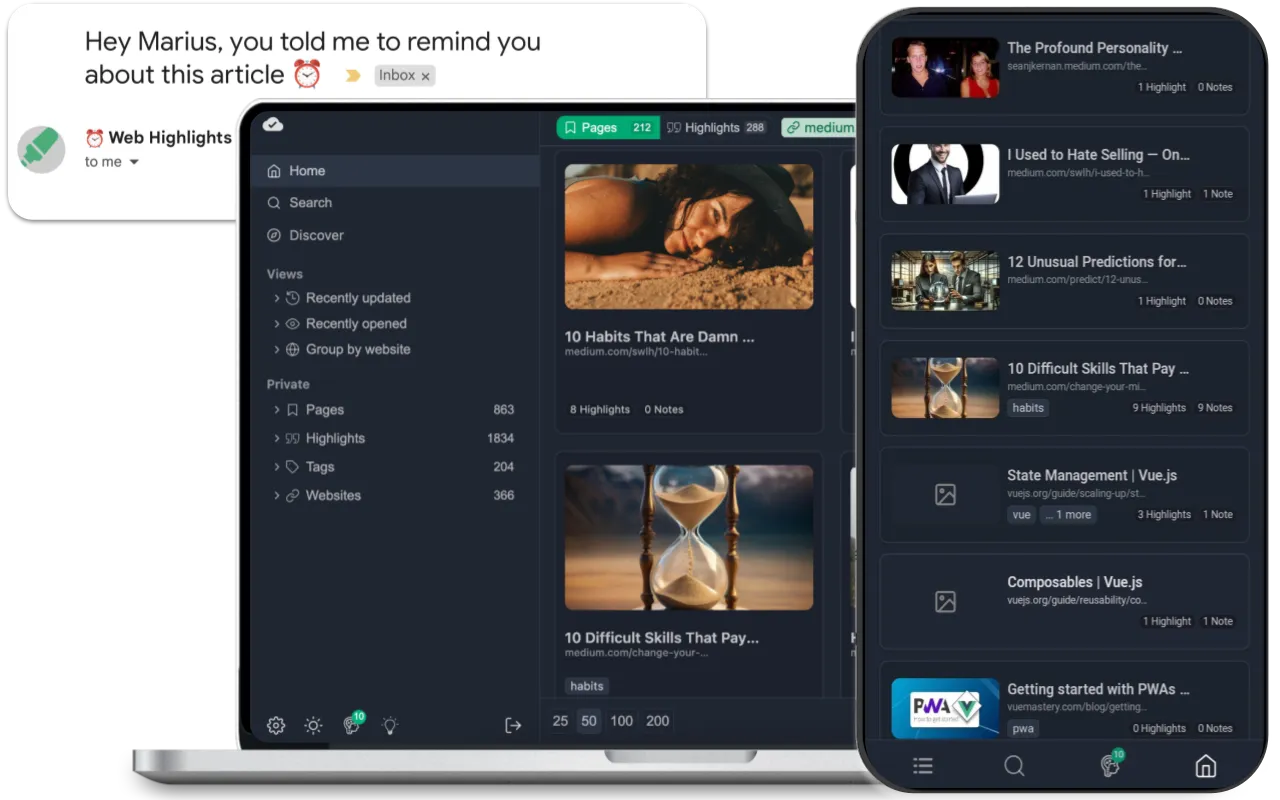
Highlight offline without an account. Unlock premium features by creating one. Premium and Ultimate plans come with a 7-day trial, offering a beautiful overview of all highlighted pages. Enjoy features like reminders, unlimited learning sessions, and more on any device with our web app.

Web Highlights dashboard showing highlighted content organization with tags, notes, and search functionality

Export to popular platforms 📑

Easily transfer your research to Markdown editors such as Notion, Obsidian, and other PKM tools with the 'Export to Markdown' feature. This way, you can keep all your research conveniently stored in the centralized tool of your preference. Additionally, you can export it to PDF or HTML files.

Reader Mode for Chrome 📖

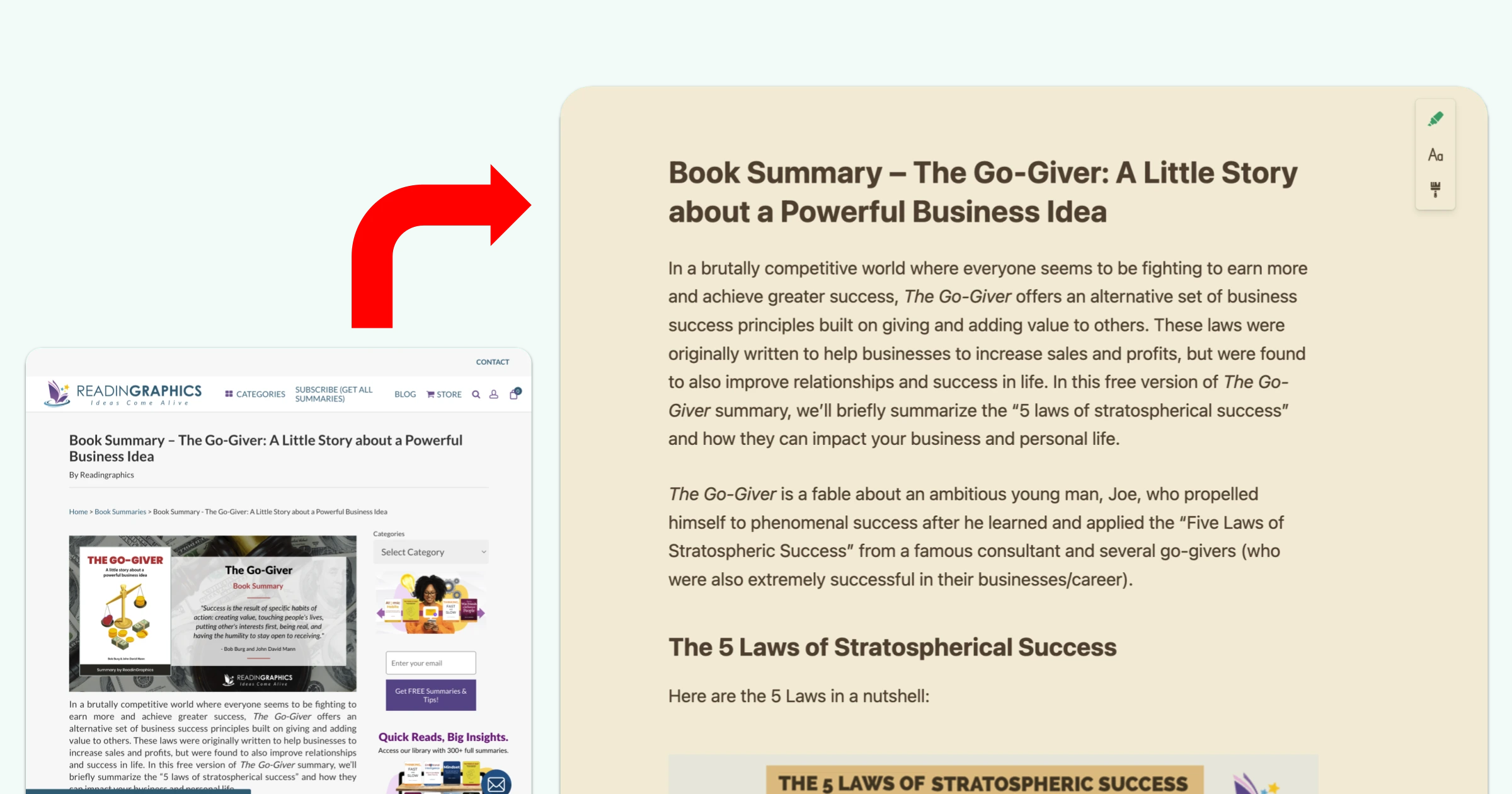
Save any webpage in a clean, distraction-free reader view. Read offline, customize fonts and colors, and keep a permanent copy of your research — even if the original page disappears. Learn more about our reader mode here.

Web Highlights reader mode showing a clean, distraction-free reading view with customizable fonts and colors

Highlight & Annotate YouTube Videos

Highlight any YouTube video transcript and take notes on it while watching. YouTube Highlighting is perfect for studying long-form content videos like podcasts, Ted-Talks, and more.

Save Bookmarks 🔖

Use our web clipper to save any page as a bookmark. Add tags to easily find your bookmarks later in the sidebar or via the web app from anywhere. Learn more about our web clipper here.

Loved by 300,000+ users ❤️

Students, online readers, and those looking for better digital experiences love us. With a 4.8 of 5 stars rating from over 5,000+ reviews, we're the top-rated PDF & Web Highlighter in the Chrome Store. Our users' testimonials are the best social proof we can get!

Add to Chrome - it's free

Add to Edge - it's free

Add to Firefox - it's free

Chrome Web Store Logo

4.8

(5,000+ ratings)

"SUCH A LIFESAVER! Lets me highlight and annotate pdfs for my college classes without having to download everything to my computer. I just copy the link of all my highlights in a word doc and paste it into the search bar whenever I need to access those notes again. …"

Thea Allesa
Thea Allesa

"I really love Web Highlights. It has cemented itself into my workflow. I am one of those people who could be classed as a student of life. I follow topics I am interested in and gather knowledge from all over the internet. …"

Susan Pearson - Creative Fibro

"The Web Highlights Tool is incredible! It greatly assists me with reading, learning, and organizing content from websites!"

Natural Liberty
Natural Liberty

"Very useful for research and additional reading; it has great features like tags or notes under the highlighted parts: i absolutly recommend!"

Martyna Kubas
Martyna Kubas

"Awesome extension. Easy to use with shortcut keys, and clear highlights. I love the function exporting to Notion the most! Helps organize my notes"

Dorothy Cheung Utsg
Dorothy Cheung Utsg

"Web-Highlights is an outstanding tool for capturing and organizing key information from web pages. Its intuitive interface and seamless syncing make it perfect for research, project documentation, and productivity workflows. …"

Shahid Hussain
Shahid Hussain

"I love this tool! It has a great selection of colors, helps with bookmarking, adding notes, tags, and importing data to Kindle. I really enjoy making notes with it. I'm currently working on my thesis, and it helps me organize different topics that I can later add to my study. …"

AASMA
AASMA

"Fantastic app. I am a researcher at heart and read voraciously. The Chrome extension allows me to highlight any part of any page. Or I can highlight just the title for use as a bookmarking system. …"

Steve Diehl
Steve Diehl

"I have been looking for a good annotation app and came across this extension, which has changed my reading experience. Now I can highlight, annotate, and record my reactions as I read, making it feel like a conversation with the book. …"

Hassan Abbas
Hassan Abbas
PreviousNext
Visit our Wall of Love ❤️

Connect your favorite tools 🔗

Export highlights to Notion, Capacities, and Markdown — or import from Pocket, Weava, Diigo, and more. The same integrations you configure in Settings in the app.

See all Integrations

Why Law Students love us

Portrait of Juliene Ebreo

The advanced highlighting feature is incredibly helpful

- Juliene Ebreo

Law Student from Philippines

Juliene, how long have you been studying and which areas are you focusing on?

I'm currently on my first year second semester Juris Doctor program and I'm expecting it to finish in 4-5 years hopefully. I still have a long way to go, and I will be using Web Highlights during the whole program [...]. Juris Doctor is the entry level program for those who want to be lawyers. So we will be studying all kinds of laws in

Read the full interview

Free Online Tools 🛠️

Try our collection of free online tools designed to enhance your productivity. Highlight any website without installing anything, analyze text content, and more. All tools are free to use with no registration required.

Explore Free Tools

Popular Tools

Flashcard Learning

Study ready-made flashcard sets with free spaced repetition — no account needed.

Highlight Website

Highlight any webpage instantly without installing anything

PDF Highlighter

Upload a PDF and highlight it in your browser — no install, no sign-up.

Highlight YouTube Video

Highlight any YouTube video instantly without installation.

Focused Reader Mode

Open any URL in a focused reader mode, with no distractions.

Highlight in Notes

Highlight any text by copying and pasting it into the tool.

View All Tools →

Pricing Plans

Most of Web Highlights is free. Create unlimited highlights, bookmarks, notes, and tags. Backup your data and export research to platforms like Notion. For more benefits, subscribe to Premium or Ultimate plans to sync highlights to the cloud and access them in our webapp.

View Pricing Plans

Frequently Asked Questions

What is Web Highlights?
Web Highlights is a browser extension I built to make it super easy to highlight and add notes to any website or PDF. It's perfect for reading, research, or just saving stuff you don't want to forget. It's one of the top Chrome extensions for productivity, and you don't even need to sign up to use it. Just install it and start highlighting. You can use different colors, add tags, and send your notes to second brain apps like Notion, Obsidian, or Capacities.
How does the page marker extension work?
It's simple: Install the extension, or use one of our free online tools, select any text on a webpage or PDF, and you'll see a popup to highlight it. You can also right-click or use keyboard shortcuts if you prefer. Add notes, create tags, and everything is saved automatically. When you come back to the page, your highlights are still there. It's like having a digital marker for the whole web.
Can I highlight and annotate PDFs in Chrome?
Yes! Web Highlights works with both online and local PDFs. Here's how:
  • For online PDFs: Simply open them in your browser and click the "Highlight this PDF" popup or click the extension icon.
  • For local PDFs:
    1. Open the PDF in Chrome (right-click > Open with > Chrome)
    2. Allow Web Highlights to access file URLs (one-time setup)
    3. Click the extension icon or "Highlight this PDF" popup
Once loaded in the Web Highlights viewer, you can highlight text, add notes, and organize with tags just like on websites. The PDF viewer makes it easy to read and annotate your documents and to take notes on the go. Read our complete guide to PDF highlighting →
Is Web Highlights really free?
Yep, most of the features are free! The main highlighter application is totally free. You can make as many highlights, notes, tags, and bookmarks as you want, and the web app stays free too. What the paid plans add is syncing across devices — free for 7 days, and after that your highlights stay where they are and only the syncing stops. You never need to pay to use the basics.
What makes Web Highlights different?
I built Web Highlights to be simple but powerful. Unlike most highlighter applications, you get things like cloud sync, formatted highlights, and easy export to second brain apps. Lots of users say it helps them keep their research and notes organized, whether they're reading for fun, studying, or working. It's all about making it easy to save and find what matters to you—without any fuss.
View all frequently asked questions →
Web Highlights

"Very useful so I don't have to save the page as pdf and save on my ipad just to annotate."

Mary Trisha Joie Quiddam

Add to Chrome - it's free

Add to Edge - it's free

Add to Firefox - it's free

Resources

  • App
  • Blog
  • About
  • FAQ
  • Install Add-On
  • Free Online Tools
  • Free Online PDF Highlighter
  • Flashcard Learning
  • Release Notes 🚀
  • Pricing
  • Use Cases
  • Feature Requests
  • Integrations
  • Pro Tips
  • Discover
  • User Interviews
  • Best Productivity Extensions

Follow us

  • Twitter
  • LinkedIn
  • Instagram
  • Facebook
  • Github
  • Linktree

Legal

  • Privacy Policy
  • Terms & Conditions
  • Imprint
  • Security
  • Support
  • Delete account

  • 🇺🇸English✓
  • 🇩🇪Deutsch
  • 🇪🇸Español
  • 🇧🇷Português (Brasil)
  • 🇫🇷Français
  • 🇻🇳Tiếng Việt
  • 🇨🇳简体中文
  • 🇯🇵日本語
  • 🇰🇷한국어
© 2026 Web Highlights. All Rights Reserved.
Web Highlights on LinkedInWeb Highlights YouTube channelWeb Highlights on Twitter