What Is Web Annotation? A Complete Guide for Students and Researchers
Learn what web annotation is, how it works, and why students and researchers use web annotation to study, review sources, and keep context online.


When we read online, most of what we learn gets lost.
We skim online articles, open research sources in multiple tabs, bookmark pages we never return to, or copy text into separate notes without context. Web annotation changes that. It allows you to annotate web pages directly, keep your notes tied to the source, and build understanding as you read. For students and researchers, web annotation turns web content into active course materials and usable research sources instead of forgotten links.
What is web annotation?
Web annotation is the practice of adding highlights, comments, tags, or notes directly to live web pages while preserving the content's original context. It is used to study online articles, review research sources, collaborate with others, and track ideas over time.
Unlike bookmarking or traditional note-taking apps, web annotation lets you annotate web pages themselves instead of saving disconnected links or copied text.
Why Web Annotation Matters Today?
Most reading has moved from printed PDFs and books to browser-based reading. Students now rely on online articles, JSTOR articles, course materials, and other online research sources that live across different web applications. This shift makes web annotation more important than ever.
Copying text into notebooks or note-taking apps breaks context. Once the text is separated from the web content, it is harder to remember where it came from or why it mattered. Over time, this leads to information overload, scattered notes, and lost references.
Web annotation helps solve these problems by letting students and researchers annotate web pages directly. Highlights, notes, and tags stay tied to the original source, making it easier to revisit insights later, compare research sources, and review ideas without rereading entire pages.
How Web Annotation Works
Web annotation follows a simple reading flow.
You stay on the web page, read at your own pace, and interact with the content as you go. Instead of jumping between tabs, notebooks, or apps, everything happens right where you are reading, so your focus stays on the content, not the tools.
Selecting Text on a Live Web Page
When reading online articles or research sources, you select the text that matters. This can be a definition, an argument, a data point, or a paragraph you want to review later. The selection happens directly on the web page, not in a separate document.
Highlighting or Commenting Inline
Once selected, you can highlight web content or add short comments next to it. These notes explain why the section matters, how it connects to course materials, or how it fits into your research question. This keeps feedback and comments close to the source.
Saving Notes to a Personal Library
Annotations are saved to a personal library or cloud-based web annotation system. Instead of scattered files or screenshots, all highlighted web content stays searchable and organized across online research sources and media types.
Reopening Pages With Annotations Intact
When you revisit the same page later, your highlights and notes are still there. This makes it easier to review ideas, compare research sources, and build on earlier thinking without starting from scratch.
Common Types of Web Annotation
Web annotation supports different reading and research habits. Each type of annotation reflects how students and researchers actually work with web content during study and review.
Text Highlighting
Text highlighting is used to mark key ideas, definitions, or arguments while reading online articles or JSTOR articles. Students often highlight exam-relevant concepts, while researchers highlight claims or evidence they may reference later. Highlighting web content makes important sections easy to scan during revision.
Margin Notes and Comments
Margin notes let readers add short explanations next to selected text. This is common when breaking down complex theories, summarizing paragraphs in your own words, or leaving feedback and comments during collaborative learning. These notes help turn passive reading into active thinking.
Tags and Notes
Tags and notes help organize web annotations across multiple research sources. Students tag course materials by subject or exam topic, while notes are used to explain ideas in their own words. This creates an organized content structure and makes related annotations easier to search and review later.
Cross-Device Sync
Cross-device sync keeps annotations available across browsers and devices. Highlights and notes added on one device remain accessible when revisiting the same web pages later. This supports consistent review, better recall, and smoother research workflows without losing context.
Quote Extraction
Quote extraction allows readers to save exact passages for citations or discussion boards. This is common in academic writing, where accuracy matters. Extracted quotes keep the original source intact, making it easier to reference research sources without losing context.
Web Annotation vs Traditional Note-Taking
Web annotation and traditional note-taking serve different purposes. Web annotation keeps notes tied to web content, while notebooks and bookmarks separate ideas from their sources.
By letting users annotate web pages directly, a web annotation tool reduces tool switching, keeps research sources clear, and makes reviewing insights much easier later.
How Students Use Web Annotation
Students use web annotation to stay focused while reading course materials online. Instead of highlighting randomly, they annotate web pages with purpose.
Many students annotate lecture readings by highlighting key points and adding short notes in their own words. Exam-relevant concepts are marked clearly, making revision faster. When paragraphs feel dense or unclear, margin notes help break ideas down into simpler explanations. During exams, students often revise from annotated sources, reviewing highlights and notes instead of rereading entire online articles or textbooks.
How Researchers Use Web Annotation
Researchers use web annotation to manage complex reading across many research sources. During literature reviews, they annotate journal articles, JSTOR articles, and blog research directly on the web, keeping insights tied to each source.
Annotations help when comparing arguments across online research sources, especially when themes overlap. Tags are often used to group sources by methodology, theory, or research question. When it is time to write, saved highlights and quote extraction support accurate citations. This improves traceability and makes research decisions easier to revisit and explain later.
Web Annotation vs PDF Annotation
Web annotation and PDF annotation solve similar problems, but they work in different ways.
Web annotation
- Works on dynamic web pages that change and update
- Keeps notes linked to live content and shared URLs
- Helps compare online articles, research sources, and competitor websites
PDF annotation
- Works on static files that rarely change
- Fits fixed documents such as course materials and downloaded research papers
- Sharing and version management can be harder across files
Tools such as Web Highlights support both website annotation and PDF annotation, including local PDFs. This allows researchers to search highlights across web content and PDFs in one place, manage versions more clearly, and review insights without switching between multiple web applications.
Popular Web Annotation Tools
Different web annotation tools support different reading and research habits. Below are commonly used options, explained in a factual and neutral way.
1. Hypothes.is
What it is: Hypothes.is is an open web annotation system built around the Web Annotation Data Model. It allows users to add highlights and comments directly on online articles and web content, either publicly or within private groups.
Primary use case: Collaborative annotation for courses, shared readings, and discussion-based learning.
Best suited for: Educators, students, and researchers working in academic or classroom settings.
2. Web Highlights
What it is: Web Highlights is a browser-based web annotation tool that lets users highlight web pages, add notes and tags, read content in reader mode, and export annotations. Compared to Hypothes.is, it supports more advanced features like annotating PDFs, including local files, and working with YouTube transcripts.
Primary use case: Studying, online research, and reviewing web content while keeping annotations organized in one place.
Best suited for: Students and researchers who annotate web pages, PDFs, and online research sources regularly.
 Web Highlights
3. Diigo
What it is: Diigo combines bookmarking with basic website annotation features such as highlights, tags, and screenshot annotations. It focuses on saving and organizing web pages rather than deep note-taking.
If you are currently using Diiigo but want to switch to Web Highlights, Web Highlights offers an integration that lets you import all your Diigo data into Web Highlights.
Primary use case: Collecting and tagging online articles, visual references, and research links.
Best suited for: Users who want lightweight annotation alongside bookmarking for online research.
What Makes a Good Web Annotation Tool
Not all annotation tools work the same way. When choosing a web annotation tool, it helps to focus on how well it supports real study and research habits. Here is what to look for:
- Works directly on web pages: The tool should let you annotate web pages without copying text into another app or document.
- Supports highlights and notes: Highlighting web content and adding comments or margin notes should feel natural while reading online articles.
- Tagging and search: Tags and search make it easier to organize research sources, group related ideas, and find annotations later.
- Export options: A good web annotation system should support exports such as Markdown or PDF so annotations can be reused for assignments or writing.
- Privacy and data control: Users should be able to control who sees their annotations, especially when working with research sources.
- Cross-device access: Annotations should stay available across devices for consistent review and recall.
- AI support: Some tools now include AI features such as article summaries or YouTube transcript generator, which help scan web content before deeper annotation.
These features help students and researchers decide which website annotation tools fit their workflow and long-term study needs.
Best Practices for Annotating the Web
Good web annotation is about intention, not volume. These practices help students and researchers get more value from annotated web pages and research sources.
1. Annotate with a question in mind: Before highlighting web content, ask what you are trying to understand or compare. This keeps annotations focused.
2. Use tags and highlights consistently: Apply the same tags or highlighter colors across online articles and research sources to keep content structure clear and searchable.
3. Write notes in your own words: Personal explanations improve recall and build digital literacy skills over time.
4. Review annotations regularly: Revisiting annotated web pages supports better recall and prevents insights from being forgotten.
5. Group related annotations across sources: Connecting notes from multiple web applications helps with synthesis and deeper understanding.
Common Web Annotation Mistakes
Web annotation helps when it supports thinking, not just collecting text. These mistakes are common among students and researchers who are new to annotating web pages.
Over-highlighting web content
Highlighting large sections of online articles without purpose creates noise. When everything is marked, it becomes harder to review key ideas during exams or research writing.
Copying text without adding context
Copying web content into notes or saving highlights without comments removes meaning. Web annotation works best when short explanations, feedback, and comments are added next to the source.
Never revisiting annotations
Annotations that are never reviewed lose value. Regular review supports recall and helps connect ideas across research sources and course materials.
Using too many annotation tools
Switching between different website annotation tools, notebooks, or browser extensions fragments research and makes content harder to search later. Make sure you stick to oe good option!
Avoiding these habits leads to clearer notes, better recall, and a more consistent web annotation system.
Using Web Highlights for Web Annotation
Modern web annotation works best when reading, annotating, and revisiting content happen in one place. Web Highlights is built around this idea and supports one highlighter for everything (web, PDFs, YouTube annotation) through a browser-based workflow.
Browser-based Web Annotation
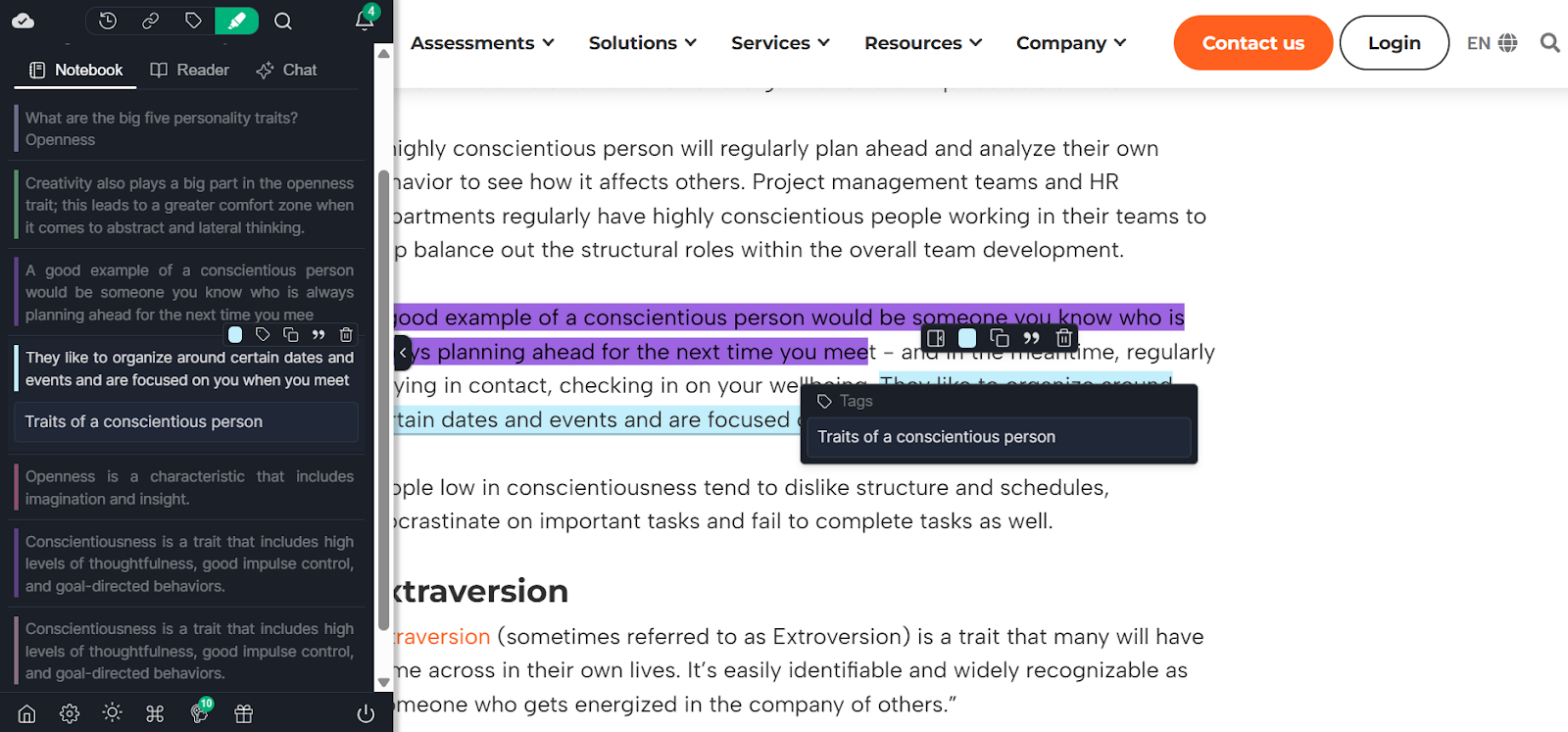
You can annotate web pages directly as you read. Highlights, notes, and comments stay attached to the original web content, which helps preserve context across online articles and research sources.
PDF annotation, including local files
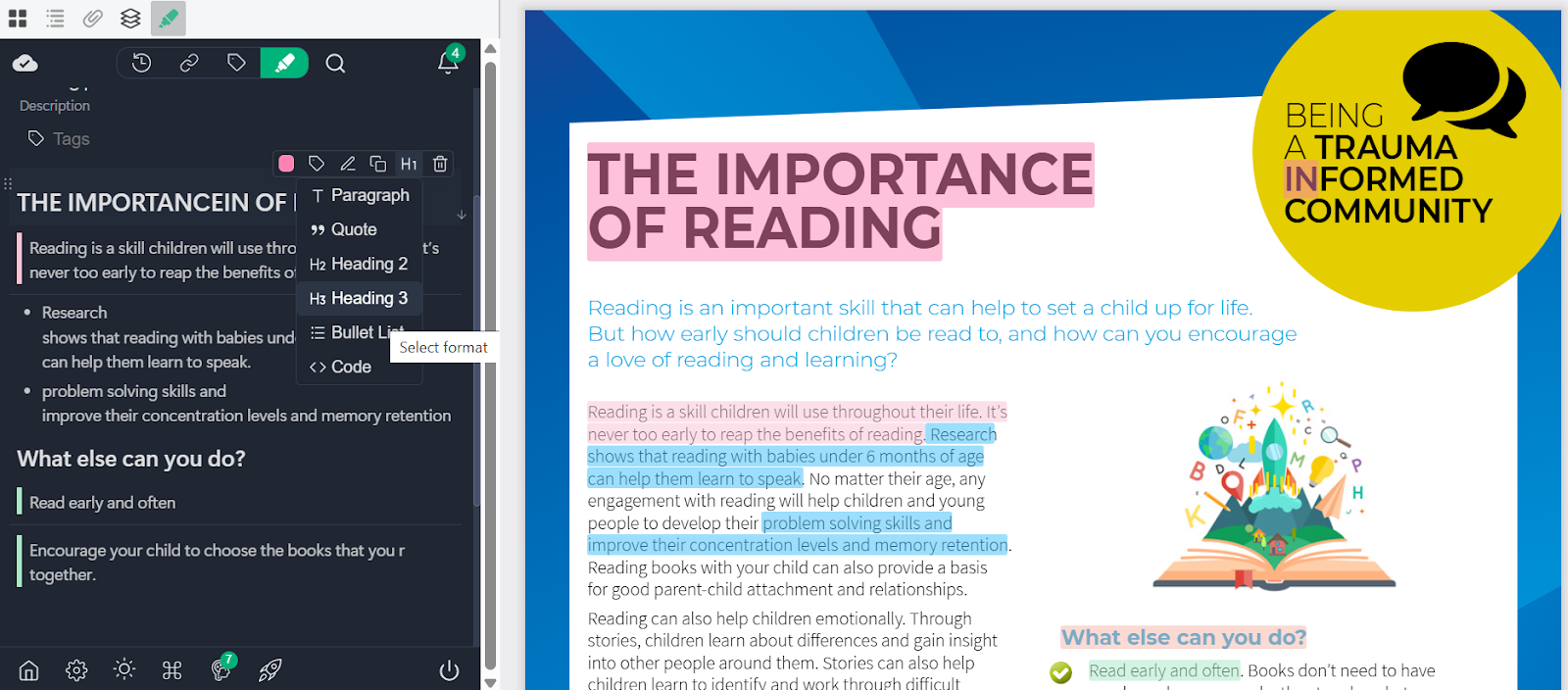
Web Highlights supports annotating both online PDFs and local PDFs from your computer. This allows students and researchers to work with course materials, journal papers, and downloaded files alongside live web pages in the same annotation system.
Reader Mode for Focused Reading
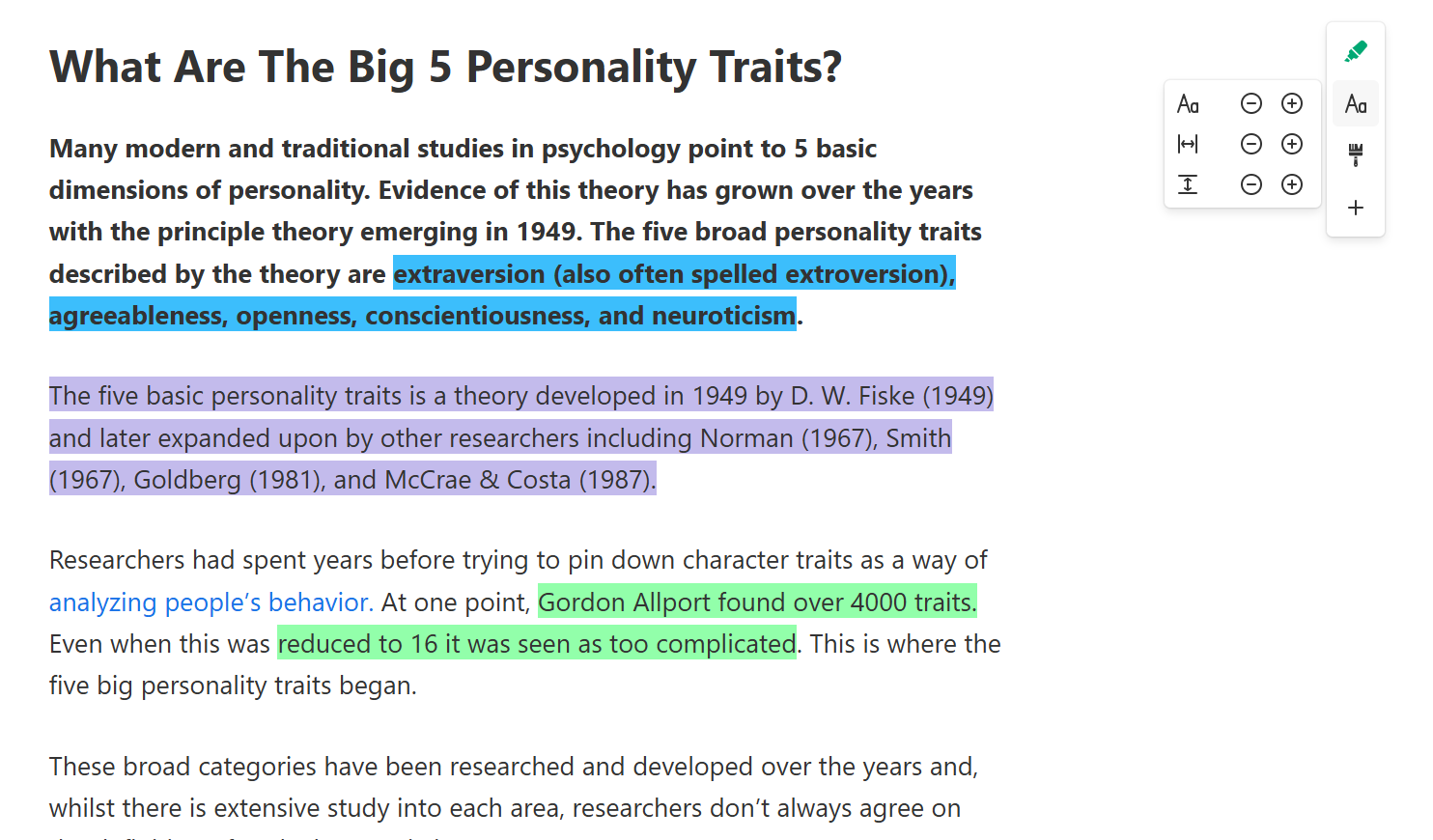
Reader mode removes visual noise from online articles and restructures content for readability. This makes it easier to focus on content structure, highlight key sections, and add notes without distractions.
YouTube Annotation and Transcripts
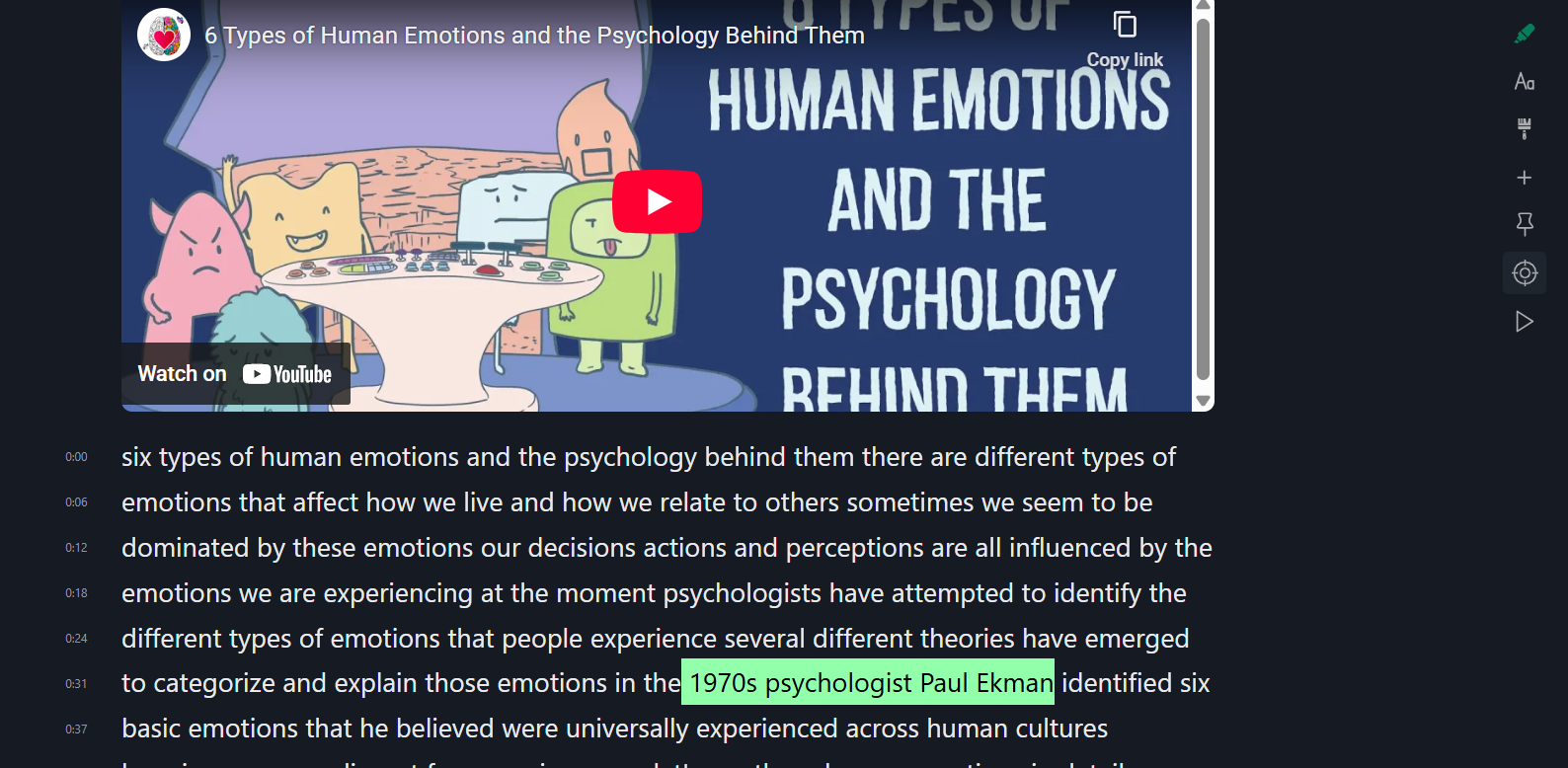
YouTube videos can be read as transcripts and annotated like text. This helps when working with lectures, tutorials, or visual learning materials where written notes matter more than replaying the video.
AI summaries and review support
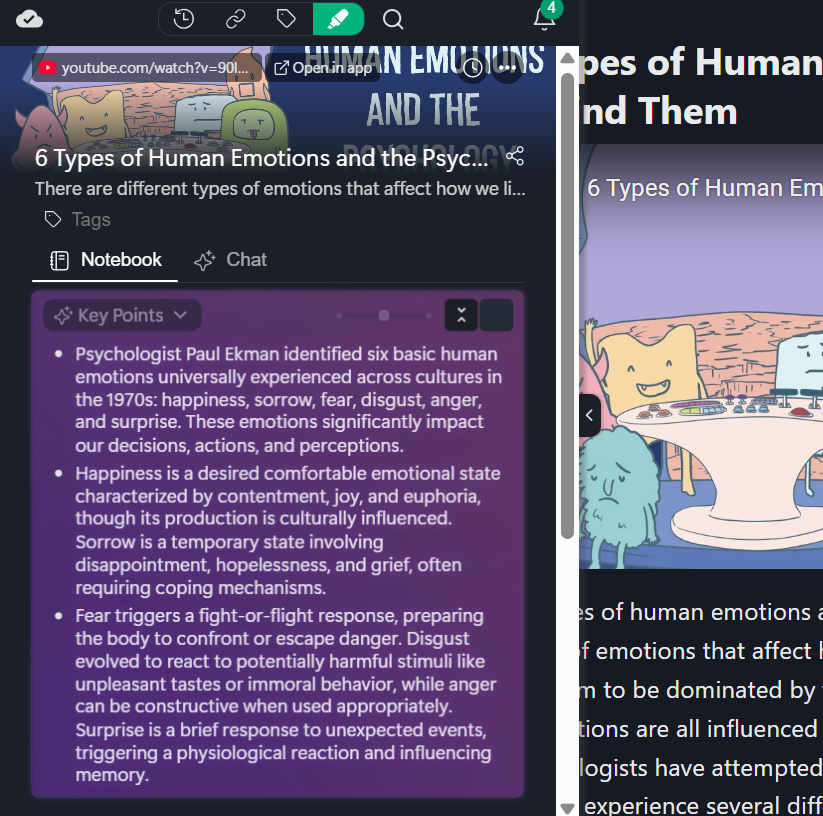
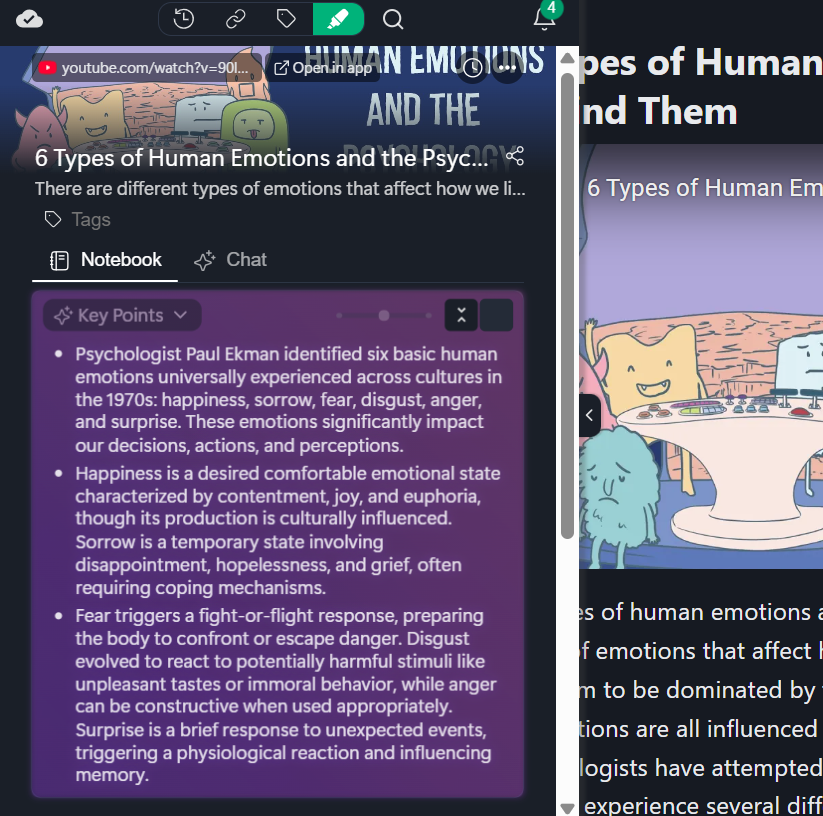
AI summaries help scan long web content before deeper annotation. Web Highlights also offers detailed AI summaries for YouTube videos in different formats.
Highlights can also be turned into flashcards, supporting review and spaced repetition across study sessions.
Exports for Research and Reuse
Annotations can be exported in formats such as Markdown or PDF, making it easier to reuse notes for assignments, writing, or long-term research work.
If you want a simple way to annotate web pages, PDFs, and YouTube content in one place, Web Highlights lets you highlight, add notes, review later, and keep everything connected to the original source. You can start using it directly in your browser and see how web annotation fits into your own study or research workflow.
Frequently Asked Questions
1. Is web annotation legal and ethical for research?
Yes. Web annotation is legal and widely accepted in academic research when sources are cited properly. Annotating web pages, JSTOR articles, or online research sources for personal study or review is considered standard research practice, as long as copyright rules and academic integrity guidelines are followed.
2. Can web annotations be private?
Yes. Most website annotation tools such as Web Highlights, allow private annotations that are visible only to the user. This is important when working with sensitive research sources, draft ideas, or early-stage analysis. Privacy controls help manage feedback and comments without sharing them publicly.
3. Does web annotation replace note-taking apps?
Web annotation does not fully replace note-taking apps, but it reduces reliance on them. It keeps notes connected to web content, improving context preservation. Many users combine web annotation systems with project management tools or writing apps for final output.
4. Can annotations be exported for assignments or research writing?
Yes. Many web annotation tools support exporting annotations to formats such as Markdown or PDF. This makes it easier to reuse highlighted web content, quotes, and notes when preparing assignments, literature reviews, or academic papers.
5. Is web annotation useful beyond academics?
Yes. Web annotation is also used in web development workflows, digital marketing strategies, and design reviews. Teams annotate competitor websites, website mockups, visual references, and content structure using screenshot annotations, feedback pins, and version management during review and approval processes.