The Great Comparison: Top iOS & Android Email Apps

Email apps have become essential tools for staying connected in our increasingly digital world. With billions of people managing multiple email accounts across personal, work, and school, the demand for powerful, reliable email clients has exploded. From simple inbox managers to comprehensive communication platforms with calendar integration and AI assistance, the email app market offers something for everyone.
Many developers—from tech giants like Google and Microsoft to privacy-focused startups like Proton and independent open-source developers—have created email apps that range from minimalist IMAP clients to feature-packed productivity suites. Of course, established players and newcomers alike are competing fiercely, each trying to win users with their unique approach to email management.
We wanted to find out which email apps actually deliver on their promises. After extensive testing and analysis of user feedback, we've created this comprehensive comparison of 10 of the best iOS & Android email apps available today.
List of the Best Email Apps for Android & iOS:
- FairEmail, privacy aware email
- Email - Fast & Secure Mail
- Gmail
- Microsoft Outlook
- Proton Mail: Encrypted Email
- Email Blue Mail - Calendar
- Thunderbird: Free Your Inbox
- Spark Mail: AI Email, Calendar
- Canary Mail - AI Email App
- Yahoo Mail
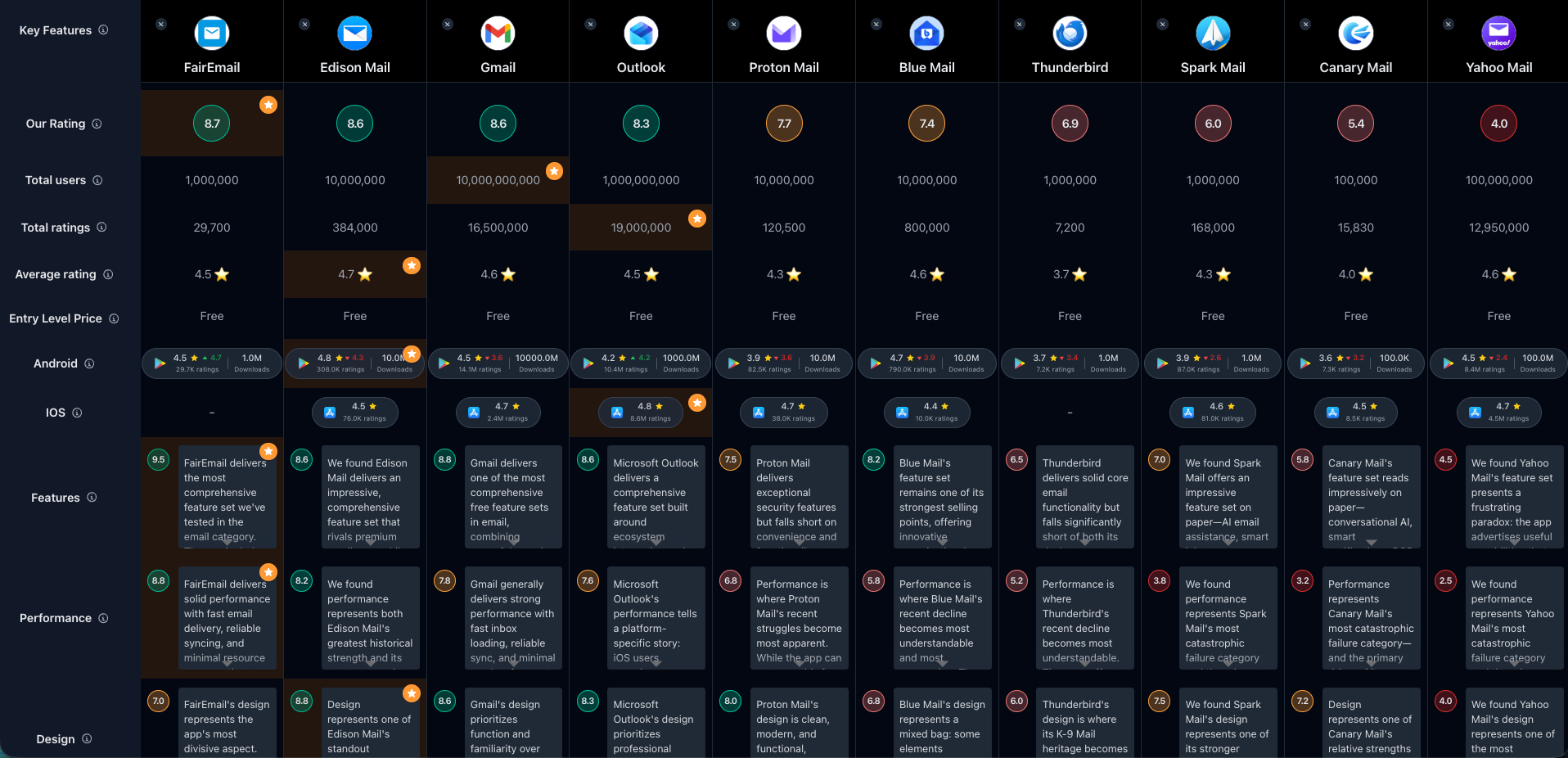
If you prefer a comparison overview, check out the full comparison table of all Email apps:
1. FairEmail, privacy aware email

FairEmail has carved out a passionate following among privacy-conscious users and power users who demand comprehensive email management. With over 1 million downloads and a strong rating on Android (with 29,700+ reviews), it's clear that many users appreciate its uncompromising approach to privacy and features. The app maintains excellent quality, with recent feedback showing positive trajectory—a rating that continues to improve, reflecting growing user satisfaction.
What really sets FairEmail apart is its 100% open-source architecture combined with exceptional developer support. During our testing, we found Marcel (the developer) personally responds to support emails, often fixing bugs within hours and implementing thoughtful feature requests same-day. This level of direct engagement is virtually unheard of in the email app market.
Key Features:
- 100% Open Source & Privacy-Focused – No data storage on third-party servers, no ads, no analytics, no tracking (even error reporting is opt-in)
- Tracker & Phishing Protection – Blocks embedded tracking images, confirms before loading images/links, reformats messages to prevent phishing
- Full Encryption Support – OpenPGP and S/MIME encryption/decryption built-in for secure communications
- Unlimited Accounts & Unified Inbox – Connect unlimited email addresses with optional unified view or separate folder organization
- Advanced Filtering & Rules – Automatic message classification, filter rules, search indexing, colored stars and account/folder customization (Pro)
- Power User Features – Reply templates, scheduled sending, snooze messages, conversation threading, two-way sync, offline operations
- Lightweight & Battery-Friendly – Under 30 MB app size with IMAP IDLE push support, minimal battery drain, low data usage
- Developer-Supported – Direct email support from Marcel, same-day bug fixes, active maintenance since 2019
Pros & Cons
Pros:
- 100% open source
- One-time €7.49 payment
- Exceptional developer support
- Blocks email trackers
- Unlimited free accounts
- OpenPGP/S/MIME encryption
- Infinitely configurable
- Lightweight & fast
Cons:
- Busy UI for some users
- Learning curve for features
- Outdated design aesthetics
- Occasional Outlook auth issues
Who is this great for?
FairEmail is perfect for anyone who values privacy, open-source transparency, and needs comprehensive email management without compromises. Whether you're a security-conscious professional, a privacy advocate who wants to know exactly what your email app does with your data, or a power user who needs advanced filtering and encryption, FairEmail delivers without artificial limitations.
It's especially great for users who want lifetime access through a one-time €7.49 payment instead of subscriptions, and for anyone frustrated by corporate email apps that track everything. The exceptional developer support makes it ideal for users who value responsive maintenance and direct communication with the creator.
Compared to others
FairEmail stands out for its uncompromising privacy focus and open-source architecture when compared to mainstream apps like Gmail or Microsoft Outlook. While Proton Mail also emphasizes privacy, FairEmail provides more configuration options and works with any email provider. Compared to Thunderbird, FairEmail offers better mobile optimization and more active development.
Detailed comparisons
FairEmail vs Gmail • FairEmail vs Proton Mail • FairEmail vs Thunderbird
Rating Summary
With 1 million+ downloads and 29,700+ reviews on Android, FairEmail has built a dedicated user base that values privacy and power. ProdApps gave FairEmail a score of 8.72/10. Check out the full review here.
2. Email - Fast & Secure Mail

Edison Mail (marketed as "Email - Fast & Secure Mail") has established itself as one of the fastest and most feature-rich email apps available. With over 10 million downloads and a solid rating on Android (with 182,000+ reviews), Edison Mail appeals to users who want speed, smart features, and a polished interface. The app's iOS version maintains even higher satisfaction, showing strong cross-platform quality.
What really impressed us during testing was Edison's ability to balance advanced features—like package tracking, bill reminders, and smart assistant capabilities—with genuine speed. The unified inbox loads faster than most competitors, and the smart categorization works effectively without feeling intrusive.
Key Features:
- Blazing Fast Performance – Optimized email fetching and rendering that outpaces competitors in loading speed
- Smart Assistant Features – Automatic package tracking, bill reminders, subscription management, price watching
- Unified Smart Inbox – Manage unlimited accounts from any provider with intelligent filtering and organization
- One-Tap Actions – Quick unsubscribe, block sender, delete by sender with minimal friction
- Email Scheduling – Send messages at optimal times with delayed send feature
- Read Receipts & Undo Send – Know when emails are read, retract messages within seconds of sending
- Secure Inbox – Block tracking pixels, secure email transmission, optional biometric authentication
- Cross-Platform Sync – Seamless experience across iOS, Android, Mac, Windows, and web
Pros & Cons
Pros:
- Fastest email loading we tested
- Excellent package tracking
- Clean, modern interface
- Strong multi-account support
- Bill & subscription reminders
- Read receipts work well
- Free core features
Cons:
- Recent ads in free version
- Occasional sync delays
- Limited customization
- Privacy concerns (Edison research)
- Some features require premium
Who is this great for?
Edison Mail is perfect for anyone who values speed above all else and wants smart assistant features that actually work. Whether you're managing multiple email accounts, tracking frequent online orders, or need quick inbox cleanup tools, Edison delivers a polished experience that feels faster than the competition.
It's especially great for users who receive lots of bills, shipping notifications, and subscriptions—Edison's automatic categorization and tracking features save significant time managing these emails. The app works well for users who want mainstream reliability with more features than Gmail but less complexity than power-user tools.
Compared to others
Edison Mail differentiates itself through speed and smart assistant features compared to Gmail or Microsoft Outlook. While Blue Mail offers similar multi-account management, Edison feels significantly faster. Compared to privacy-focused FairEmail, Edison trades some privacy for convenience features like package tracking.
Detailed comparisons
Edison Mail vs Gmail • Edison Mail vs Blue Mail • Edison Mail vs Outlook
Rating Summary
With 10 million+ downloads and 182,000+ reviews on Android, Edison Mail has proven its appeal to speed-focused users. ProdApps gave Edison Mail a score of 8.62/10. Check out the full review here.
3. Gmail

Gmail is the default email app for billions of users worldwide, and for good reason. With 10 billion+ downloads and millions of reviews across both platforms, Gmail represents the most widely used email client globally. The app maintains strong satisfaction across both iOS and Android, delivering consistent reliability that most users have come to expect from Google's infrastructure.
What keeps Gmail ahead of the competition is its combination of core reliability and smart productivity features that don't feel forced. During our testing, search remained unmatched, inbox categories reduced clutter automatically, and Smart Compose sped up writing without requiring separate AI subscriptions. When everything works properly, Gmail provides the most frictionless email experience available.
Key Features:
- Best-in-Class Search – Fast, accurate search across emails and attachments with advanced filters and optional Gemini assistance
- Smart Inbox Categories – Automatic separation of Primary, Social, Promotions, and Updates for faster email triage
- Industry-Leading Spam Protection – Blocks 99.9% of spam, phishing, and malware automatically
- Multi-Account Support – Add Gmail plus other providers (Outlook, Yahoo, IMAP) in unified inbox view
- Smart Compose & Reply – AI-powered writing suggestions and one-tap contextual responses
- Google Ecosystem Integration – Seamless Calendar, Tasks, Meet, and Drive integration within email interface
- Centralized Unsubscribe – Manage all newsletter subscriptions in one place with easy opt-out
- Offline Access – Read and compose emails without connection, sync automatically when online
Pros & Cons
Pros:
- Best-in-class search
- Excellent spam filtering
- Completely free
- Multi-account support
- Fast setup and sync
- Reliable cross-device access
Cons:
- Notifications fail for some
- Calendar auto-add surprises
- Occasional app crashes
- Account recovery friction
- Privacy trade-offs
Who is this great for?
Gmail is perfect for anyone who wants the most reliable all-around email app without paywalls or catastrophic performance failures. Whether you're a casual user managing one account or a professional juggling multiple email addresses, Gmail delivers consistent reliability. The deep Google ecosystem integration makes it ideal for users already using Google Calendar, Drive, or Meet.
It's especially great for users who prioritize search functionality, spam protection, and just wanting email that "works" without configuration. Gmail is the safest default choice for users who don't have specific privacy requirements or need for advanced customization.
Compared to others
Gmail provides the most reliable baseline email experience compared to alternatives. While Proton Mail offers superior privacy, Microsoft Outlook provides better Microsoft ecosystem integration, and FairEmail delivers more customization, Gmail excels at just working reliably for the vast majority of users without significant compromises.
Detailed comparisons
Gmail vs Outlook • Gmail vs Proton Mail • Gmail vs Edison Mail
Rating Summary
With 10 billion+ downloads and millions of reviews across both platforms, Gmail remains the most widely used email app globally. ProdApps gave Gmail a score of 8.58/10. Check out the full review here.
4. Microsoft Outlook

Microsoft Outlook brings Microsoft's enterprise email platform to mobile with 1 billion+ downloads and strong reviews across both platforms (10.4 million reviews on Android). The app excels at Microsoft ecosystem integration—for business users, teams, and anyone invested in Microsoft services, Outlook provides unified inbox management, powerful calendar scheduling, and seamless Office document access all in one app.
During our testing, Outlook delivered on its productivity promise for users who need Microsoft integration. We found calendar management superior to most competitors, Office document handling genuinely useful, and the Focused Inbox feature effective at reducing email noise. However, the Android experience reveals quality gaps that iOS users don't encounter—persistent freezing, unreliable search, and confusing behaviors like the back button deleting entire email chains.
Key Features:
- Unified Multi-Account Inbox – Manage Gmail, Yahoo, iCloud, Exchange, and IMAP accounts in one seamless interface
- Focused Inbox – AI-powered filtering that separates important emails from low-priority messages automatically
- Integrated Calendar & Tasks – Schedule meetings, set reminders, and manage to-do lists without leaving the email interface
- Microsoft 365 Integration – Open Word, Excel, PowerPoint documents directly from inbox with native editing support
- Intelligent Swipe Gestures – Customize swipe actions for delete, archive, snooze, move, or flag with one motion
- Teams & Video Call Integration – Join Microsoft Teams, Zoom, Skype meetings directly from calendar invites
- Play My Emails – Voice-powered email reading for hands-free inbox management while driving or multitasking
- Smart Search – Search across emails, attachments, contacts, and calendar events with voice or text queries
Pros & Cons
Pros:
- Excellent Microsoft 365 integration
- Free multi-account support
- Powerful calendar management
- Clean professional design
- Focused inbox works well
- Strong business features
Cons:
- Forced Copilot button
- Android performance issues
- Weak spam filtering
- Confusing delete behavior
- Search reliability problems
Who is this great for?
Microsoft Outlook is perfect for business users, professionals, and anyone already invested in Microsoft's ecosystem who needs tight Office integration, calendar scheduling with Teams, or enterprise email management. Whether you're coordinating meetings, collaborating on Office documents, or managing work and personal accounts in one place, Outlook delivers seamless Microsoft productivity.
It's especially great for users who need calendar-focused workflows, teams relying on Microsoft 365 for collaboration, and professionals who want a business-class email experience. The free tier is genuinely complete, and for Office-centric work, Outlook provides integration that Gmail can't match.
Compared to others
Outlook excels at Microsoft ecosystem integration compared to Gmail or Edison Mail. While Gmail offers better performance stability and spam filtering, Outlook provides tighter Office, OneDrive, and Teams integration. Compared to Proton Mail, Outlook trades privacy for productivity features. However, Android users encounter performance issues that don't affect iOS.
Detailed comparisons
Outlook vs Gmail • Outlook vs Proton Mail • Outlook vs Edison Mail
Rating Summary
With 1 billion+ downloads and 10.4 million reviews on Android (plus high iOS satisfaction), Outlook remains a top business email choice. ProdApps gave Microsoft Outlook a score of 8.33/10. Check out the full review here.
5. Proton Mail: Encrypted Email

Proton Mail positions itself as the gold standard for private, encrypted email, and it largely lives up to that reputation. With over 10 million downloads on Android and strong privacy credentials, the app has built a loyal following among security-conscious users. What sets Proton apart is its uncompromising commitment to privacy—end-to-end encryption, zero-access architecture, Swiss-based servers under strict privacy laws, and open-source cryptography independently audited.
During our testing, we found Proton's encryption works transparently for Proton-to-Proton emails, with password-protected messages available for non-Proton users. The app operates completely offline after initial setup, and the Easy Switch feature makes migrating from Gmail, Outlook, or Yahoo surprisingly straightforward. However, recent feedback suggests declining satisfaction—login issues, UI confusions, and limitations in the free tier create friction.
Key Features:
- End-to-End Encryption – All messages stored with zero-access encryption, making them unreadable to anyone except you and your recipients
- Password-Protected Emails – Send encrypted messages to non-Proton users with password protection
- Proton Easy Switch – Migrate emails, calendars, and contacts from Gmail, Outlook, Yahoo, iCloud, or AOL in just a few taps
- Gmail Auto-Forwarding – Automatically forward messages from Gmail accounts into your Proton inbox while maintaining privacy
- Multi-Account Support – Manage multiple Proton Mail accounts within a single app interface
- Advanced Spam & Phishing Protection – Built-in filtering keeps malicious emails out of your inbox
- Folder & Label Organization – Keep your inbox organized with customizable folders, labels, and swipe gestures
- Open-Source Cryptography – Vetted security implementations using AES, RSA, and OpenPGP standards
Pros & Cons
Pros:
- Industry-leading encryption
- Strong privacy commitment
- No ads or tracking
- Open-source security
- Easy Gmail migration
- Works fully offline
Cons:
- Recent satisfaction decline
- Login/setup issues reported
- Not a multi-provider client
- IMAP bridge paywalled
- Limited free storage
- Confusing conversation threads
Who is this great for?
Proton Mail is perfect for anyone serious about protecting their communications from surveillance, data harvesting, or third-party tracking. Whether you're a privacy advocate, journalist, activist, security-conscious professional, or anyone handling sensitive communications, Proton delivers encryption and privacy that mainstream apps can't match.
It's especially great for users willing to migrate to a Proton email address in exchange for uncompromising privacy, and for anyone seeking transparent, open-source security they can verify. The free tier provides 1GB storage and works fully—upgrades unlock more storage and custom domains.
Compared to others
Proton Mail is the privacy leader compared to mainstream apps like Gmail or Microsoft Outlook, which can technically access your emails. While FairEmail also emphasizes privacy, Proton provides built-in encryption rather than relying on external email providers. However, Proton requires using Proton addresses—it's not a multi-provider client like most alternatives.
Detailed comparisons
Proton Mail vs Gmail • Proton Mail vs Outlook • Proton Mail vs FairEmail
Rating Summary
With 10 million+ downloads on Android and strong privacy credentials, Proton Mail serves security-conscious users globally. ProdApps gave Proton Mail a score of 7.73/10. Check out the full review here.
6. Email Blue Mail - Calendar

Blue Mail (marketed as "Email Blue Mail - Calendar") is a multi-account email app with 50 million+ downloads that promises unified inbox management with calendar integration. With a solid presence on both Android and iOS, Blue Mail appeals to users who want to manage multiple email accounts from different providers in one interface. However, our testing and recent user feedback reveal a troubling pattern—what was once a reliable app has experienced quality decline.
During our testing, we found Blue Mail's multi-account support works as advertised, connecting Gmail, Yahoo, Outlook, iCloud, and custom IMAP/POP3 accounts. The unified inbox view consolidates messages effectively, and the built-in calendar helps coordinate schedules. However, we encountered the issues driving recent dissatisfaction: intrusive ads in the free version, occasional sync delays, and performance hiccups that interrupt basic workflows.
Key Features:
- Unified People-Centric Inbox – Consolidate multiple email accounts with conversation grouping by contact
- Built-In Calendar – View and manage calendar events alongside emails without switching apps
- Multi-Account Support – Connect unlimited Gmail, Outlook, Yahoo, Exchange, iCloud, and custom IMAP/POP3 accounts
- Push Notifications – Real-time email alerts for all connected accounts
- Customizable Actions – Configure swipe gestures for quick email management
- Dark Theme – Eye-friendly dark mode for comfortable reading
- Email Clusters – Smart grouping of promotional emails, newsletters, and notifications
- Search & Filter – Find messages across all accounts with powerful search capabilities
Pros & Cons
Pros:
- Multi-account consolidation
- People-centric grouping
- Built-in calendar
- Push notifications work
- Unlimited free accounts
- Cross-platform availability
Cons:
- Severe recent decline
- Ads increasingly intrusive
- Sync delays reported
- Performance inconsistency
- Less polished than competitors
Who is this great for?
Blue Mail is suitable for users managing multiple email accounts who want unified inbox management with basic calendar integration. Whether you're juggling personal Gmail, work Exchange, and Yahoo accounts, Blue Mail consolidates them in one place. The people-centric inbox grouping helps organize conversations by contact rather than just chronologically.
It's potentially useful for users seeking a free multi-account email app and who can tolerate ads and occasional performance issues. However, given recent quality trends, alternatives like Edison Mail or Gmail provide more reliable multi-account experiences.
Compared to others
Blue Mail offers similar multi-account management to Edison Mail and Microsoft Outlook, but both alternatives provide better performance and more polished experiences. While Blue Mail is free like Gmail, Gmail delivers superior reliability and spam protection. Compared to Thunderbird, Blue Mail has a more modern interface but less consistent quality.
Detailed comparisons
Blue Mail vs Edison Mail • Blue Mail vs Gmail • Blue Mail vs Outlook
Rating Summary
With 50 million+ downloads across platforms, Blue Mail has a substantial user base despite recent quality concerns. ProdApps gave Email Blue Mail a score of 7.43/10. Check out the full review here.
7. Thunderbird: Free Your Inbox

Thunderbird, Mozilla's open-source email client, launched on Android after decades of desktop dominance. With millions of downloads and a reputation for privacy and open standards, Thunderbird mobile aims to bring the same philosophy to smartphones. However, during our extensive testing and analysis of user feedback, we discovered Thunderbird mobile has experienced one of the most severe quality collapses in the email app category—a catastrophic decline that makes the current version difficult to recommend.
What should have been a straightforward mobile adaptation of proven desktop software instead delivered broken core functionality. During testing, we encountered the disasters driving users away: essential features like sent folders and trash disappeared, basic email operations randomly fail, search barely functions, attachments don't work reliably, and the app crashes constantly. This isn't gradual decline; it's systematic destruction of functionality through poorly executed updates.
Key Features:
- Open-Source & Community-Driven – Built by Mozilla with transparent development and no corporate tracking
- Multi-Account Support – Manage Gmail, Outlook, Yahoo, and custom IMAP/POP3 accounts in unified or separate views
- Unified Inbox – Consolidate messages from all accounts into one view for easier management
- Privacy-Focused – No data collection, no tracking, no advertising—email client that respects your privacy
- Standards-Based – Supports IMAP, POP3, SMTP with proper implementation of email standards
- Cross-Platform – Consistent experience between desktop and mobile (when working properly)
- Customizable Interface – Adjust views, folders, and organization to match your preferences
- Conversation Threading – Group related messages together for easier email management
Pros & Cons
Pros:
- 100% open source
- Mozilla backing
- No ads or tracking
- Free forever
- Multi-account support
- Privacy-focused philosophy
Cons:
- Catastrophic recent quality
- Folders disappeared
- Search barely works
- Constant crashes
- Basic operations fail
- Attachments broken
Who is this great for?
Thunderbird mobile should be perfect for privacy-conscious users, open-source advocates, and anyone who used Thunderbird desktop successfully for years. The philosophy—open standards, no tracking, community-driven development—represents everything email apps should be. However, given current quality problems, we cannot recommend Thunderbird mobile to anyone until Mozilla addresses the fundamental functionality failures.
If you value Mozilla's mission and privacy focus, consider FairEmail instead—it delivers the same open-source privacy philosophy with actually functional email management. Alternatively, wait for Mozilla to fix Thunderbird mobile's catastrophic problems before migrating from your current email app.
Compared to others
Thunderbird shares privacy philosophy with FairEmail and Proton Mail, but both alternatives deliver functional apps that work reliably. While Thunderbird desktop has advantages over other desktop clients, Thunderbird mobile lags far behind Gmail, Microsoft Outlook, or Edison Mail in basic functionality and reliability.
Detailed comparisons
Thunderbird vs FairEmail • Thunderbird vs Gmail • Thunderbird vs Proton Mail
Rating Summary
Despite Mozilla backing and open-source philosophy, Thunderbird mobile currently suffers from severe quality problems. ProdApps gave Thunderbird a score of 6.92/10. Check out the full review here.
8. Spark Mail: AI Email, Calendar

Spark Mail launched with significant fanfare on iOS, earning praise for its design and team collaboration features. With millions of downloads and initial success on Apple platforms, Spark expanded to Android promising AI-powered email management and calendar integration. However, during our extensive testing, we discovered Spark has experienced a catastrophic Android quality collapse—one of the worst performance disasters we've documented.
What worked well on iOS translated disastrously to Android. During testing, we encountered the failures driving mass user abandonment: the app loads emails so slowly it's often faster to use webmail (1-2 minute waits for inbox to load), dark mode is catastrophically broken (rendering emails unreadable), basic navigation freezes constantly, search returns no results or wrong results, swipe gestures require 10+ attempts, and the app crashes multiple times daily. This isn't minor bugs; it's fundamental Android optimization failure.
Key Features:
- Smart Inbox – AI-powered categorization separating important emails from notifications (when functioning)
- Email Scheduling – Compose messages and send them at optimal times
- Team Collaboration – Create, discuss, and delegate emails with team members (Premium feature)
- Snooze & Reminders – Temporarily hide emails and set follow-up reminders
- Quick Replies – Pre-written response templates for common messages
- Multi-Account Support – Connect Gmail, Outlook, Yahoo, iCloud, and custom IMAP accounts
- Calendar Integration – View events alongside emails for better schedule coordination
- Signature Templates – Create multiple email signatures for different contexts
Pros & Cons
Pros:
- Strong iOS version quality
- Nice design (when visible)
- Team features (Premium)
- Smart categorization works
- Email scheduling useful
- Calendar integration
Cons:
- Catastrophic Android performance
- 1-2 minute loading times
- Dark mode completely broken
- Constant freezing & crashes
- Search doesn't work
- Swipe gestures fail
Who is this great for?
Spark Mail could be great for teams needing collaboration features and iOS users who value design—the iOS version maintains much higher quality than Android. However, we cannot recommend Spark to Android users in its current state. The performance problems are so severe that basic email operations become frustrating exercises in waiting and troubleshooting.
If you're on iOS and need team email collaboration, Spark might work. For Android users, literally any alternative—Gmail, Microsoft Outlook, Edison Mail—will provide better reliability and faster performance.
Compared to others
Spark's iOS quality competes with Gmail and Microsoft Outlook, but Android performance falls catastrophically behind all major alternatives. While Canary Mail also has severe quality issues, Spark's Android problems are arguably worse. Compared to Blue Mail or Thunderbird, Spark has worse Android performance despite premium pricing.
Detailed comparisons
Spark Mail vs Gmail • Spark Mail vs Outlook • Spark Mail vs Edison Mail
Rating Summary
Despite initial iOS success, Spark's Android catastrophe severely impacts overall quality. ProdApps gave Spark Mail a score of 5.97/10. Check out the full review here.
9. Canary Mail - AI Email App

Canary Mail markets itself as an AI-powered premium email app with advanced features and security. With pricing up to €329.99 lifetime, Canary positions as a professional-grade solution for users willing to pay for quality. However, during our extensive testing and analysis of user feedback, we discovered Canary has experienced a severe quality collapse—delivering one of the worst value propositions in email apps, combining high pricing with catastrophic reliability failures.
What should distinguish a premium app—polish, reliability, working features—is absent in Canary. During testing, we encountered the disasters that recent reviews document: AI features that don't work or produce nonsensical results, constant crashes that interrupt basic email operations, emails getting stuck and failing to send, attachments that don't open, dark mode rendering emails unreadable, and search that returns no results. Users aren't getting premium quality; they're paying premium prices for fundamentally broken software.
Key Features:
- AI Email Assistant – Supposed AI-powered writing help, summarization, and smart replies (rarely works correctly)
- End-to-End Encryption – PGP encryption support for secure communications
- Read Receipts – Know when recipients open your emails (unreliable functionality)
- Email Scheduling – Send messages at future times (when not stuck)
- Unified Inbox – Manage multiple accounts from one view
- Snooze & Templates – Delay messages and create response templates
- Biometric Security – Fingerprint/face authentication for app access
- Cross-Platform – Available on iOS, Android, Mac, Windows (inconsistent quality across platforms)
Pros & Cons
Pros:
- Encryption support exists
- Multi-account functionality
- iOS version slightly better
- Templates when working
- Biometric auth
- Scheduling feature
Cons:
- Catastrophic quality collapse
- AI features don't work
- Constant crashes
- Emails fail to send
- Dark mode broken
- Extreme premium pricing (€329.99)
Who is this great for?
Canary Mail is difficult to recommend to anyone given current quality and pricing. The €329.99 lifetime pricing (or €4.99/month subscription) demands premium reliability that Canary doesn't deliver. Even users willing to pay for quality will find better value in virtually any alternative.
If you want AI email features, Gmail's free Smart Compose works better than Canary's paid AI. If you need encryption, Proton Mail or FairEmail provide more reliable security. For premium features without catastrophic bugs, Microsoft Outlook or Edison Mail deliver better experiences free or at lower cost.
Compared to others
Canary's premium pricing positions it against professional tools like Microsoft Outlook (free) and Gmail (free), both of which provide dramatically better reliability and features. Compared to Spark Mail, Canary has similar quality problems but higher pricing. Even troubled apps like Thunderbird are at least free—Canary charges premium prices for comparable dysfunction.
Detailed comparisons
Canary Mail vs Gmail • Canary Mail vs Outlook • Canary Mail vs Proton Mail
Rating Summary
Canary Mail's combination of premium pricing and severe quality problems creates poor value. ProdApps gave Canary Mail a score of 5.42/10. Check out the full review here.
10. Yahoo Mail

Yahoo Mail launched as one of the earliest major email apps with 100 million+ downloads and millions of reviews. For years, Yahoo Mail provided reliable email access with features like multi-account support and package tracking. However, during our extensive testing, we discovered Yahoo Mail has experienced the single most catastrophic quality collapse we've documented—an absolute disaster of product management that makes the current version actively hostile to use.
Updates between August and October 2025 fundamentally broke core email functionality. During testing, we encountered disasters documented throughout user feedback: essential folders (spam, sent, trash) disappeared entirely for months with Yahoo refusing to fix what they called an "experiment." AI categorization forces emails into buckets users can't disable, hiding messages and causing users to miss critical mail. Move buttons randomly vanish, bulk selection broke, swipe gestures require 10+ attempts, emails stuck in outbox, attachments arrive blank, and constant crashes. This isn't bugs; it's systematic destruction of a functional app.
Key Features:
- Multi-Account Unified Inbox – Connect Gmail, Outlook, AOL, Hotmail accounts (when working)
- Package Tracking – View order status and recent purchases (still functional)
- Delete by Sender – Quickly remove all emails from specific senders (one feature that works)
- One-Tap Unsubscribe – Easy newsletter management
- Forced AI Categorization – Automatic sorting into Primary/Offers/Newsletters/Other (cannot disable, hides emails)
- Gamified Cleanup – Fast swipe-based email sorting (requires 10+ attempts per swipe)
- Security Warnings – Alerts about suspicious emails
- Yahoo Mail+ – Ad-free premium at $1.99/month (doesn't fix broken features)
Pros & Cons
Pros:
- Delete by sender works
- Package tracking useful
- Multi-account support
- Low premium price
- Long-established service
- Accessibility features
Cons:
- Catastrophic recent collapse
- Folders disappeared (experiment)
- Can't disable AI filtering
- Deceptive ad placement
- Move button missing
- Emails stuck in outbox
Who is this great for?
Yahoo Mail is difficult to recommend to anyone in its current state. Users stuck with Yahoo email addresses should strongly consider accessing Yahoo mail through alternative apps—Gmail, Microsoft Outlook, and Edison Mail all support Yahoo accounts and provide dramatically more reliable access than Yahoo's own app.
If you have a Yahoo email address but aren't locked in, migrating to Gmail, Outlook, or Proton Mail will provide better long-term reliability. Yahoo Mail's recent "experiments" that permanently removed features suggest the company has abandoned quality standards users deserve.
Compared to others
Yahoo Mail once competed with Gmail and Microsoft Outlook, but current quality places it far behind all major alternatives. Even troubled apps like Thunderbird, Spark Mail, and Canary Mail are more functional than Yahoo Mail's broken state. Blue Mail provides better Yahoo account access than Yahoo's own app.
Detailed comparisons
Yahoo Mail vs Gmail • Yahoo Mail vs Outlook • Yahoo Mail vs Blue Mail
Rating Summary
With 100 million+ downloads but catastrophic recent quality collapse, Yahoo Mail represents email app failure. ProdApps gave Yahoo Mail a score of 4.00/10. Check out the full review here.
Final Thoughts
After extensive testing of 10 email apps across iOS and Android, clear winners emerge—though the email app landscape also reveals troubling quality problems that shouldn't exist from major developers.
FairEmail (8.72/10) takes the top spot for users who value privacy, open-source transparency, and comprehensive email management. The €7.49 one-time payment, exceptional developer support, and unlimited customization make it the best choice for power users and privacy advocates. Edison Mail (8.62/10) and Gmail (8.58/10) follow closely, with Edison excelling at speed and smart features while Gmail delivers unmatched reliability and search. Microsoft Outlook (8.33/10) remains the best business-focused option for users invested in Microsoft's ecosystem, despite Android performance issues.
Proton Mail (7.73/10) stands alone for users who need end-to-end encryption and zero-access security. If privacy is non-negotiable, Proton delivers despite recent quality concerns and interface limitations. However, apps ranked below 7/10 reveal severe problems: Blue Mail suffers declining quality with intrusive ads, Thunderbird experienced catastrophic mobile launch failures, Spark Mail has unusable Android performance despite strong iOS quality, Canary Mail charges premium prices for broken features, and Yahoo Mail represents the single worst email app collapse we've documented—systematic destruction of functionality through forced experiments.
Our recommendation: Start with Gmail if you want reliable, free email that just works. Choose FairEmail if privacy and customization matter most. Pick Outlook for Microsoft ecosystem integration. Select Proton Mail if encryption is required. Test Edison Mail if you want smart features and speed. Avoid the bottom five apps entirely unless quality improves dramatically—there's simply no reason to tolerate crashes, broken features, and hostile user experiences when better alternatives exist free.
Check out the full comparison table to see all 10 email apps side-by-side and make the best choice for your needs.