How to Get a YouTube AI Summary & Transcript for Any Video Instantly
Get a quick YouTube AI summary for any video and read full transcripts instantly. Paste a link and get key insights, clean text, and exports in seconds.


Long YouTube videos can be helpful, but most of us don’t always have the time to sit through an hour-long lecture or talk. Sometimes you just want the key insights, the main ideas, or a quick way to revisit a specific point without replaying the whole video.
This is where Web Highlights helps. You can open any YouTube link and get an instant YouTube AI summary and a clean transcript in seconds. Everything runs in your browser, so nothing leaves your device. No signup. No copy-paste. Just fast, private summaries and transcripts whenever you need them.
What Is a YouTube AI Summary?
A YouTube AI Summary is a quick breakdown of any YouTube video that turns long, detailed video content into short, clear takeaways. It helps you understand the core ideas, video chapters, and key insights without watching the entire clip. This is useful for lengthy lectures, news content, or any video that takes time to process.
When you use the YouTube AI summary feature inside Web Highlights, you get four compact types:
- Key Points — A short list of the main ideas from the video. Good when you want quick bullet points or are taking meeting notes, planning content scripting, or dealing with volumes of video content.
- Headline — A one-line title capturing the video’s main message. This works well for quick video overview notes or when saving summaries into your research organization library.
- TL;DR — A brief text file–style summary that explains the message in a few sentences. Helpful when you want to understand complex materials or get ideas in minutes without manual effort.
- Teaser — A short preview sentence that hints at the video’s theme. Ideal when you’re sorting YouTube videos, planning mind maps, or comparing several long clips.
All of these are generated locally in your browser, which means your video link and summary stay private. No data is sent to servers, making Web Highlights a safe, fast option for anyone who wants clear, time-saving YouTube summaries.
How to Get an Instant YouTube AI Summary (Step-by-Step)
Here is a step-by-step process on how you can get an instant YouTube AI summary using Web Highlights:
Step 1 — Install the Web Highlights Chrome Extension
Start by installing the Web Highlights extension from the Chrome Web Store (also works in Edge and Firefox). Once installed, it sits on your browser and lets you open any YouTube videos for fast video summaries.
You don’t need an account to use the YouTube AI summary feature, and you don’t need mobile apps or extra software. Everything works directly on YouTube like a simple video summarizer.
Step 2 — Open Any YouTube Video
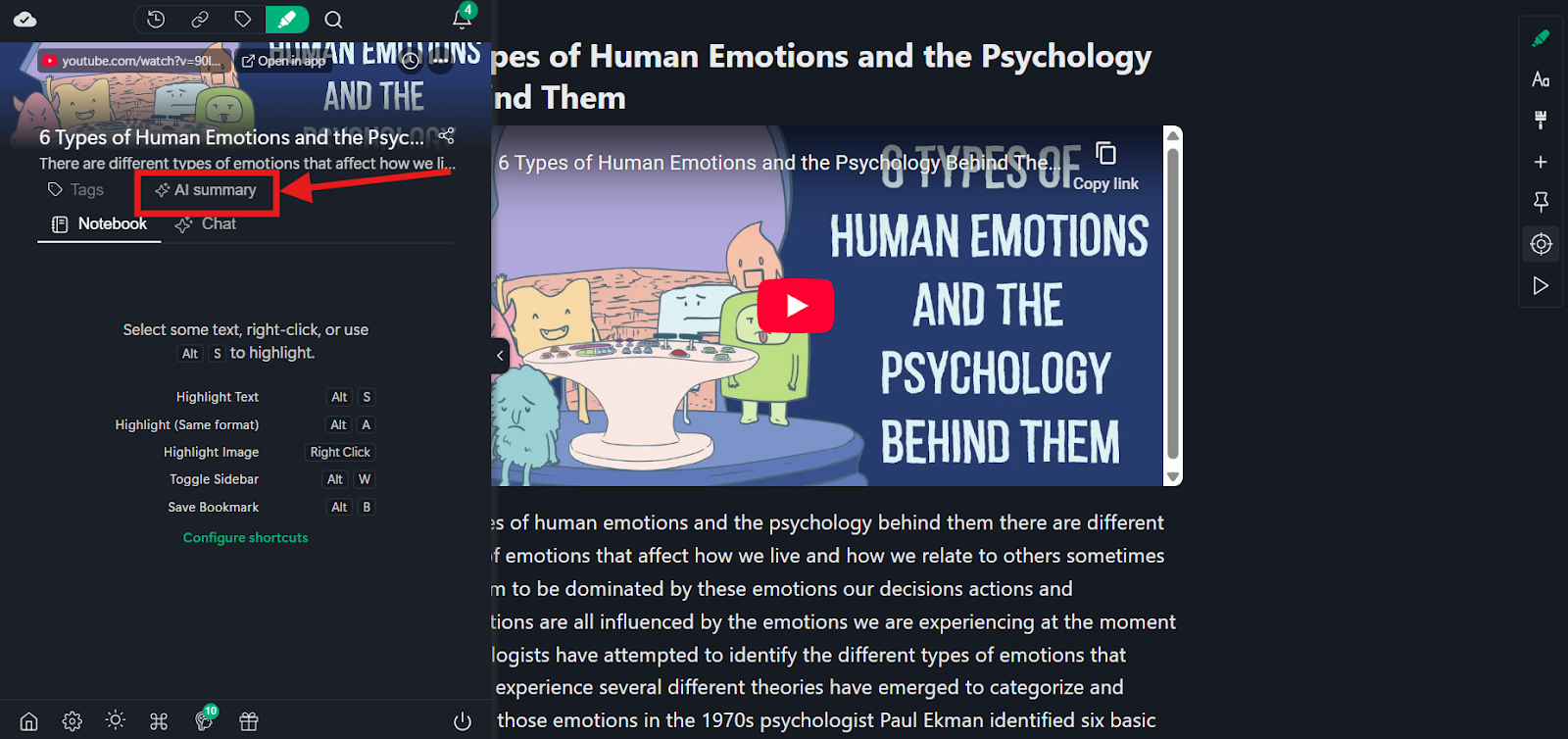
Open any lecture, tutorial, podcast, commentary, or news clip.
As soon as the page loads, click the Web Highlights extension icon in your extension bar.
Clicking on it will take you to the Reader Mode, where the side bar opens, giving you the option to highlight, add notes or tags to the transcript, or get a summary of your YouTube video.
Step 3 — Click “AI Summary”
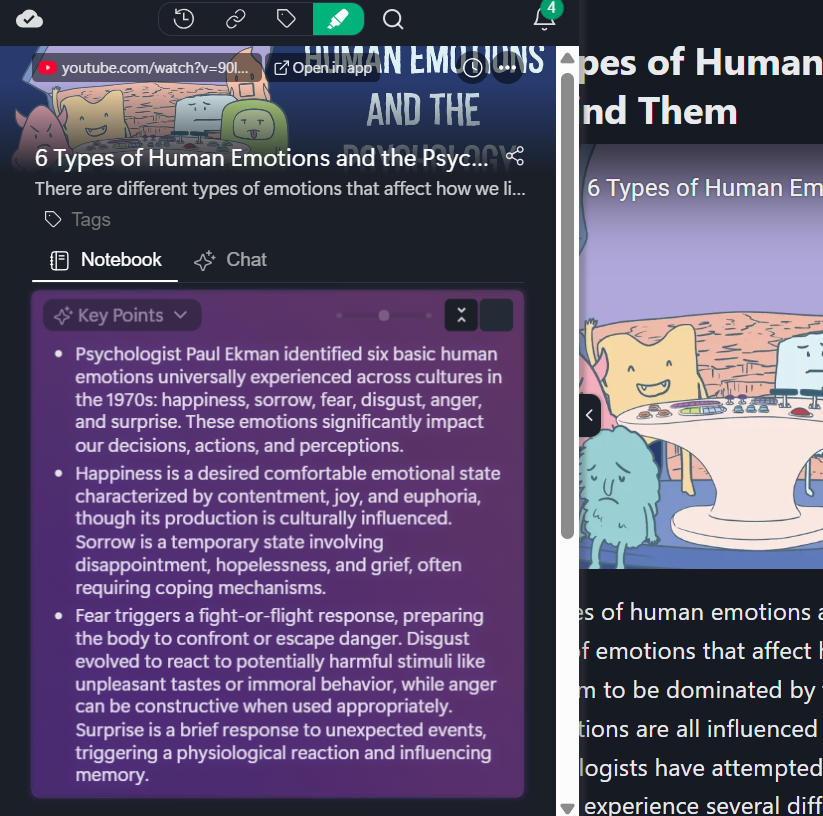
Press the AI Summary button, and Web Highlights instantly creates a structured summary using advanced AI models.
You will see:
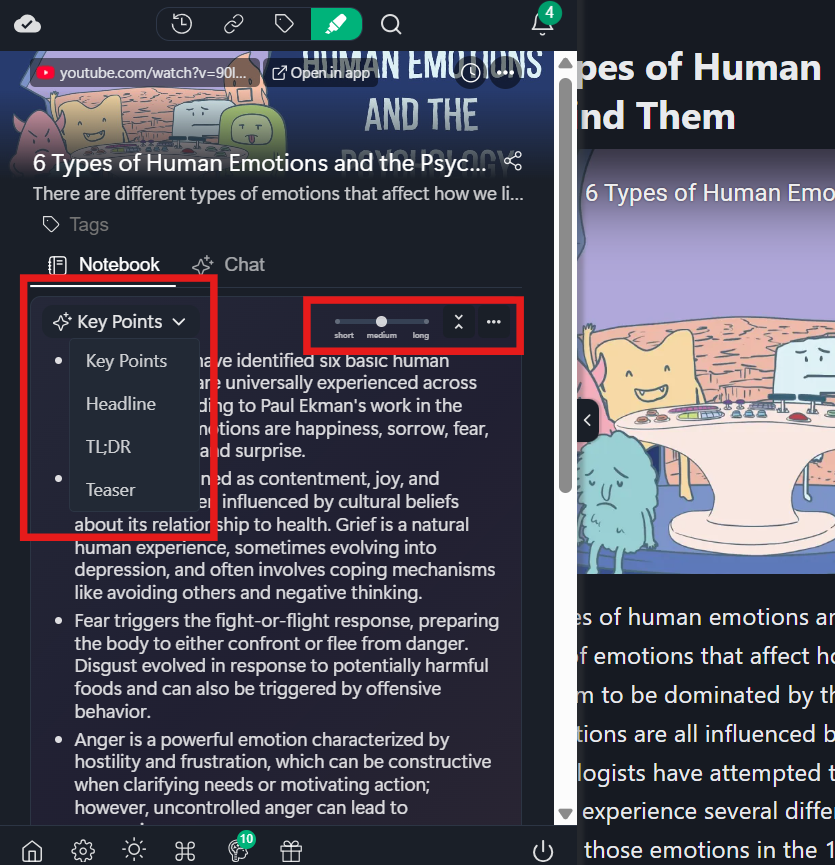
- Key Points (helpful when handling large volumes of video content)
- TL;DR (a short text file style explanation)
- Headline (quick Video Overview)
- Teaser (preview sentence for quick sorting)
Choose the type of AI summary you want and its length.
The AI YouTube summarizer runs locally in your browser, so your video link never leaves your device. No servers. No web search requests. Just quick, private summaries.
Step 4 — Copy, Save, or Export the Summary
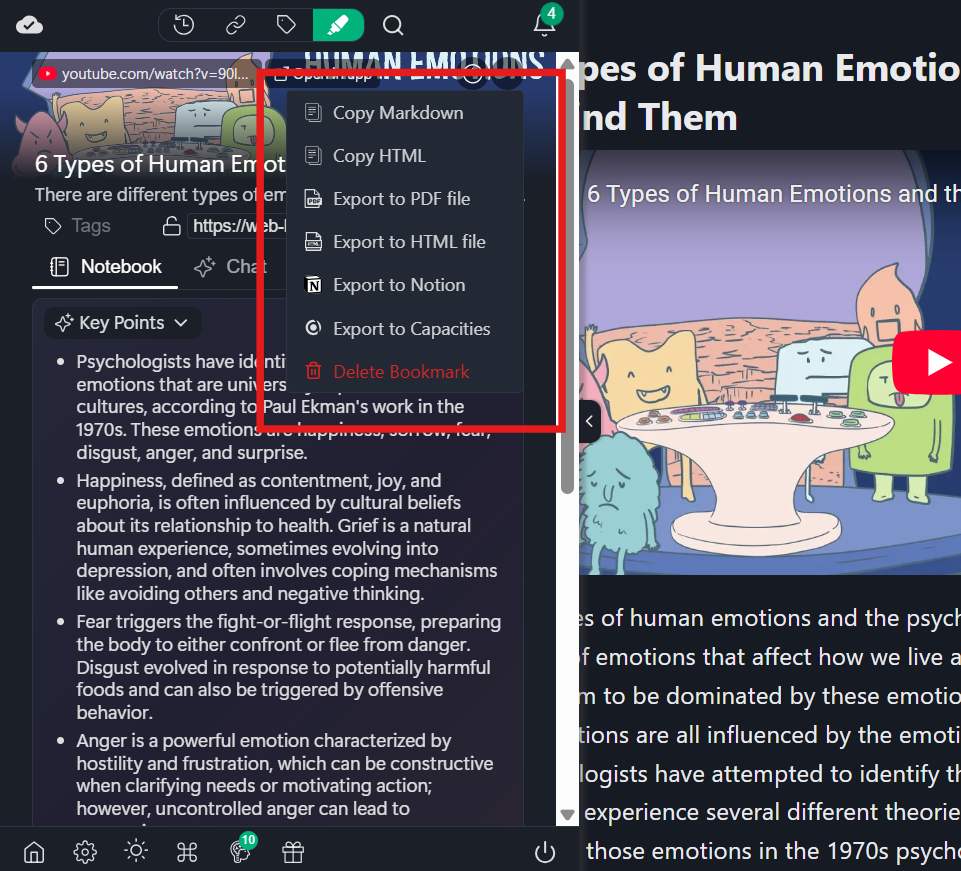
Once your video summary generator finishes, you can reuse it anywhere. Export to:
- Markdown
- Notion
- HTML
- CSV
You can also save summaries to your Web Highlights library with your preferred highlight colors, tags, and folders. This is useful for structured knowledge, meeting notes, video to text workflows, content scripting, mind maps, or combining summaries with the transcript generator for clear, time-saving YouTube summaries across all types of videos.
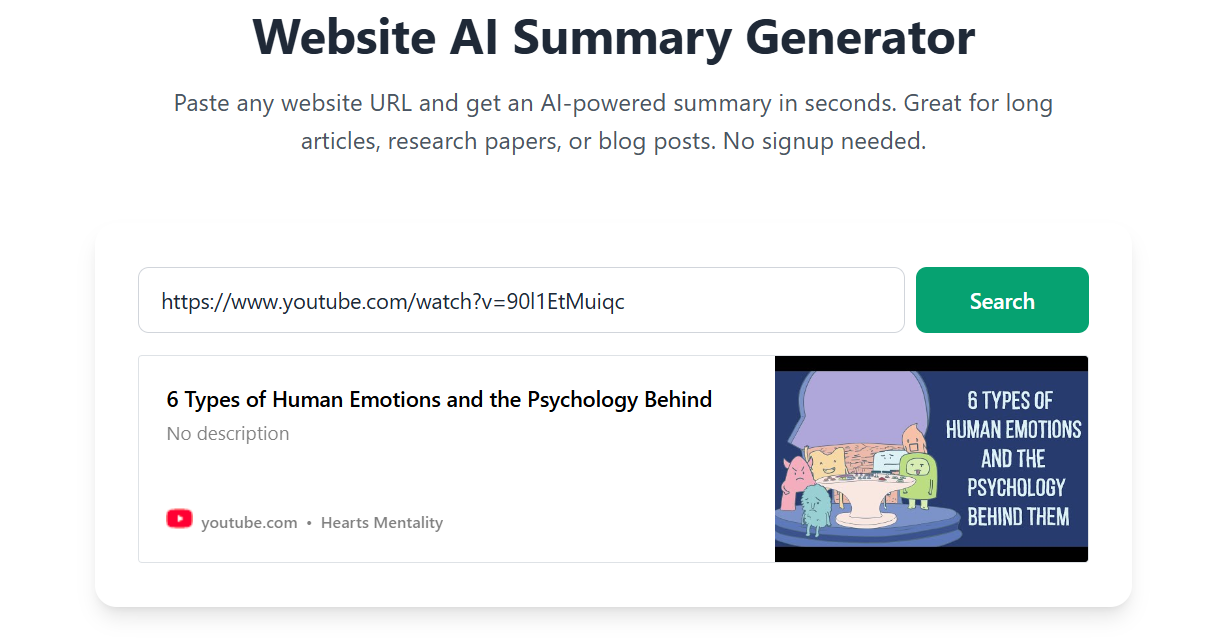
Another easy way to get the AI summary is simply to copy and paste the YouTube video’s URL here: https://web-highlights.com/tools/website-ai-summary
How to Get a YouTube Transcript Instantly
With the Web Highlights YouTube Transcript Reader, you just paste a video link and get instant video-to-text. You see the full transcript as a clean text file, search inside it, copy any part, and switch languages with multilingual support. You can then export your notes to Markdown, PDF, or Notion using the transcript generator, keeping your notes organised without an account.
Here’s what you can do with it:
Copy and Use - Copy any line and reuse it in meeting notes, research organization, text files, mind maps, or content scripting.
Works in Multiple Languages - Web Highlights tries to fetch transcripts in your language first. You can switch between all available languages through simple steps, which helps when dealing with language barriers or multilingual content.
Clean, Readable Format - The transcript appears in an easy-to-read layout, so you don’t have to scroll through cluttered video chapters or manual effort.
100% Free - No signup, no web search limits, and no restrictions tied to mobile apps.
Perfect for Research - Students, journalists, educators, and professionals can quickly pull text from any YouTube video for structured knowledge, clear notes, or quick Key Insights without watching the whole video.
Why Use Web Highlights for YouTube Summaries?
Web Highlights makes it easy to get a YouTube AI summary and a YouTube transcript without extra steps or tools. Everything works right inside your browser, and you can use the same workspace for notes, tags, exports, and transcript reading. Here is why many people prefer Web Highlights for video summaries:
- Easy copy and paste
- Works on any YouTube video, including long tutorials and lengthy lecture content
- Runs locally in your browser, which keeps your video link private
- Reader Mode for distraction-free viewing of summaries and video content
- Highlight or annotate YouTube videos inside Reader Mode to mark core ideas or specific lines
- Organize everything with tags for better research organization
- Export to Markdown, Notion, Capacities, Obsidian, HTML, or PDF for reuse in text files or meeting notes
- Merge summaries + transcripts + highlights into one place to handle volumes of video content easily
Additional Tools You Can Use
YouTube Transcript Reader
The YouTube Transcript Reader is a free, instant Video to Text tool. Paste any video link and get clean text you can copy, search, and reuse in notes or research organization.
YouTube AI Summary (Online Tool)
The online YouTube AI summary tool gives you quick video summaries without installing anything. No signup needed. Just paste a video link and get Key Insights, bullet points, and a short video overview in seconds.
Website Highlighter
The Website Highlighter helps you save transcripts, summaries, and text from web pages in one place. This is useful when merging YouTube videos, articles, and other video content into structured knowledge or text file notes.
Use Cases for YouTube AI Summaries
Students summarizing lectures - Useful for turning a lengthy lecture into quick bullet points, Key Insights, and timestamped summaries for easier revision.
Professionals learning faster - Helps break down long training videos or tutorials into simple steps and core ideas you can act on immediately.
Researchers extracting quotes - Makes it easy to scan large volumes of video content, pull accurate lines, and reuse them in research organization or mind maps.
Coaches and consultants taking notes - Useful for pulling Video to Text from long talks, saving meeting notes, and organising them with tags.
Creators doing competitive analysis - Lets you scan YouTube videos from other creators, grab the main ideas, and create quick video overview notes.
Anyone preparing study notes - Converts long videos into short, clear summaries that can be exported to Notion, Obsidian, or a text file for quick review.
Journalists scanning long content - Helps go through news content, lengthy lectures, and interviews to find core details without watching the entire video.
Frequently Asked Questions
1. Can I summarize any YouTube video with Web Highlights?
Yes. Web Highlights can create a YouTube AI summary for most YouTube videos, including tutorials, commentary, news content, and lengthy lecture clips. If the video is public and loads normally, the AI summarizer can process it and turn the video content into clear bullet points and Key Insights.
2. Does Web Highlights work on long videos or videos with no chapters?
Yes. Web Highlights works on long tutorials, multi-hour lectures, and videos without chapters. The tool extracts the core ideas using advanced AI models, so you can handle large volumes of video content without limits on video length while improving your overall learning efficiency.
3. Are the summaries accurate for complex materials?
Web Highlights uses local AI to generate high-quality video summaries. It handles complex materials like research talks, technical tutorials, and news content by breaking them into short, readable, timestamped summaries, TL;DR blocks, and Key Insights.
4. Do I need to sign up to get a summary or transcript?
No signup is required. The YouTube Video Summarizer and Transcript Generator both work instantly. Paste the video link and get your results. This works without accounts, mobile apps, or extra tools, and you can use it directly from your browser.
5. Can I export my summaries and transcripts?
Yes. You can export summaries and transcripts to Markdown, Notion, HTML, PDF, or a text file. This is helpful for meeting notes, mind maps, research organization, and preparing structured knowledge from different types of videos.
Key Takeaways
Web Highlights turns long YouTube videos into clear, quick notes by giving you a fast, private YouTube AI summary and an instant transcript with no signup or manual effort.
You paste a link, get clean text, bullet points, Key Insights, and exports in a few seconds, useful for studying, research, content scripting, and handling large volumes of video content.
If you want an easy way to review YouTube videos without sitting through every minute, try Web Highlights and save both time and effort.