# 3 Instant Ways to Increase Your Google Ranking
> Anyone can implement these three essential points to make their product visible on Google, Bing, and Co.
- Author: Marius Bongarts
- Published: 2022-10-31
- Updated: 2024-09-05
- Tags: SEO, Marketing
- Reading time: 8 min
- URL: https://web-highlights.com/blog/3-instant-ways-to-increase-your-google-ranking/
---
Search Engine Optimization (SEO) is a highly complex subject area. Not for nothing, there are many highly-paid experts in this field. Similar to programming, no one has mastered the subject 100%.
While it's tough to reach the tip of the iceberg, the first steps to getting visible on Google in the first place are straightforward. In this article, I would like to describe three essential points that anyone can easily implement to make their product visible on Google.
### Introduction
A few weeks ago, I was a developer with virtually no SEO knowledge. Like many, I built a product and waited for what will happen.
Then, I decided not to take things by luck or chance anymore. I took fortune into my own hands, grabbed two SEO books, and read many articles online.
The great thing about SEO is that you can see results very fast. When I started three months ago, my [online web highlighter page](https://web-highlights.com/) had around 40 search impressions on Google daily — Today, there are about **2,400!**
> [**SEO Strategies I Used to Gain 2,000 Users In Two Months**](https://web-highlights.com/blog/seo-strategies-i-used-to-gain-2-000-users-in-two-months/) — Here is how my user base grew by 37 % in just two months. Learn how to improve the SEO score of your website by publishing a blog and following best practices. (Marius Bongarts)
### 1\. Hosting a Blog
> One of the most powerful on-page SEO strategies is adding more unique, fresh content to your site. — **Adam Clarke**
I know; online, it feels like everyone is telling you to host a blog. I do not always agree with it. It's totally fine to write, e.g., only on medium.com or other platforms, to spread your knowledge.
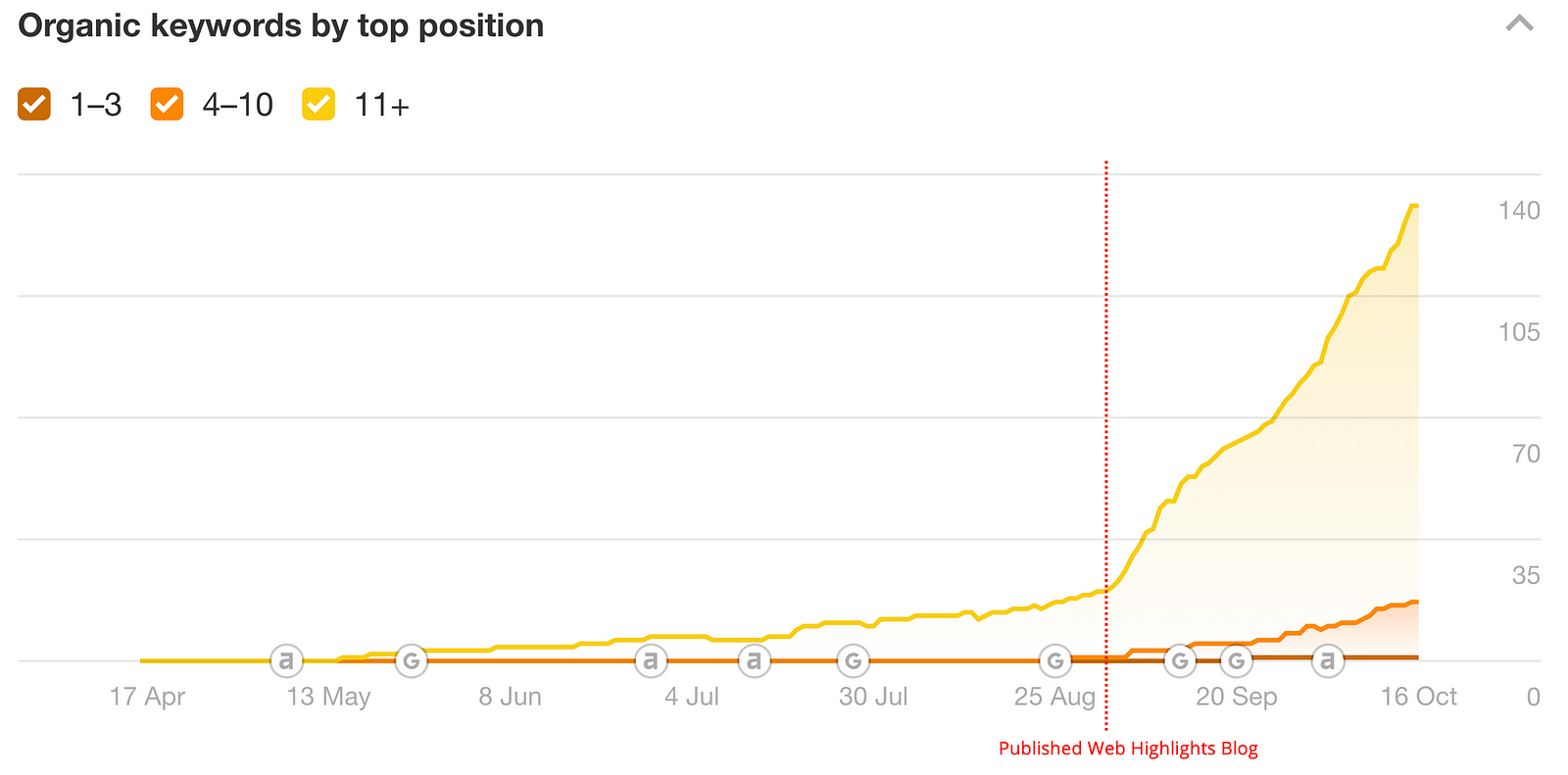
Still, when it comes to SEO, then there is no way around it. Hosting a blog and creating content on my [highlighter app](https://web-highlights.com/blog) was a game-changer.
*Organic keywords by top position*
My highlighter app ranks second for the keywords _"web highlighter"_ and fourth for the keywords _"website highlighter"_ and _"online highlighter."_ Also, there are many more middle-ranked (4–10) and low-ranked (11+) keywords for which my app appears on Google.
**Content marketing** is a strategy where you create relevant and valuable content on your website. By that, you attract potential new customers and get ranked higher in Google.
> Search engines reward businesses that publish quality, consistent content. — [contentmarketinginstitute.com](https://contentmarketinginstitute.com/what-is-content-marketing/)
Using this strategy, it is crucial to create new content **consistently** to receive more traffic. Furthermore, ensure that your Blog is linked on your landing page to give search engines an entry point to your website.
Use [Google Search Console](https://search.google.com/) to analyze traffic or request your Blog's manual indexing. You can also upload a _sitemap.xml_ to ensure that Google will find your website.
#### How To
If you've decided to host your own Blog, there are thousands of options. You can host it on any content management system (CMS) of your choice. The most famous examples are probably WordPress, Drupal, or Joomla. Those are perfect for getting your Blog up and running fast without any developer skills.
But, if you are a developer like me, it makes sense to self-host your Blog. I decided to go for [**Ghost**](https://ghost.org/) .
> _Ghost is a powerful app for new-media creators to publish, share, and grow a business around their content. It comes with modern tools to build a website, publish content, send newsletters & offer paid subscriptions to members. —_ [_https://ghost.org/_](https://ghost.org/)
I wanted to host my Blog on the same domain as my Web Highlights web app ( [web-highlights.com](https://web-highlights.com/) ). I created a digital ocean droplet and set up Ghost on it. This is easy, as Ghost and Digital Ocean provide excellent [getting-started articles](https://ghost.org/docs/install/digitalocean/) and [documentation](https://marketplace.digitalocean.com/apps/ghost) .
Afterward, I configured my Nginx to serve the Ghost CMS from a subfolder of my website: [web-highlights.com/blog](https://web-highlights.com/blog) .
### 2\. Improve Performance, Accessibility, Best Practices, and SEO score
It makes sense for Google to rank websites with overall good performance and excellent user experience higher than pages that take 10 seconds to load.
> “Google wants to keep poor-quality, untrustworthy sites out of the search results” — Adam Clarke
Therefore, one of the most efficient things you can do is to fix all the problems on your website. Ensure your site is fast-loading, accessible, responsive, SSL encrypted, and following best practices.
Especially responsiveness is key. Today, a website that is not optimized for mobile devices has no chance against its competitors as Google will predominantly use the mobile version of the content for indexing and ranking.
> “Since the majority of users now access Google via a mobile device, the index will primarily use the mobile version of a page’s content going forward”. — Adam Clarme
Luckily, there are great tools that can help us to achieve al those things.
#### How To
The first thing you should do is resolve as many issues as possible on your website. You can do this easily with Lighthouse.
**Lighthouse**
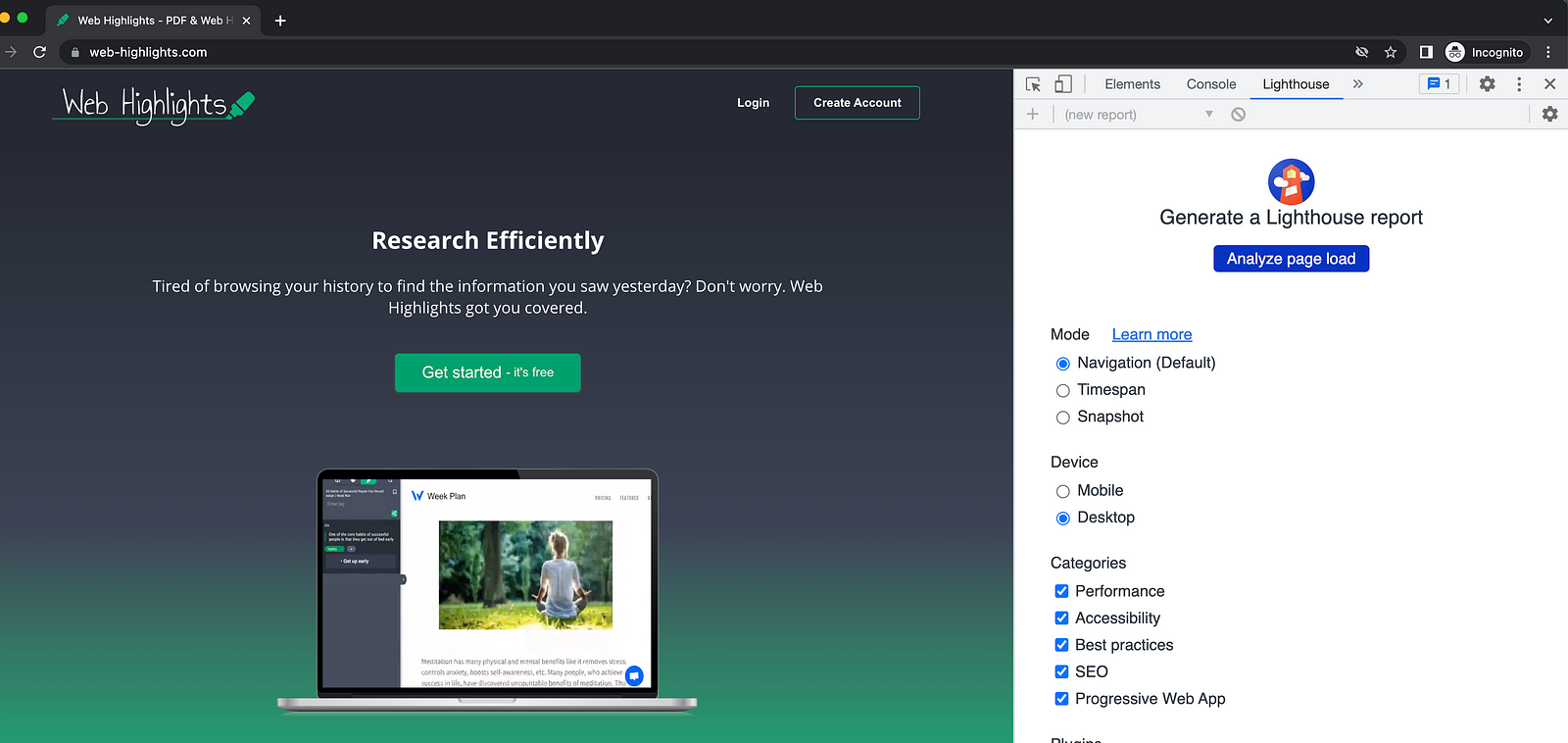
Go to your website and open the Chrome Developer tools. Here are three ways to open the Developer Tools:
- Click the dots menu in the upper right corner -> Select More Tools -> Developer Tools
- Right click -> Select inspect
- Use **Option + ⌘ + J** or **Option + ⌘ + I** (on macOS), or Shift + CTRL + J (on Windows/Linux).
Then choose Lighthouse in the tabs, and this window should open:
*Using Lighthouse in Chrome*
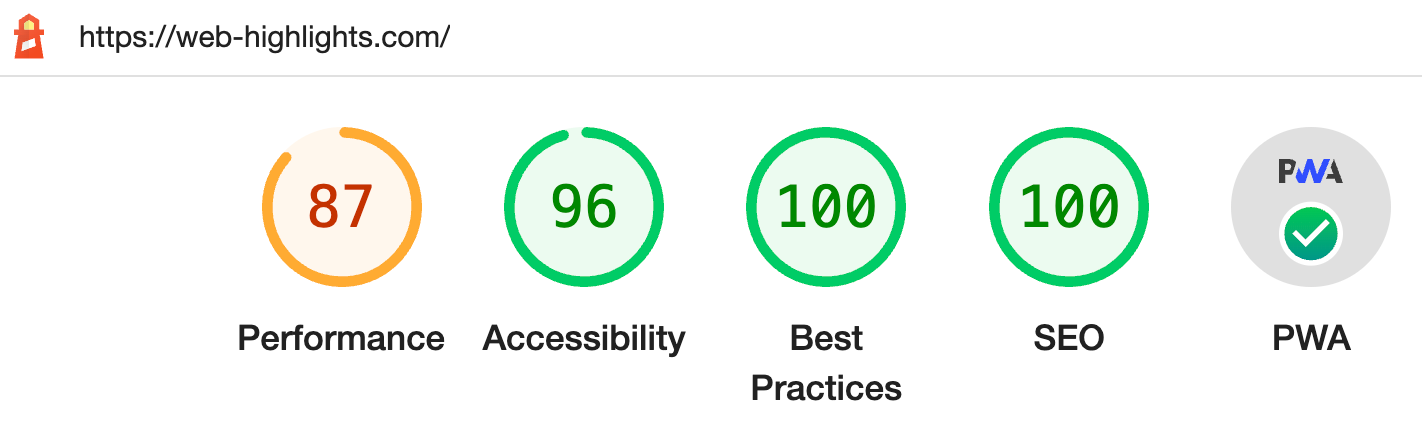
Then you can click "Analyze page load," and Lighthouse will run a report on your website. Chrome recommends doing this in an Incognito window to prevent external resources from affecting your scores.
*Lighthouse report*
Afterward, you will see a report telling you what to do to improve your score. Lighthouse will give you a detailed overview of your issues and also instructions on how to resolve them.
For example, you want to ensure that all images contain an accessible `alt` attribute. This enables search engines to access your images as well. But, most importantly, it makes your website accessible for people with disabilities by using tools like screen readers.
> Perhaps the most important reason to use the `alt` tag is to support accessibility — [MDN](https://developer.mozilla.org/en-US/docs/Web/API/HTMLImageElement/alt)
Fulfilling all accessibility standards for your website will bring many benefits for everyone, and as a side effect, you will be ranked higher by Google.
**PageSpeed Insights**
Another tool you can use is [PageSpeed Insights](https://pagespeed.web.dev/) from Google. You can enter the URL of your website, and it generates a similar report of your website as Lighthouse does. I would recommend using Lighthouse as its report is more detailed.
A great and free alternative to test more than one page at a time is the [EXPERTE.com Bulk Page Speed Test](https://www.experte.com/pagespeed) . This tool allows you to test hundreds of URLs automatically.
### 3\. Creating Backlinks
Once your website is equipped with some keywords and has fixed most Lighthouse issues, you should focus on getting **backlinks** .
A **backlink** is just an anchor link from a different site to your site. Backlinks are one of the most critical factors in improving your site's SEO ranking.
> _“If your site has high-quality content and_ **_**backlinks**_** _from reputable sources, your site is more likely to be considered a trustworthy source, and more likely to rank higher in the search results”. — Adam Clarke_
#### Do-follow and Nofollow backlinks
Backlinks are not all the same. We need to understand that there are two different types of backlinks:
- **Do-Follow** links: Anchor links **without** `rel="nofollow"` attribute.
- **Nofollow** links: Anchor links with a `rel="nofollow"` attribute.
**Do-Follow link:**
```html
blue text
```
[View this code on GitHub Gist](https://gist.github.com/MariusBongarts/cf3123682e65428908ada518756bd4c9)
**Nofollow link:**
```html
Web Highlights
```
[View this code on GitHub Gist](https://gist.github.com/MariusBongarts/81b3b3bb586f55599e66519693c5e6a5)
**Nofollow** links are the ones you should focus on. But they are much harder to get. On platforms like Medium, Quora, etc., where anyone can publish content, links are **nofollow** automatically. These links will not be crawled by Google and will not have much effect on your Google rank. Nevertheless, nofollow links are also valuable as they bring traffic to your site.
But what brings the most significant effect are **do-follow** links. Those links allow Google and other search engines to point back to your website. Every do-follow link strengthens your domain authority.
> _Getting a do-follow backlink to your story or to your root domain is the №1 factor for getting ranked on Google search. — [Aamir Kamal 🚀](https://medium.com/u/dd64f287dc93?source=post_page-----d36cf98a933e--------------------------------)_
#### Domain Authority
Each backlink from another website will make your website rank higher. Especially do-follow links will have a great impact on your SEO score.
You should focus on creating as many backlinks to your website as possible. But, what's also very important is that you should not only focus on **quantity** but also the **quality** of your backlinks domains.
The higher the **domain authority** of the linking page is, the better it will affect your page's authority.
> _The domain authority of a website says how important this website is for its subject and how likely it is to achieve good rankings. —_ [_en.ryte.com_](https://en.ryte.com/wiki/Domain_Authority)
The scale goes from 0 to 100, and you can check the domain authority using a tool [like this](https://moz.com/domain-analysis) . E.g., a backlink from a domain like **medium.com** (domain-authority = **95** ) will have much more impact than a backlink from a low-ranked website.
> Medium is one of the websites with one of the highest domain authority. — [Aamir Kamal](https://medium.com/u/dd64f287dc93?source=post_page-----d36cf98a933e--------------------------------)
#### How To
One of the things you should do first is to ensure that your content on other websites always has at least one backlink to your webpage.
I ensured that every single Medium article of mine has at least one backlink to [web-highlights.com](https://web-highlights.com/) . Even though Medium links within articles are **nofollow** links, they still positively impact SEO as they bring more traffic to my website.
> A nofollow backlink from Medium still has some SEO value. — [Aamir Kamal](https://medium.com/u/dd64f287dc93?source=post_page-----d36cf98a933e--------------------------------)
Furthermore, I linked Web Highlights by writing answers on [quora.com](https://www.quora.com/Is-there-an-extension-that-lets-me-highlight-text-on-websites-and-save-them/answer/Marius-Bongarts-1) and reaching out to authors of online highlighter comparison articles.
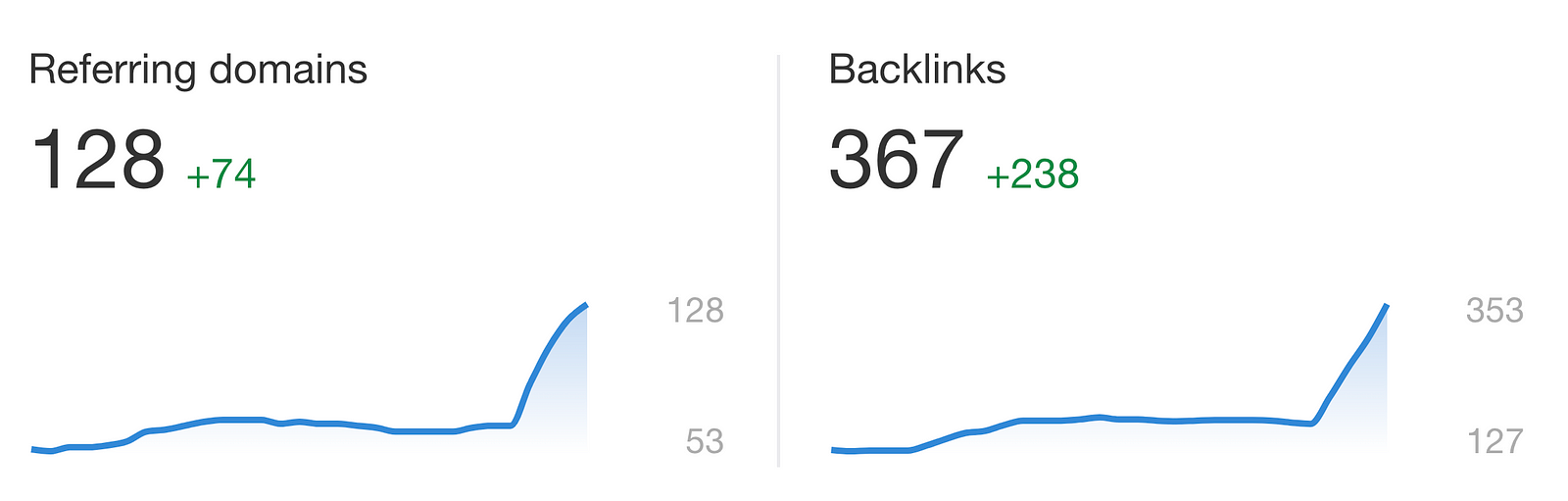
Once again, [Ahrefs](https://ahrefs.com/) can help us with this. We can easily see the backlinks and referring domains increase in the last months.
*Ahrefs — Number of backlinks*
Furthermore, [Ahrefs](https://ahrefs.com/) enables us to analyze the domain authority of each linking website.
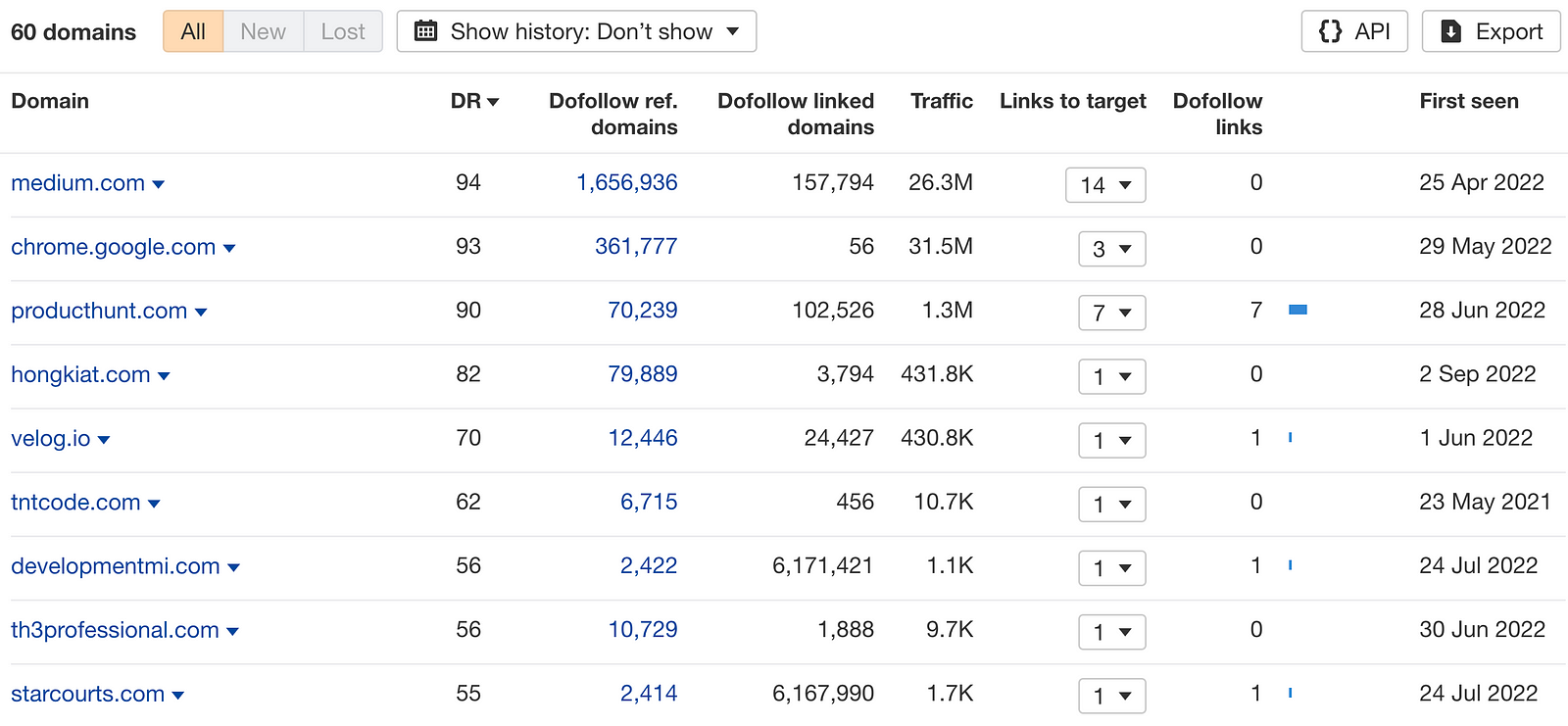
*Referring domains*
You can see that **medium.com** is the linking domain with the highest **domain authority** . Unfortunately, it does not include a do-follow link, as most linking domains do.
Still, e.g., launching my product on [Producthunt](https://www.producthunt.com/posts/web-highlights) was essential to provide seven do-follow links for my highlighter extension from a page with very high domain authority.
### Final Thoughts
Search Engine Optimization is a topic many developers underestimate. While it is fun to improve your product by creating new features to make it better, it is even more important to make your product visible to the world. Even the best product in the world is worth nothing if no one knows of it.
While SEO is a highly complex subject, getting started is relatively easy. Start by hosting a blog on your website and publish high-quality content regularly. Additionally, ensure that your website aligns with best practices and fulfills accessibility and performance standards. Afterward, you can focus on getting many and, most importantly, high-quality backlinks to your website. Following these three things, a solid foundation is laid to be found on Google and other search engines.
I hope you enjoyed reading this article. I am always happy to answer questions and am open to criticism. Feel free to contact me at any time! Get in touch with me via [**LinkedIn**](https://www.linkedin.com/in/marius-bongarts-6b3638171/) **,** or follow me on [**Twitter**](https://twitter.com/MariusBongarts) **.**